
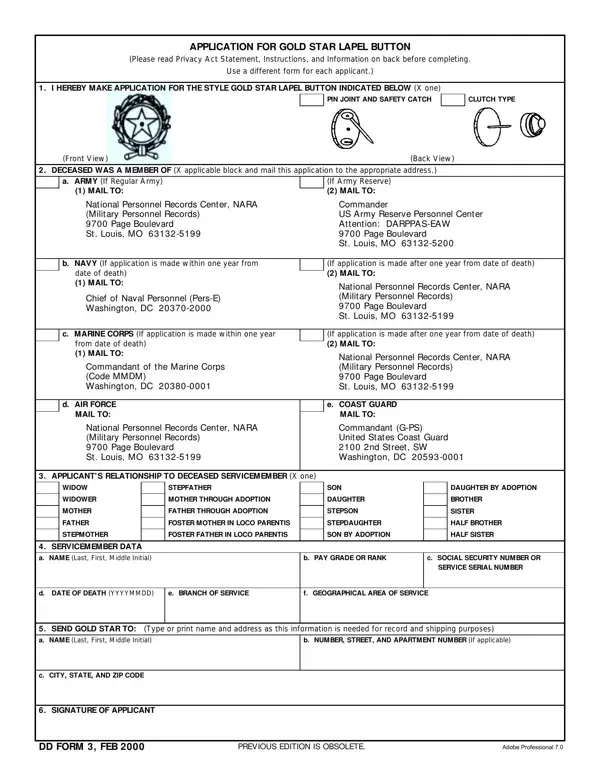
Dd Form 3 PDF Details

The Gold Star Lapel Button is a federal military honor awarded to eligible family members of service members who died in the line of duty. The Department of Defense has administered this honor since 1947, reflecting the nation's respect for the ultimate sacrifice of U.S. Armed Forces personnel.

Who Can Apply

Eligible applicants include widows, widowers, parents, stepparents (including adoptive), children, and siblings of a deceased service member. The service member's death must be connected to active military duty. Qualifying circumstances include deaths from World War I, World War II, Korea, Vietnam, Lebanon, Operation Desert Storm, Operation Iraqi Freedom, Operation Enduring Freedom, and other authorized operations.

Only one application is typically submitted per family, though multiple eligible members each have an individual right to the button.

How to Submit by Branch of Service

After completing the form, mail it to the branch-specific address for the deceased service member:

Processing typically takes 6 to 8 weeks after the application is received and verified.

QuestionAnswer
Form NameDd Form 3
Form Length2 pages
Fillable?No
Fillable fields0
Avg. time to fill out30 sec
Other namesFEB, Washington, Matsu, 1958

How to Edit Dd Form 3 Online for Free

Use FormsPal to open and complete the form online, then print or download a finished PDF. The application has three main sections. Work through each one carefully and print legibly in black or blue ink.

Step 1: Applicant Information

Enter your full legal name, current mailing address, and your relationship to the deceased service member. Check the box that describes your relationship: widow, widower, mother, father, stepfather, mother through adoption, father through adoption, or son/daughter.

Filling in Part 1 of DD Form 3

Step 2: Deceased Service Member Information

Provide the service member's full name, Social Security number or military service number, branch of service, grade or rank, and date and place of death. This section also shows the branch-specific mailing addresses for submission. Double-check the name and service number against official records to avoid delays.

How to complete Part 2 of DD Form 3

Step 3: Sign and Submit

Sign and date the form as the applicant. Your signature certifies that the information is accurate and that you are an eligible next of kin. No notarization is required. Mail the completed form to the appropriate branch address from Step 2.

Completing Part 3 of DD Form 3

Frequently Asked Questions

How long does processing take? The reviewing branch typically mails the Gold Star Lapel Button within 6 to 8 weeks of receiving a complete application.

Do I need supporting documents? No documents are required with the initial submission, but the processing office may request proof of the service member's death certificate or your relationship if questions arise.

Can multiple family members receive the button? Yes. Each eligible family member (widow, parent, child, sibling) has a separate right to the button and may submit an individual application.

Related military forms: DD Form 93 (Record of Emergency Data), DD Form 149 (Correction of Military Record), Next of Kin Form, and Military Funeral Form.