
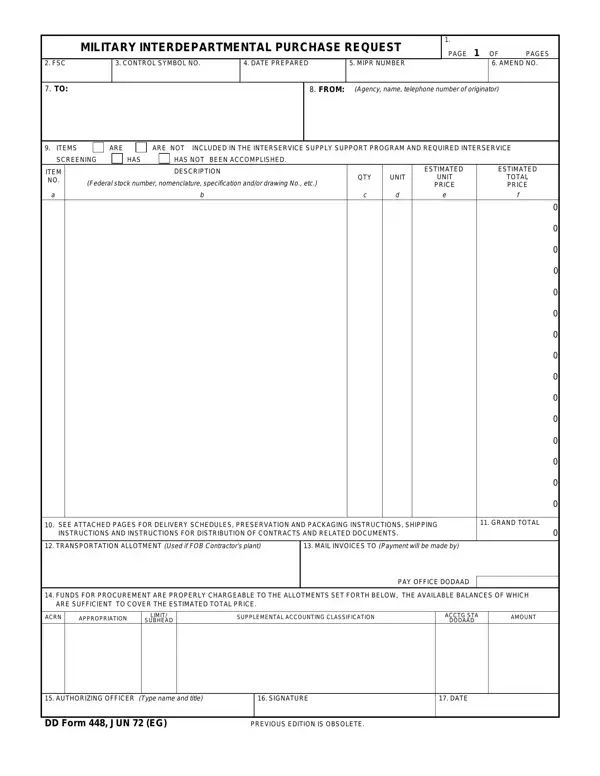
The Military Interdepartmental Purchase Request (MIPR), captured on DD Form 448, is a key document in military procurement. It facilitates the transfer of funds within and between various departments and agencies of the United States military, serving as a formal request for goods, services, or works. The form covers a broad range of details required for processing, approving, and fulfilling military requisitions. From basic identification such as control symbols and preparation dates to delivery schedules, preservation, packaging, and shipping instructions, the MIPR guides interdepartmental collaboration. Financial aspects are also included, covering fund allocation, accounting data, and invoicing details. These fields support transparency and accountability in government spending. The form also requires screening of requested items to verify they are not included in the interservice supply support program, preventing unnecessary duplication and improving resource use. An authorizing officer must sign the completed form, confirming its role as a critical instrument in military procurement management.
MIPRs come in two types. A Category I MIPR transfers funds from one DoD component to another, where the receiving agency acts as the contracting office. A Category II MIPR allows the receiving agency to use the funds for its own contracting purposes. Understanding the difference is important for correct processing, fund accountability, and compliant handling of interdepartmental requisitions.
When a receiving agency accepts a MIPR, they acknowledge responsibility for fulfilling the request. The requesting component retains the right to withdraw or modify the MIPR under certain conditions. Proper documentation of fund transfers, delivery terms, and item specifications helps prevent disputes and supports accurate defense spending records. Offices processing a high volume of MIPRs may also benefit from reviewing the amendment process covered by the DD Form 448-2 (Acceptance of MIPR). For non-military procurement reference, the standard purchase request form covers similar fund authorization workflows.
| Question | Answer |
|---|---|
| Form Name | DD Form 448 |
| Form Length | 1 pages |
| Fillable? | No |
| Fillable fields | 0 |
| Avg. time to fill out | 15 sec |
| Other names | DD448(MIPR) military interdepartmental purchase request form |
DD Form 448 isn’t the one you’re looking for?