
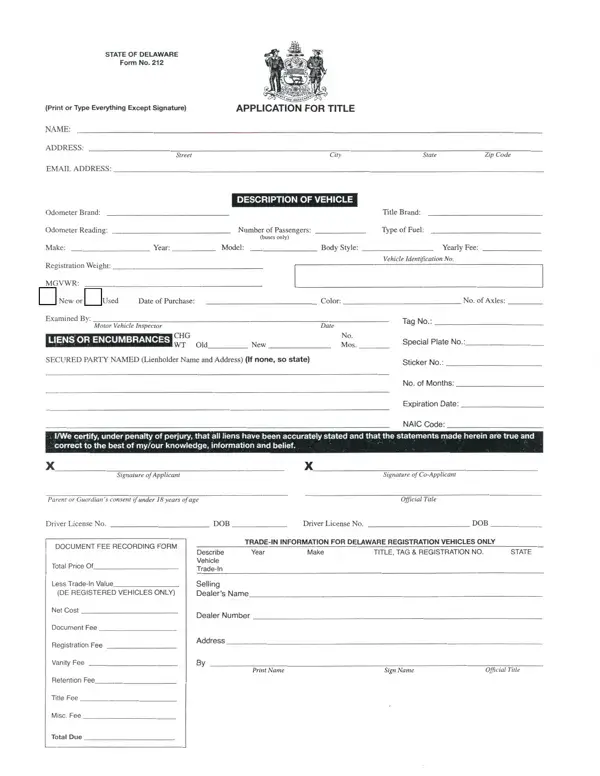
Delaware Form No 212 PDF Details

The Delaware MV-212 is the official application for vehicle title and registration issued by the Delaware Division of Motor Vehicles. You must complete this form when you buy a new vehicle, receive a vehicle as a gift, or transfer an out-of-state title to Delaware. The form was last revised on August 12, 2020, and carries Document No. 45-07-08-06-01.

Who Needs Delaware Form 212

Both individuals and corporations must use this form to apply for a Delaware vehicle title. You need Form MV-212 if you are a new resident bringing a vehicle from another state, a buyer purchasing a car from a private seller, or a business adding a vehicle to its fleet. Dealers also use this form when transferring vehicles to customers in Delaware.

Required Documents

You must gather several documents before submitting your application. The exact documents depend on your situation, but the core requirements are the same for most applicants. Missing documents cause delays and may result in your application being returned without processing.

Proof of Vehicle Ownership

Provide one of the following to prove you own the vehicle. For a brand-new vehicle, submit the Manufacturer's Statement of Origin (MSO) from the dealer. For a used vehicle from another state, provide the original out-of-state title transferred correctly to your name. If the originating state requires notarization on the title, you must notarize the document before submission to the Delaware DMV.

Proof of Valid Liability Insurance

Delaware requires all registered vehicles to carry valid liability insurance. Attach your current insurance policy, a Delaware insurance card, or a letter from your insurer confirming active coverage. Expired insurance documents are not accepted. Your vehicle cannot be registered until valid insurance is confirmed by the Division of Motor Vehicles.

Vehicle Safety Inspection

All vehicles must pass a Delaware state safety inspection at an authorized Motor Vehicle Division inspection station. Bring your vehicle in person to the inspection site. The inspection checks brakes, lights, tires, windshield wipers, and other safety components. A passing inspection certificate is required before the DMV processes your title transfer.

Identification Requirements

Individual applicants must present a valid Delaware driver's license or equivalent government-issued ID. Out-of-state applicants should bring their license plus proof of Delaware residency. Corporate applicants must provide a valid Delaware business license along with officer identification.

Signature Requirements

All owners listed on the vehicle title must sign Delaware Form 212. If one owner cannot be present, attach a notarized power of attorney in their place. Corporate applicants must have an authorized officer sign the form or provide a notarized corporate power of attorney. Unsigned forms will be returned without processing.

Additional Documents for Dealer Purchases

When you buy from a licensed dealer, include the Dealer's Bill of Sale with your application. This document must show the purchase price, vehicle information, and the dealer license number. You may also need to submit a completed vehicle registration application at the same time as your title request.

Common Mistakes to Avoid

Many applications are returned due to avoidable errors. The most common problems are out-of-state titles not properly transferred to the new owner's name, expired insurance documentation, and missing signatures from all listed owners. Double-check every section before you submit. Review all owner names and addresses for accuracy. Any error can delay your title transfer by several weeks.

Where to Submit and Processing Time

Bring your completed application and all supporting documents to a Delaware Division of Motor Vehicles office. Submit originals of all primary ownership documents because copies are not always accepted. Title processing typically takes 2 to 4 weeks after a complete application is received. For additional Delaware government forms, visit the Delaware Form 1027 page on FormsPal.

QuestionAnswer
Form NameDelaware Form No 212
Form Length2 pages
Fillable?No
Fillable fields0
Avg. time to fill out30 sec
Other namesdelaware application title form, de title application, de application title, blank state of delaware application

How to Edit Delaware Form No 212 Online for Free

In case you would like to fill out the Delaware title form, you don't have to install any programs. Simply use our PDF tool. The editor is constantly upgraded by our staff, adding new features and becoming more convenient. It takes only a few easy steps:

Step 1: Click the orange "Get Form" button above. It will open our tool so you can begin completing your form.

Step 2: Use the PDF tool to fill in all required fields. You can add customized text, adjust original content, insert photos, and sign the document directly in your browser.

As for the blank fields in this form, here is what you need to do:

1. Start with the first section of the Delaware title form and fill in all blank fields on that page:

delaware application form download writing process explained (stage 1)

2. Fill in Print Name and Sign Name in the next section.

Sign Name, Print Name, and Sign Name inside delaware application form download

3. Complete all fields shown in this stage with care and precision.

Stage no. 3 of filling in delaware application form download

4. Complete the following fields in this section: Manufacturers Statement of Origin, Must be properly transferred to, D Out of State Title, Must be in owners name or properly, Proof of valid liability insurance, Vehicle must be presented for a safety inspection, and This application for Delaware.

D Out of State Title The title, Must be in owners name or properly, and Vehicle must be presented for a of delaware application form download

5. Complete the final section fields: D Applications in a corporations, accompanied by an original, D Dealers Bill of Sale, Companies must provide a copy of, Title Specialists name, MV Rev, and DOCUMENT NO.

Filling out section 5 in delaware application form download

Review your completed MV Rev section before finalizing the form. Errors in this area are common and can slow down processing.

Step 3: After reviewing all fields, click "Done" to finish your document. Sign up for a FormsPal account to download, email, or edit your completed Delaware title form at any time. All your details are kept protected at FormsPal.

Documents to Prepare Before You Start

Gathering your documents before you open the form saves time. You will need proof of vehicle ownership. This is the Manufacturer's Statement of Origin for new vehicles, or the original out-of-state title for used vehicles. You also need your current liability insurance card and the vehicle's safety inspection certificate.

Check that all ownership documents are in the new owner's name before you begin. Out-of-state titles must be properly transferred before submission. Bring originals to the DMV office because photocopies of ownership documents are not always accepted.

Understanding the Key Sections

Vehicle Identification

Enter the vehicle identification number (VIN), make, model, and year in the first section. Cross-check the VIN against your title document or window sticker. An incorrect VIN causes immediate rejection by the Delaware Division of Motor Vehicles.

Owner Information

List every vehicle owner exactly as the name appears on the title. All owners must sign the form before you submit it. If one owner cannot attend in person, attach a notarized power of attorney before submitting the application.

Insurance and Inspection

Enter your insurance policy number, company name, and expiration date. Attach a copy of your current insurance card. Also include your safety inspection certificate showing the vehicle passed inspection at an authorized Delaware station.

Frequently Asked Questions

How long does Form MV-212 processing take?

Title processing in Delaware typically takes 2 to 4 weeks after you submit a complete application. Applications with missing documents take longer. Fill in every field and attach all required documents before visiting the DMV.

Can I complete this form online?

Yes. Fill out the form online using FormsPal. After completing all fields, print and sign the form. Bring the signed form and all supporting documents to a Delaware DMV office to submit your application in person.

What if my out-of-state title needs notarization?

Some states require a notarized signature on the title when transferring ownership to a new buyer. Contact the DMV of the originating state to confirm their requirements. If notarization is needed, complete it before bringing the title to the Delaware DMV.

What is the MV-212 form?

The MV-212 is the official Delaware vehicle title and registration application. Both names refer to the same form issued by the Delaware Division of Motor Vehicles. Use it any time you need to establish a Delaware title for a vehicle for the first time or transfer an existing title.

Do I need a separate registration form?

In many cases, Form 212 handles both title and registration in one submission. Some situations require a separate vehicle registration application. Ask the DMV representative about your specific situation when you arrive.

Can a corporation apply for a Delaware vehicle title?

Yes. Corporate applicants must have an authorized officer sign the form. The company must also provide a valid Delaware business license and appropriate officer identification. A corporate power of attorney is acceptable if the signing officer cannot be present.

For other Delaware forms and vehicle documents, visit the Delaware Form 1027 page or browse vehicle registration forms on FormsPal.