
DHS Form Incident Report PDF Details

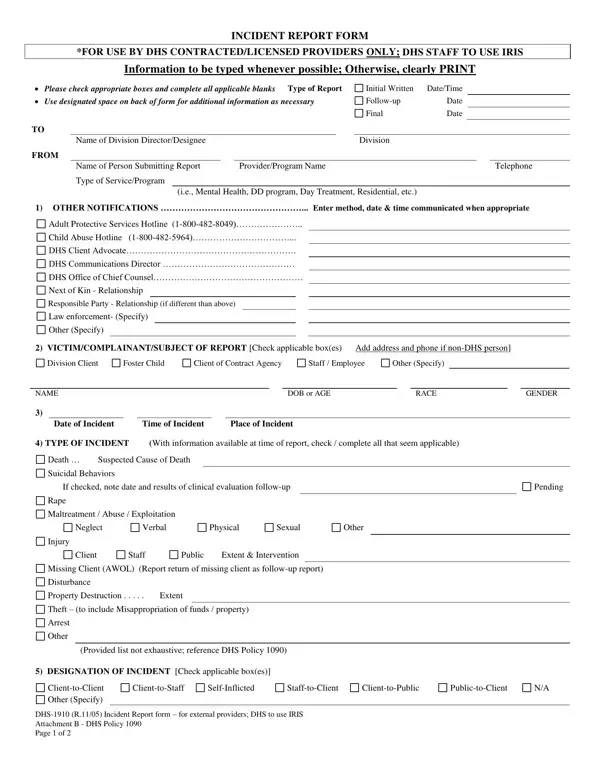
The DHS-1910 Incident Report Form is explicitly created for use by DHS contracted or licensed providers. This document ensures that incidents involving clients under the care of various DHS programs are systematically reported.

The form includes several sections where specific information must be filled out, such as:

- Type of report (initial, follow-up, or final)

- Details of the incident (date, time, location, and nature of the incident)

- Notifications made to various parties (e.g., Adult Protective Services, law enforcement)

It also provides space for a narrative description of the incident, allowing the reporter to detail the events leading up to and following it. This way, all relevant factors are considered in any subsequent investigation or review. The form helps maintain safety, accountability, and compliance within DHS-operated or affiliated programs.

QuestionAnswer
Form Name DHS Form Incident Report
Form Length 2 pages
Fillable? Yes
Fillable fields 70
Avg. time to fill out 12 min
Other names incident report applicable sample, incident form applicable print, DHS incident report form Arkansas, DHS form incident report

How to Edit DHS Form Incident Report Online for Free

Filling out the DHS Incident Report Form requires a systematic approach to ensure accurate and complete documentation of any incident involving clients or staff.

1. Determine the Type of Report

Begin by identifying the type of report you are filling out. The form allows for three options: Initial, Follow-up, or Final. Check the appropriate box and fill in the date and time of the report.

Filling out section 1 in incident report applicable blank

2. Enter the Reporting Person's Information

Provide details in the "FROM" section, including your name, the provider or program name you represent, and your telephone number.

3. Designate the Incident Type

Check the relevant box(es) that best describe the nature of the incident. Options include, but are not limited to, death, injury, abuse, or theft.

Filling out segment 2 in incident report applicable blank

4. Detail the Incident

Use the space provided to give a clear, concise narrative description of the incident. Add details such as who, what, when, where, why, and how the incident occurred.

PublictoClient, SelfInflicted, and DHS R Incident Report form  for inside incident report applicable blank

5. Specify Notifications Made

Record any notifications you have made regarding the incident. This could cover calls to protective services, law enforcement, or DHS officials. Specify the method of communication, whom you contacted, and the time and date of the communication.

The best ways to fill in incident report applicable blank step 4

6. Add Information on Others Involved

If other individuals were involved or witnessed the incident, list their roles and contact information. It may include clients, staff members, or external individuals. If more space is needed than provided, use the designated areas on the form to expand on these details.

When appropriate include, Investigated with following, and If yes please explain in incident report applicable blank

7. Consider Preventive Measures

Reflect on whether the incident could have been anticipated or prevented and check the appropriate box. If yes, explain briefly how the incident might have been avoided.