
Discipline Fill Of Blank Form PDF Details

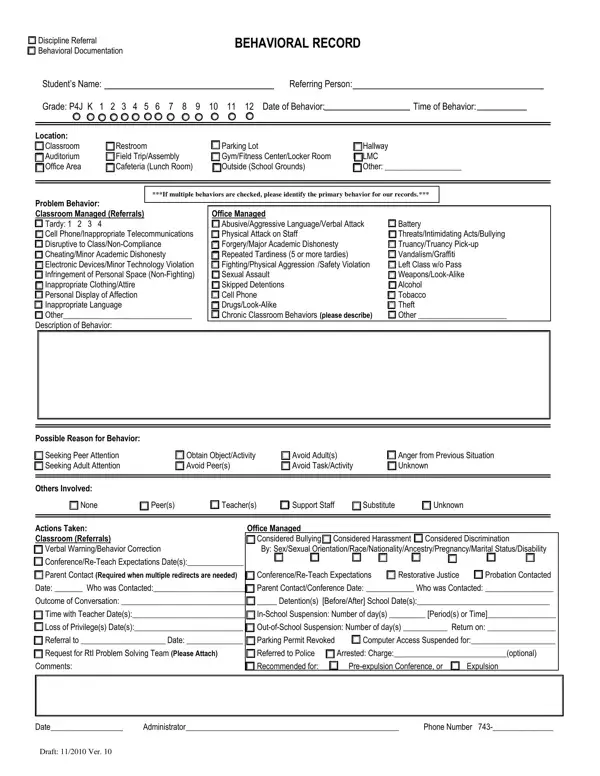
In schools across the nation, managing student behavior and maintaining a conducive learning environment are priorities that cannot be overstated. Integral to this process is the use of a Discipline Fill Of form, a comprehensive document designed to systematically capture and address student behavioral issues. This form encompasses various aspects, including the categorization of the behavior as either a Discipline Referral or Behavioral Documentation, thereby helping educators to record and analyze patterns in student conduct. Detailed fields such as the student's name, grade, specifics of the behavior (time, date, location), and the nature of the misconduct provide a structured way to document incidents. It distinguishes between classroom-managed behaviors and those requiring office intervention, covering a wide spectrum from tardiness to more serious offenses like bullying or physical aggression. Additionally, it prompts the referring person to consider the possible reasons for the behavior, potentially identifying underlying issues needing attention. Further, the form outlines the actions taken in response, ranging from verbal warnings to suspension, thus ensuring a well-documented and consistent approach to discipline within educational institutions. This meticulous documentation aids in distinguishing recurring issues, tailoring interventions, and, when necessary, involving law enforcement or initiating expulsion proceedings, thereby making it a critical tool in the educational system’s approach to discipline and student welfare.

QuestionAnswer
Form NameDiscipline Fill Of Blank Form
Form Length1 pages
Fillable?No
Fillable fields0
Avg. time to fill out15 sec
Other namesLMC, discipline referral form elementary, P4J, school discipline referral form

How to Edit Discipline Fill Of Blank Form Online for Free

tardies can be completed without difficulty. Simply make use of FormsPal PDF editing tool to complete the task fast. To keep our editor on the forefront of convenience, we work to put into operation user-oriented capabilities and improvements regularly. We're routinely pleased to receive feedback - join us in revolutionizing how we work with PDF documents. With some basic steps, you can start your PDF editing:

Step 1: Press the "Get Form" button above. It is going to open our tool so that you could begin filling out your form.

Step 2: As you launch the online editor, you'll notice the form prepared to be filled in. Besides filling out different fields, you may as well perform some other actions with the Document, including writing custom text, changing the original text, adding graphics, putting your signature on the form, and a lot more.

As a way to finalize this form, be certain to enter the right information in each area:

1. The tardies usually requires specific information to be typed in. Be sure the following blanks are completed:

Filling out part 1 of RtI

2. Once your current task is complete, take the next step – fill out all of these fields - Battery ThreatsIntimidating, Skipped Detentions Cell Phone, Problem Behavior Classroom Managed, Possible Reason for Behavior, Obtain ObjectActivity Avoid Peers, Avoid Adults Avoid TaskActivity, Anger from Previous Situation, Others Involved, None, Peers, Teachers, Support Staff, Substitute, Unknown, and Office Managed Considered with their corresponding information. Make sure to double check that everything has been entered correctly before continuing!

Step no. 2 for filling in RtI

Always be extremely attentive while completing Battery ThreatsIntimidating and Problem Behavior Classroom Managed, as this is the section where a lot of people make mistakes.

3. The following section will be about Actions Taken Classroom Referrals, Referred to Police Arrested, Administrator, Phone Number, and Draft Ver - type in each one of these fields.

Learn how to fill in RtI stage 3

Step 3: Just after double-checking your entries, press "Done" and you are good to go! Right after registering afree trial account at FormsPal, you'll be able to download tardies or send it through email promptly. The document will also be available through your personal account menu with your every edit. We don't share or sell any details that you provide whenever completing forms at our website.