
Dl82 Form PDF Details

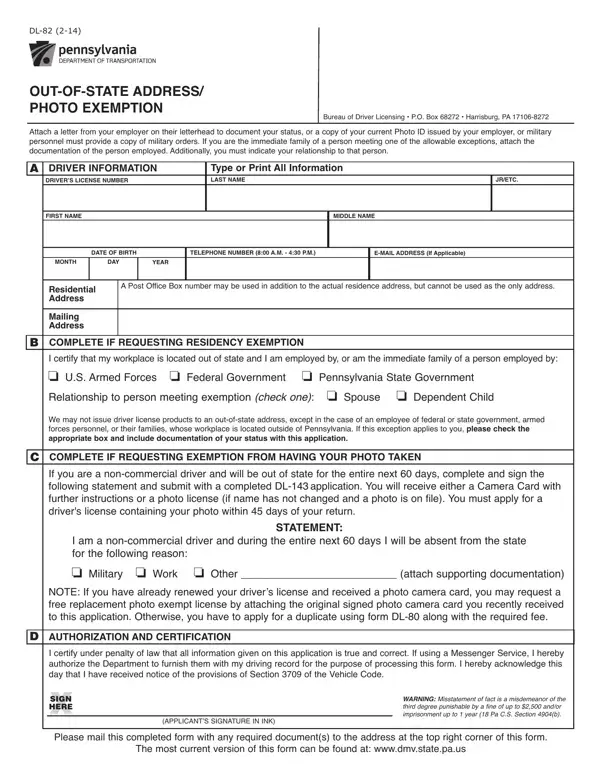
Understanding the DL-82 form is essential for individuals who find themselves needing to navigate the intricacies of maintaining Pennsylvania driving requirements while living or working out of state, or for those with specific photo exemption needs. This form, provided by the Bureau of Driver Licensing, serves crucial functions, including allowing Pennsylvania residents to maintain their driver's license when their employment takes them across state lines, or granting exemptions from the state's photo requirements under certain conditions. The DL-82 form requires detailed information about the applicant, including driver's license number, full name, date of birth, and contact details, alongside evidence to support the exemption claim. It's designed for use by members of the U.S. Armed Forces, federal or Pennsylvania state government employees, or their immediate family members seeking a residency exemption. Additionally, it caters to non-commercial drivers who will be out of state for more than 60 days and, therefore, unable to renew their license in person. Completing this form accurately and submitting the necessary documentation, such as employment verification or military orders, along with statements of absence, ensures that eligible applicants can receive their driver's license or secure a photo exemption without complication. It underscores the importance of honesty and accuracy in the application process, highlighting penalties for misstatements, and functions as a bridge for those navigating between their obligations to the state and their commitments elsewhere.

QuestionAnswer
Form NameDl82 Form
Form Length1 pages
Fillable?No
Fillable fields0
Avg. time to fill out15 sec
Other namespenndot dl 82, pa license form dl 82, penndot dl 82 form, pa dl82 form

How to Edit Dl82 Form Online for Free

You can fill in dl82 without difficulty with our PDF editor online. The tool is continually maintained by us, acquiring new features and growing to be even more versatile. To get started on your journey, consider these basic steps:

Step 1: Simply click on the "Get Form Button" in the top section of this site to see our form editor. This way, you'll find all that is required to fill out your document.

Step 2: Once you access the file editor, you will find the document ready to be completed. Aside from filling out various blanks, you might also perform other things with the form, particularly writing custom textual content, changing the original textual content, adding images, putting your signature on the form, and more.

Completing this form usually requires care for details. Ensure that all required blank fields are filled out accurately.

1. While completing the dl82, be certain to incorporate all of the needed blanks within the associated form section. This will help to facilitate the work, which allows your information to be handled fast and properly.

pa dl82 form writing process outlined (stage 1)

2. After filling out the last section, go to the next part and complete the essential details in these fields - I am a noncommercial driver and, o Military o Work o Other attach, NOTE If you have already renewed, AUTHORIZATION AND CERTIFICATION, I certify under penalty of law, XSIGN, HERE, APPLICANTS SIGNATURE IN INK, WARNING Misstatement of fact is a, Please mail this completed form, and The most current version of this.

pa dl82 form writing process clarified (step 2)

People who work with this document generally make errors while filling in I certify under penalty of law in this part. Be sure you read twice whatever you type in here.

Step 3: Spell-check what you have inserted in the blanks and press the "Done" button. After registering a7-day free trial account with us, you'll be able to download dl82 or send it through email promptly. The PDF document will also be available in your personal account with your each and every edit. When you work with FormsPal, you can complete forms without stressing about personal data incidents or data entries being distributed. Our secure software makes sure that your personal information is maintained safe.