
Dliflc Form 220 PDF Details

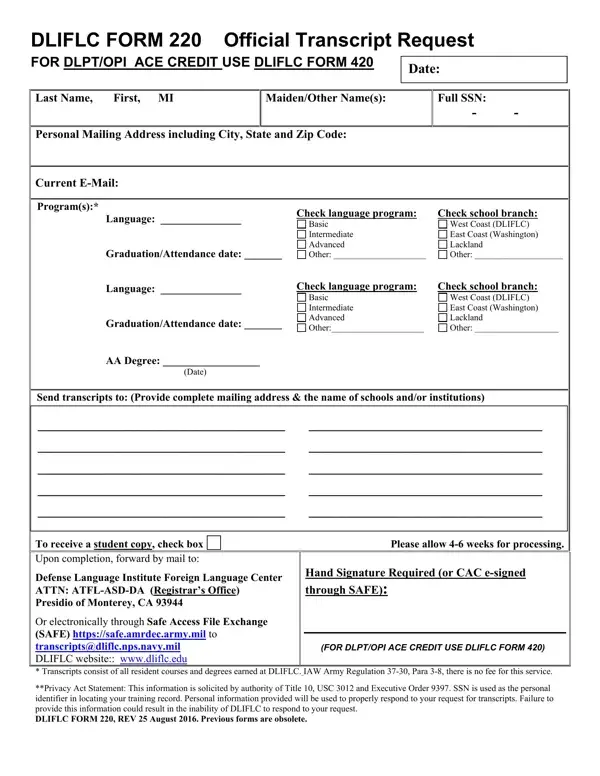
The Defense Language Institute Foreign Language Center (DLIFLC), recognized for its comprehensive language programs, offers an important resource for past and present students seeking academic credit recognition through the DLIFLC Form 220, Official Transcript Request. This form is specifically designed for individuals looking to use their Defense Language Proficiency Test (DLPT) or Oral Proficiency Interview (OPI) results to gain American Council on Education (ACE) credits, enabling further educational advancements or career progression. Applicants are required to provide detailed personal information, including their Social Security Number (SSN) under the assurance of privacy protection guided by Title 10 of the United States Code (USC) 3012 and Executive Order 9397. The form clearly outlines various segments for applicants to complete such as personal details, program and school branch selection, and the specifics of the language program studied, among other requirements. Additionally, it stipulates the need for a physical signature, denoting the inability to accept e-signed submissions, and advises on the estimated processing time. The form also informs on the protocol for requesting student copies and the procedures for submission, which include mailing, faxing, or emailing the completed form to the registrar's office. Highlighted within this document is the institutional commitment to providing transcript services at no cost to the requester, as per Army Regulation 37-30, Para 3-8, reinforcing DLIFLC's dedication to supporting its students' academic and professional achievements.

QuestionAnswer
Form NameDliflc Form 220
Form Length1 pages
Fillable?No
Fillable fields0
Avg. time to fill out15 sec
Other namesdliflc lackland, dliflc your lackland download, dliflc, dliflc form

How to Edit Dliflc Form 220 Online for Free

You could fill in dliflc transcript easily in our online tool for PDF editing. We at FormsPal are dedicated to providing you with the perfect experience with our editor by regularly introducing new functions and upgrades. Our tool has become even more user-friendly with the latest updates! So now, working with PDF forms is easier and faster than ever before. Starting is simple! All you have to do is follow the following simple steps below:

Step 1: First, open the pdf editor by clicking the "Get Form Button" in the top section of this webpage.

Step 2: As you open the tool, you will see the form ready to be filled in. Apart from filling in different blanks, you can also perform several other things with the file, namely writing any textual content, modifying the initial textual content, inserting images, putting your signature on the form, and much more.

This PDF form will need you to type in specific details; in order to guarantee accuracy, make sure you bear in mind the subsequent recommendations:

1. You'll want to complete the dliflc transcript correctly, hence be careful while working with the sections containing these particular fields:

dliflc request transcript completion process clarified (stage 1)

2. Now that the last section is completed, you have to insert the needed specifics in Send transcripts to Provide, To receive a student copy check, Defense Language Institute Foreign, Please allow weeks for processing, Hand Signature Required or CAC, Or electronically through Safe, and FOR DLPTOPI ACE CREDIT USE DLIFLC so you're able to move forward further.

Part no. 2 for submitting dliflc request transcript

A lot of people often make mistakes while completing Defense Language Institute Foreign in this section. Be sure to revise whatever you enter right here.

Step 3: Prior to finalizing this file, it's a good idea to ensure that all blank fields have been filled in the proper way. Once you determine that it is good, click on “Done." Get your dliflc transcript once you subscribe to a free trial. Conveniently access the pdf document within your FormsPal account, with any modifications and adjustments being all saved! When using FormsPal, you can easily complete documents without the need to worry about database incidents or entries being shared. Our secure software helps to ensure that your personal data is kept safe.