
Form Fl 220 PDF Details

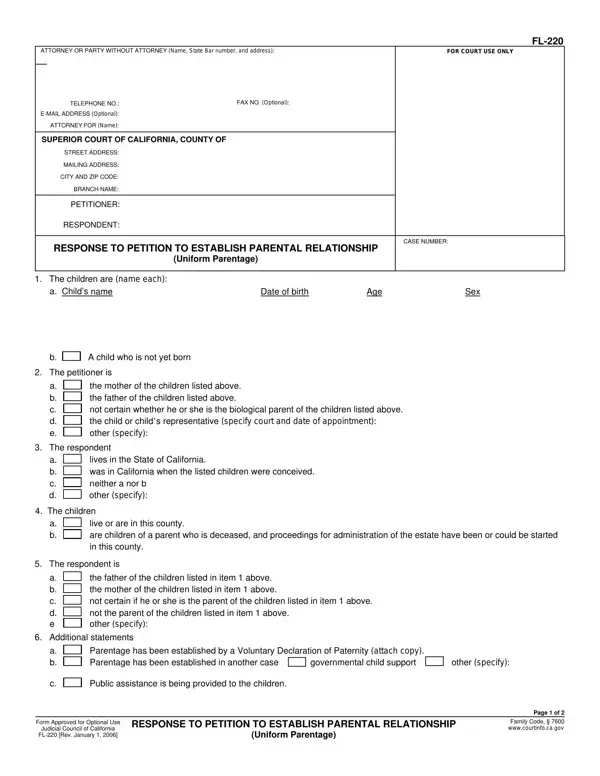
In the realm of legal family matters, the establishment of parental relationships holds significant importance for all parties involved, particularly for the children. The FL-220 form, used within the Superior Court of California, acts as a direct response to a petition to establish such a relationship, formally known as the Uniform Parentage Act. This form serves as a comprehensive avenue for respondents to present their side, particularly addressing the identification of the children involved, affirming or questioning the petitioner's relationship to them, and detailing their residence status. It further allows the respondent to assert claims regarding the children's parentage, whether by acknowledging paternity or maternity, disputing it, or requesting genetic tests to ascertain biological connections. Considering child custody, visitation rights, financial support, and even matters such as the children's name changes, the form encapsulates a broad spectrum of issues pertinent to establishing parental relations. Through its structured format, it not only facilitates the legal process but also ensures that the children's welfare and rights, alongside those of the parents involved, are thoroughly considered and addressed in court proceedings. Explicitly, the FL-220 form stands as a crucial document in the legal establishment of parental relationships, embodying the complexities and sensitivities inherent in such cases.

QuestionAnswer
Form NameForm Fl 220
Form Length2 pages
Fillable?No
Fillable fields0
Avg. time to fill out30 sec
Other namesfl 220 fillable, form fl 210 ca, which petition parental rights, parental petition

How to Edit Form Fl 220 Online for Free

Once you open the online editor for PDFs by FormsPal, you can easily fill out or edit parental petition here and now. The editor is consistently maintained by our staff, receiving new functions and becoming much more versatile. Getting underway is easy! All you have to do is take the next simple steps directly below:

Step 1: Simply click on the "Get Form Button" at the top of this site to launch our pdf form editor. There you'll find everything that is necessary to fill out your file.

Step 2: The tool will let you change your PDF in many different ways. Enhance it with customized text, adjust what's already in the PDF, and put in a signature - all when it's needed!

This PDF doc will need some specific details; in order to guarantee accuracy, you should take note of the guidelines listed below:

1. Firstly, once filling out the parental petition, beging with the section that contains the following blank fields:

Tips to fill in fl 220 step 1

2. After performing this part, head on to the subsequent stage and complete the necessary details in all these blank fields - a Childs name, Date of birth, Age, Sex, A child who is not yet born, The petitioner is, a b c d e, the mother of the children listed, The respondent, a b c d, lives in the State of California, The children, a b, live or are in this county are, and The respondent is.

Step number 2 in filling in fl 220

3. Completing a b c d e, the father of the children listed, Additional statements, a b, Parentage has been established by, other specify, Public assistance is being, Form Approved for Optional Use, Judicial Council of California FL, RESPONSE TO PETITION TO ESTABLISH, Uniform Parentage, Page of, and Family Code wwwcourtinfocagov is essential for the next step, make sure to fill them out in their entirety. Don't miss any details!

RESPONSE TO PETITION TO ESTABLISH, Form Approved for Optional Use, and Family Code   wwwcourtinfocagov in fl 220

4. To go ahead, the next part will require filling in a handful of blank fields. Included in these are PETITIONER, RESPONDENT, The respondent requests that the, Respondent, Petitioner, Other specify Other specify, CASE NUMBER, is the parent of the children, Respondent Respondent requests, is not the parent of the children, Petitioner, Child custody and visitation, a If, Petitioner, and Respondent, which are fundamental to continuing with this document.

Completing section 4 of fl 220

5. And finally, the following last part is what you'll want to finish prior to closing the form. The blanks under consideration include the following: Visitation should occur with the, I request mediation to work out a, Reasonable expenses of pregnancy, Reasonable expenses of pregnancy, Petitioner, Respondent, Both, Fees and costs of litigation, a Attorney fees should be paid by, b Expert fees guardian ad litem, Petitioner, Respondent, Both, Name change and new names, and The childrens names should be.

fl 220 completion process described (portion 5)

Always be very attentive when filling in Both and Reasonable expenses of pregnancy, because this is where a lot of people make some mistakes.

Step 3: Make sure the details are right and then click "Done" to continue further. After starting afree trial account with us, you will be able to download parental petition or email it promptly. The file will also be readily available via your personal account menu with your edits. FormsPal guarantees secure document editor without data record-keeping or distributing. Rest assured that your information is safe here!