

Form B-350 at a glance
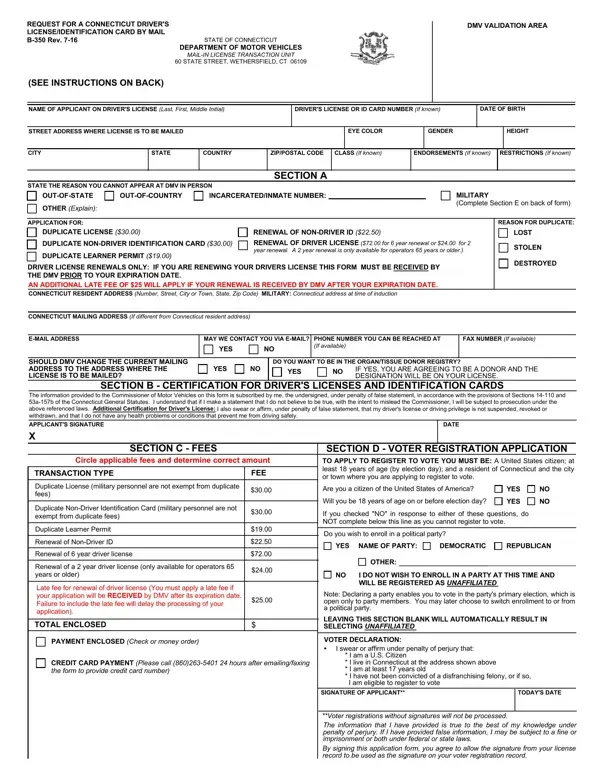
What it is: B-350 Rev. 2-2026 is the Request for a Connecticut Driver's License/Identification Card by Mail.
Where and when to file: Send completed application through postal mail.
Per the REAL ID act and state statute you are allowed only one renewal through the mail before a new in-person photo is required.
A filled-in Form B-350 example: a driver renews a license by mail
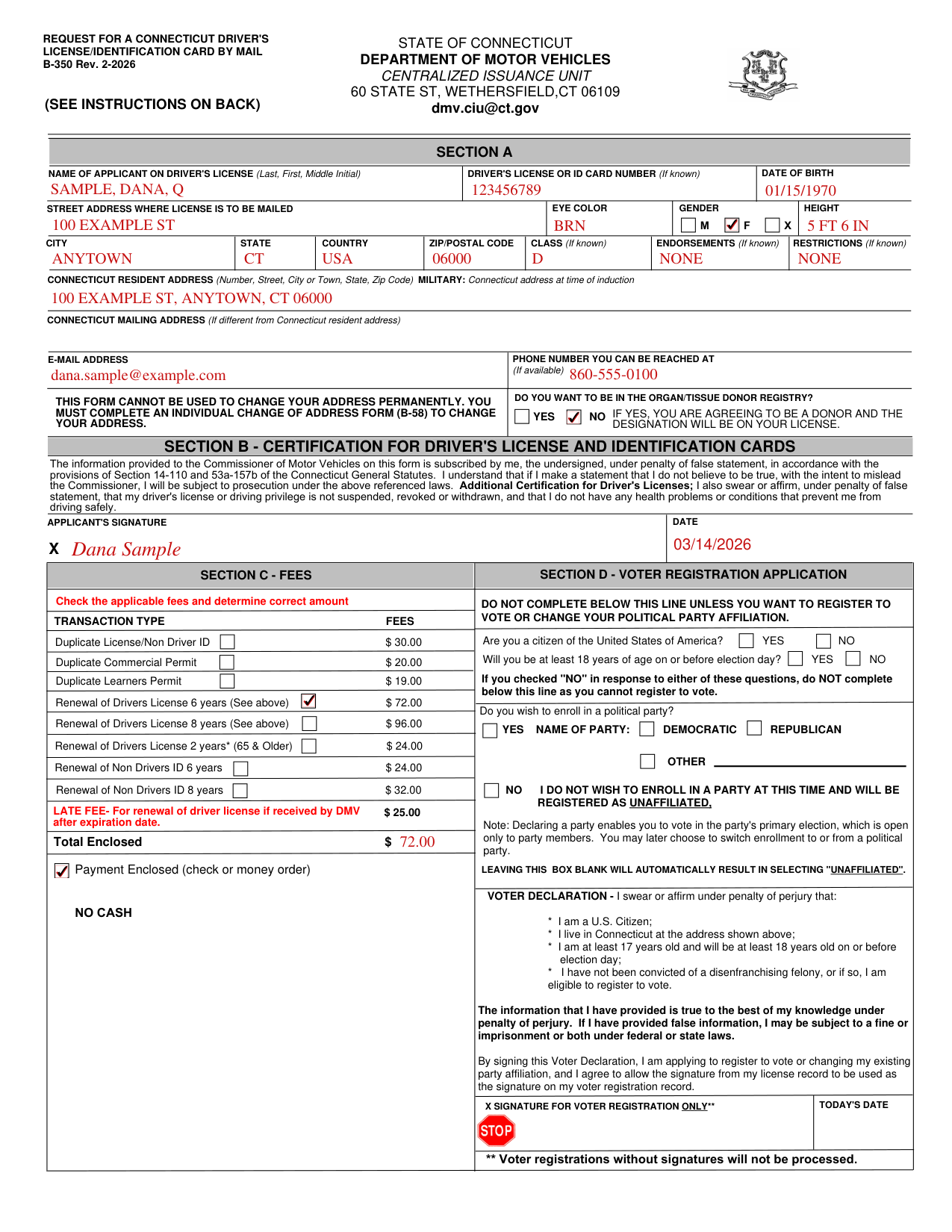
How to fill out Form B-350, box by box
Section A
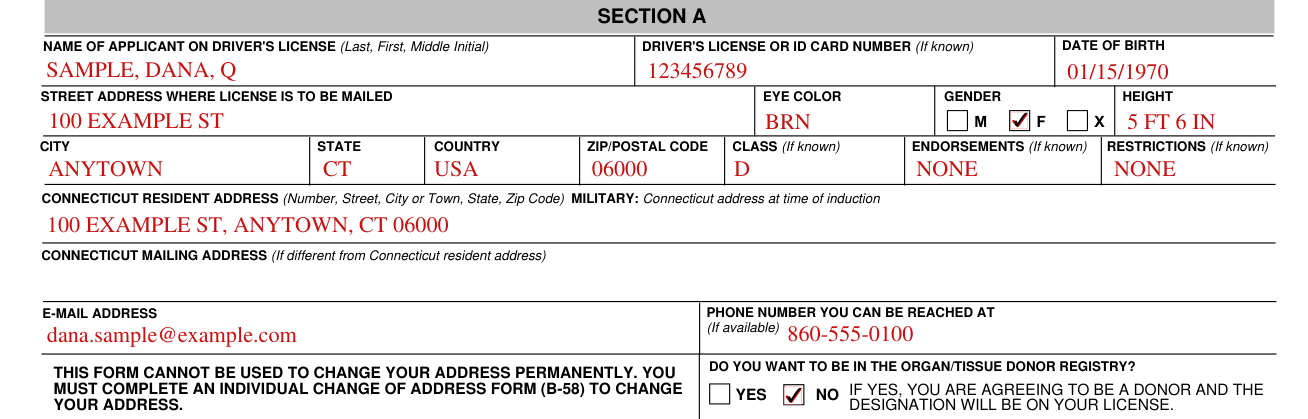
Complete Section A entirely. Type or print clearly.
Enter the Name of Applicant on Driver's License (Last, First, Middle Initial), the Driver's License or ID Card Number (If known) and the Date of Birth.
Enter the Street Address Where License Is to Be Mailed, Eye Color, Gender (M, F or X), Height, City, State, Country, ZIP/Postal Code, Class (If known), Endorsements (If known) and Restrictions (If known).
Enter the Connecticut Resident Address (Number, Street, City or Town, State, Zip Code). Military: Connecticut address at time of induction.
Enter the Connecticut Mailing Address (If different from Connecticut resident address).
Enter the E-mail Address and the Phone Number You Can Be Reached At (If available).
This form cannot be used to change your address permanently. You must complete an Individual Change of Address Form (B-58) to change your address.
Do You Want to Be in the Organ/Tissue Donor Registry?

Do you want to be in the organ/tissue donor registry? YES or NO. If YES, you are agreeing to be a donor and the designation will be on your license.
Section B - Certification for Driver's License and Identification Cards

The information provided to the Commissioner of Motor Vehicles on this form is subscribed by you, the undersigned, under penalty of false statement, in accordance with the provisions of Section 14-110 and 53a-157b of the Connecticut General Statutes. If you make a statement that you do not believe to be true, with the intent to mislead the Commissioner, you will be subject to prosecution under Section 14-110 and 53a-157b of the Connecticut General Statutes. Additional Certification for Driver's Licenses: you also swear or affirm, under penalty of false statement, that your driver's license or driving privilege is not suspended, revoked or withdrawn, and that you do not have any health problems or conditions that prevent you from driving safely.
Sign the certification in Section B at Applicant's Signature, and enter the Date.
Section C - Fees
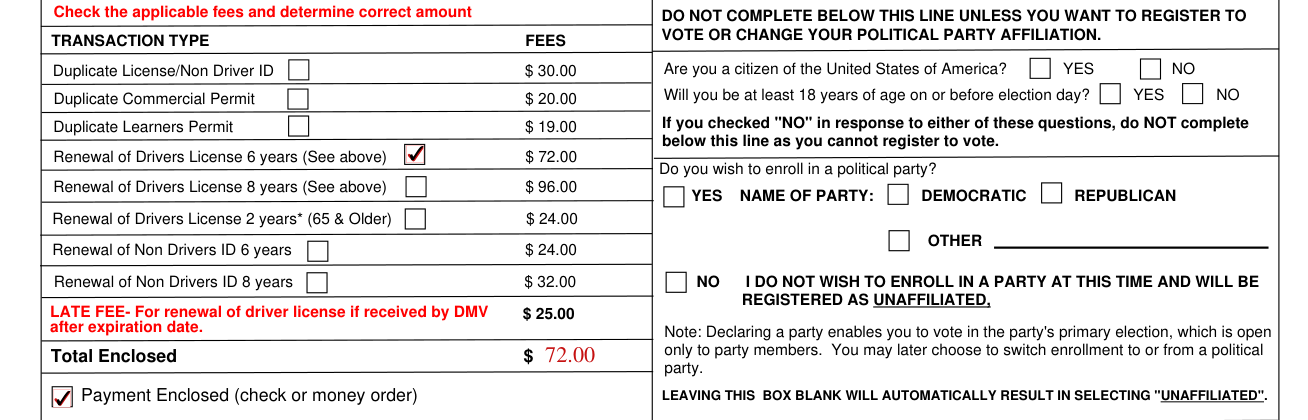
Check the applicable fees and determine correct amount.
Duplicate License/Non Driver ID is $30.00 (checked October 20, 2026).
Duplicate Commercial Permit is $20.00 (checked October 20, 2026).
Duplicate Learners Permit is $19.00 (checked October 20, 2026).
Renewal of Drivers License 6 years is $72.00 (checked October 20, 2026).
Renewal of Drivers License 8 years is $96.00 (checked October 20, 2026).
Renewal of Drivers License 2 years (65 & Older) is $24.00 (checked October 20, 2026).
Renewal of Non Drivers ID 6 years is $24.00 (checked October 20, 2026).
Renewal of Non Drivers ID 8 years is $32.00 (checked October 20, 2026).
Enter the Total Enclosed.
Payment Enclosed (check or money order). No cash.
Section D - Voter Registration Application
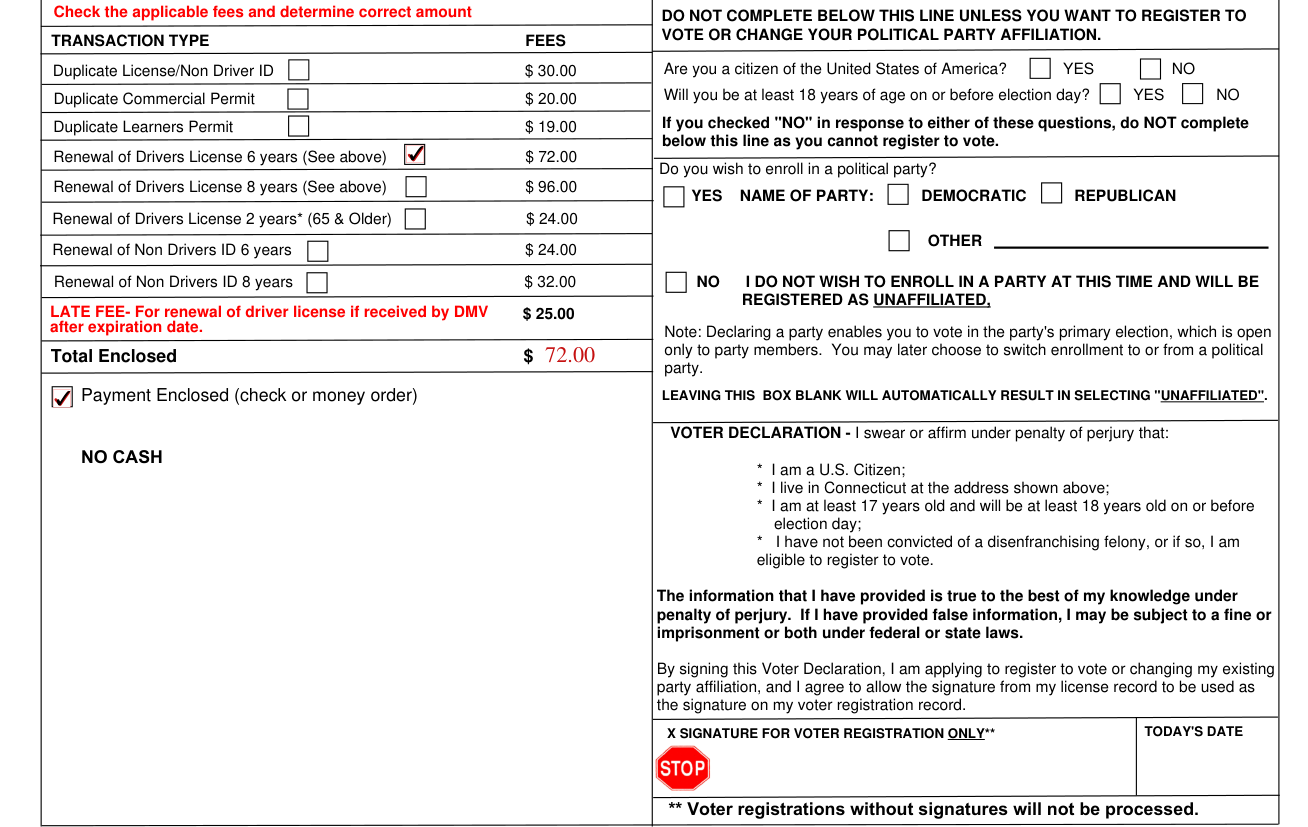
Complete Section D if you want to apply to register to vote in CT or change your party affiliation.
Do not complete Section D unless you want to register to vote or change your political party affiliation.
To register, you must be a U.S. citizen and at least 18 years old on or before the next election.
Are you a citizen of the United States of America? YES or NO. Will you be at least 18 years of age on or before election day? YES or NO. If you checked "NO" in response to either of these questions, do NOT complete Section D as you cannot register to vote.
Do you wish to enroll in a political party? YES, Name of Party: Democratic, Republican or Other.
NO, I do not wish to enroll in a party at this time and will be registered as unaffiliated.
Leaving this box blank will automatically result in selecting "unaffiliated".
Voter Declaration: you swear or affirm under penalty of perjury that you are a U.S. Citizen; you live in Connecticut at the address shown; you are at least 17 years old and will be at least 18 years old on or before election day; and you have not been convicted of a disenfranchising felony, or if so, you are eligible to register to vote. Sign at X Signature for Voter Registration Only and enter Today's Date. Voter registrations without signatures will not be processed.
If you have provided false information, you may be subject to a fine or imprisonment or both under federal or state laws. By signing this Voter Declaration, you are applying to register to vote or changing your existing party affiliation, and you agree to allow the signature from your license record to be used as the signature on your voter registration record.
Active Military Personnel Only, Section E
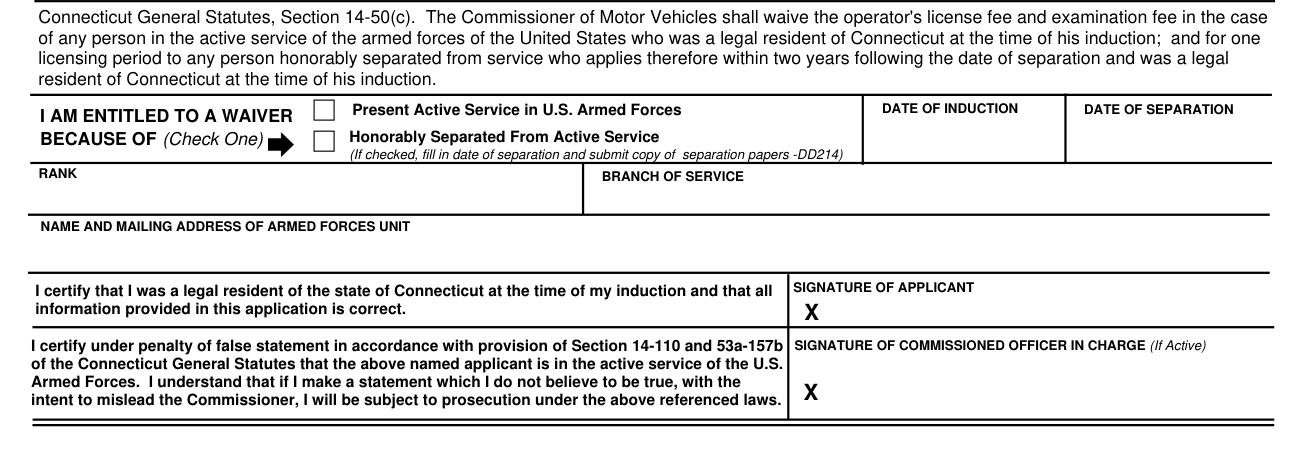
Military: If recently honorably discharged or an active member of the armed services of the United States, Section E must be completed if requesting a no fee renewal.
A fee exemption is not given for duplicate licenses or identification cards.
Check one under I Am Entitled to a Waiver Because Of: Present Active Service in U.S. Armed Forces, or Honorably Separated From Active Service. If you check Honorably Separated From Active Service, fill in date of separation and submit copy of separation papers -DD214.
Enter the Date of Induction, the Date of Separation, the Rank, the Branch of Service and the Name and Mailing Address of Armed Forces Unit.
At Signature of Applicant, you certify that you were a legal resident of the state of Connecticut at the time of your induction and that all information provided in this application is correct.
The Signature of Commissioned Officer in Charge (If Active) certifies under penalty of false statement in accordance with provision of Section 14-110 and 53a-157b of the Connecticut General Statutes that the applicant is in the active service of the U.S. Armed Forces.
Common questions about Form B-350
Is there a deadline?
License renewals: Payments must be received prior to or the day of expiration or a $25.00 late fee will be charged (checked October 20, 2026). The late fee for renewal of driver license, it applies if received by DMV after expiration date.
Where do I file it?
Send the completed application and payment (fees are listed in section C) of check or money order drawn on a United States bank (dollar currency) and mailed to: Department of Motor Vehicles 60 State Street Wethersfield, CT 06109 Attn: Central Issuance Operations Unit dmv.ciu@ct.gov
When is this form not the right one?
These transactions cannot process through the mail: Renewal of commercial driver license (CDL), public service license, name change, if you did not have a new photo taken at your last renewal, or drive-only permit / license.
Sources
[1] Form B-350 (Rev. 2-2026), Request for a Connecticut Driver's License/Identification Card by Mail, Connecticut Department of Motor Vehicles (the Official source link on this page).