

Form MED 20 at a glance
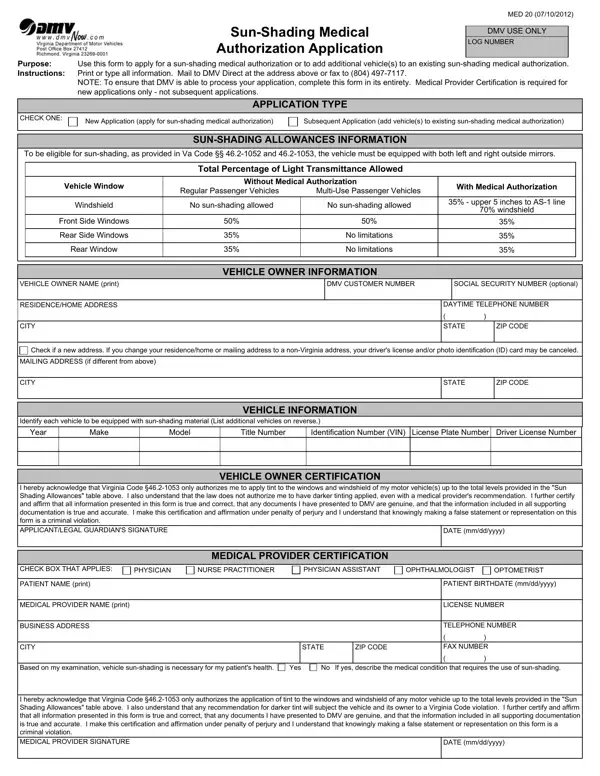
What it is: Form MED 20 is the Sun-Shading Medical Authorization Application: use it to apply for a sun-shading medical authorization or to add additional vehicle(s) to an existing sun-shading medical authorization.
Who signs: Sign on the Applicant/Legal Guardian's Signature line and enter the Date (mm/dd/yyyy).
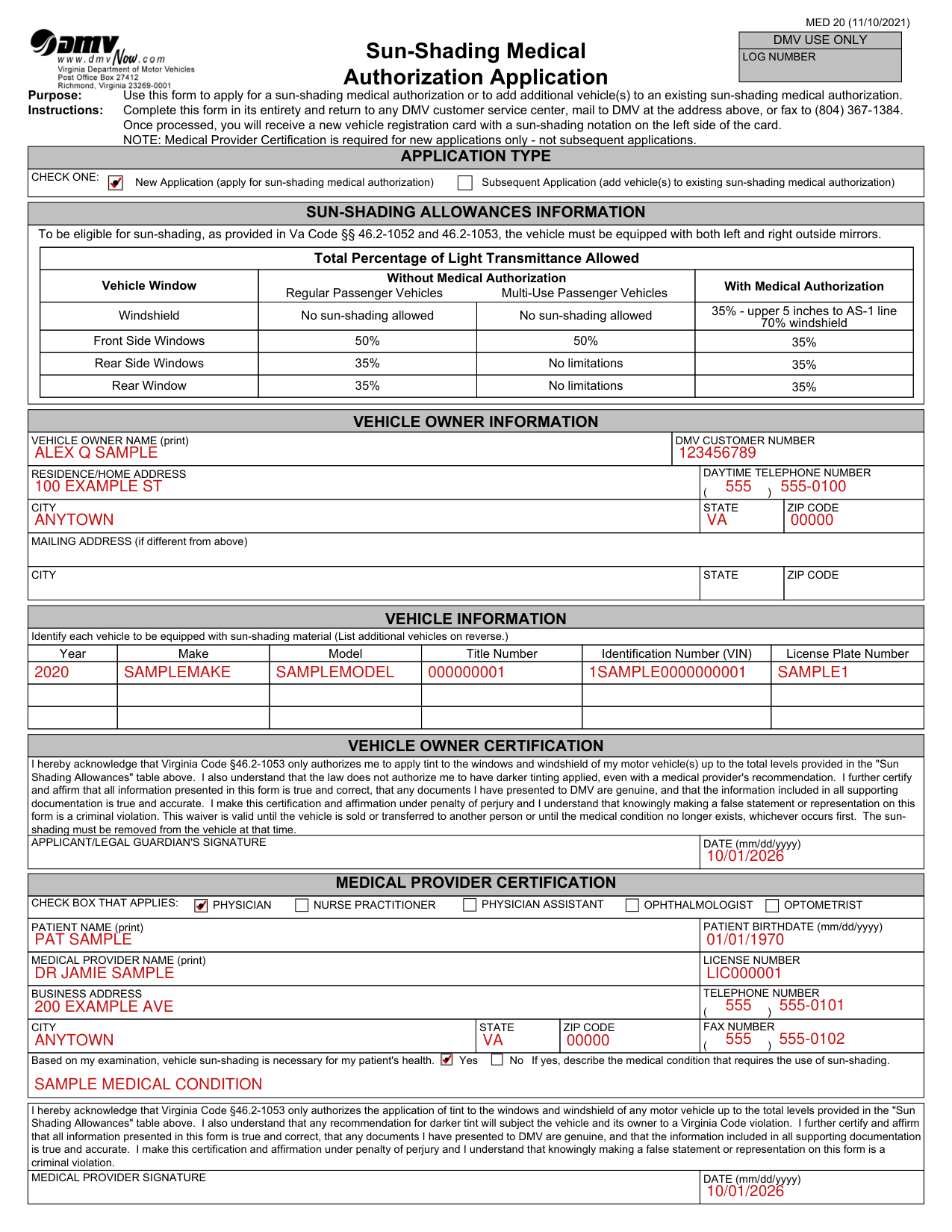
A filled-in Form MED 20 example: an owner applies for a sun-shading medical authorization
How to fill out Form MED 20, box by box
Application Type, check one
Check one: New Application (apply for sun-shading medical authorization) or Subsequent Application (add vehicle(s) to existing sun-shading medical authorization).
Vehicle Owner Information
Enter the Vehicle Owner Name (print) and the DMV Customer Number.
Enter the Residence/Home Address, the Daytime Telephone Number, and the City, State and Zip Code.
Enter a Mailing Address, with its City, State and Zip Code, if it is different from the Residence/Home Address.
Vehicle Information
Identify each vehicle to be equipped with sun-shading material.
For each vehicle, enter the Year, Make, Model, Title Number, Identification Number (VIN) and License Plate Number.
Vehicle Owner Certification
Sign on the Applicant/Legal Guardian's Signature line and enter the Date (mm/dd/yyyy).
The vehicle owner acknowledges that Virginia Code §46.2-1053 only authorizes applying tint to the windows and windshield of the owner's motor vehicle(s) up to the total levels provided in the Sun Shading Allowances table, and that the law does not authorize darker tinting, even with a medical provider's recommendation.
The vehicle owner and the medical provider each certify and affirm that all information presented in this form is true and correct, that any documents presented to DMV are genuine, and that the information included in all supporting documentation is true and accurate.
Medical Provider Certification
Medical Provider Certification is required for new applications only, not subsequent applications.
Check the box that applies: Physician, Physician Assistant, Nurse Practitioner, Ophthalmologist or Optometrist.
Enter the Patient Name (print) and the Patient Birthdate (mm/dd/yyyy).
Enter the Medical Provider Name (print) and the License Number.
Enter the Business Address, City, State, Zip Code, Telephone Number and Fax Number.
Mark Yes or No for: Based on my examination, vehicle sun-shading is necessary for my patient's health. If yes, describe the medical condition that requires the use of sun-shading.
The medical provider acknowledges that Virginia Code §46.2-1053 only authorizes the application of tint to the windows and windshield of any motor vehicle up to the total levels provided in the Sun Shading Allowances table, and that any recommendation for darker tint will subject the vehicle and its owner to a Virginia Code violation.
For new applications only, not subsequent applications, the medical provider signs on the Medical Provider Signature line and enters the Date (mm/dd/yyyy).
More rules for Form MED 20
The waiver is valid until the vehicle is sold or transferred to another person or until the medical condition no longer exists, whichever occurs first. The sun-shading must be removed from the vehicle at that time.
Once processed, you will receive a new vehicle registration card with a sun-shading notation on the left side of the card.
Sun-Shading Allowances Information
Eligibility and mirrors
To be eligible for sun-shading, as provided in Va Code §§ 46.2-1052 and 46.2-1053, the vehicle must be equipped with both left and right outside mirrors.
Windshield and front side windows
Windshield, total percentage of light transmittance allowed: no sun-shading allowed without medical authorization for regular passenger vehicles and multi-use passenger vehicles; with medical authorization, 35% - upper 5 inches to AS-1 line 70% windshield. Front Side Windows: 50% for regular passenger vehicles and 50% for multi-use passenger vehicles without medical authorization, and 35% with medical authorization.
Rear side windows and rear window
Rear Side Windows and Rear Window, total percentage of light transmittance allowed: 35% for regular passenger vehicles and no limitations for multi-use passenger vehicles without medical authorization, and 35% with medical authorization.
Common questions about Form MED 20
Where do I file it?
Complete the form in its entirety and return it to any DMV customer service center, mail it to DMV, or fax it to (804) 367-1384.
Is there a penalty?
The vehicle owner and the medical provider each make their certification and affirmation under penalty of perjury, and knowingly making a false statement or representation on this form is a criminal violation.
Sources
[1] Form MED 20 (11/10/2021), Sun-Shading Medical Authorization Application, Virginia Department of Motor Vehicles (the Official source link on this page).