
Dss Form 2930 PDF Details

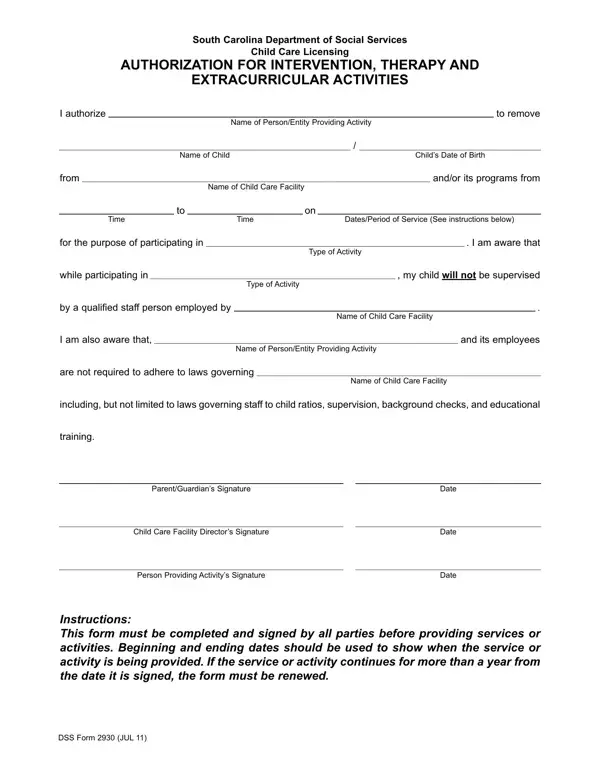
Embarking on the journey of enrolling a child in extra-curricular activities within a child care setting comes with its set of required paperwork, among which the DSS 2930 form plays a crucial role for parents and guardians in South Carolina. Created by the South Carolina Department of Social Services Child Care Licensing, this form acts as a formal authorization allowing children to participate in various interventions, therapies, and extracurricular activities. It meticulously outlines the specifics: the person or entity responsible for the activity, the child’s details, and the child care facility from where the child will be removed for participation. The document also specifies the period of service, shedding light on its start and end dates, to ensure a clear understanding of the duration of service provided. What stands out about this form is the transparency it promotes - alerting signatories about the differences in supervision and legal obligations that traditional child care staff have, as opposed to those leading the designated activities. This includes, but is not limited to, staff-to-child ratios, supervisorial regulations, background checks, and educational training requirements. Completing this form requires signatures from the parent or guardian, the child care facility director, and the person or entity providing the activity, underscoring a collective agreement and understanding amongst all parties involved. The necessity for renewal of the form if activities extend beyond a year further emphasizes the commitment to maintaining updated and accurate records of child participation in such programs.

QuestionAnswer
Form NameDss Form 2930
Form Length1 pages
Fillable?No
Fillable fields0
Avg. time to fill out15 sec
Other namesdss2930, dsss form 2930, dss form 1, dss form 2930

How to Edit Dss Form 2930 Online for Free

dss form 1 can be completed in no time. Just open FormsPal PDF editor to get the job done fast. In order to make our tool better and easier to work with, we constantly implement new features, bearing in mind suggestions coming from our users. All it requires is several easy steps:

Step 1: Open the PDF file in our editor by clicking on the "Get Form Button" in the top section of this webpage.

Step 2: This tool provides the capability to customize PDF forms in a range of ways. Modify it with customized text, adjust existing content, and put in a signature - all at your convenience!

Filling out this form needs care for details. Ensure that every single field is filled out correctly.

1. It is recommended to complete the dss form 1 accurately, so pay close attention while working with the segments that contain all these blanks:

form 2930 conclusion process outlined (stage 1)

2. Now that the last segment is done, you're ready to include the essential particulars in ParentGuardians Signature, Child Care Facility Directors, Person Providing Activitys, Date, Date, Date, Instructions This form must be, and DSS Form JUL so you're able to proceed further.

The way to complete form 2930 step 2

In terms of Date and Child Care Facility Directors, ensure that you review things in this section. These two are definitely the key ones in this form.

Step 3: After going through your filled out blanks, hit "Done" and you are done and dusted! After getting afree trial account here, you'll be able to download dss form 1 or email it at once. The form will also be available from your personal cabinet with your changes. FormsPal is committed to the privacy of our users; we make sure that all personal information processed by our tool continues to be protected.