
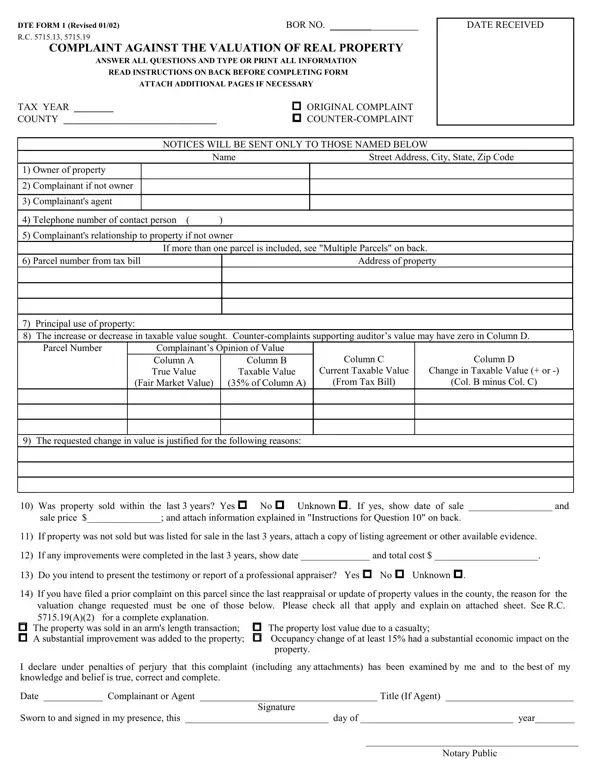
Dte Form 1 PDF Details

Understanding the DTE 1 form is essential for anyone involved in disputing the valuation of real property for tax purposes in specific states. Essentially, the form serves as a conduit for property owners or authorized representatives to voice concerns or disagreements with the current assessed value of a property. What stands out about the DTE 1 form is its comprehensive nature, catering to various scenarios such as casualty loss that depreciates a property's value, a significant occupancy change impacting economic performance, or a discrepancy in the taxable value of real estate. From providing basic information about the complainant and the property in question to detailed queries needing elaboration, such as changes in property use, sale history, improvements made, and the intention to present professional appraiser testimony, the form covers a broad spectrum of reasons that could affect a property's valuation. It mandates a clear articulation of the change sought in valuation, supported by factual justifications. Moreover, it stipulates deadlines for filing a complaint and outlines who may file, emphasizing a structured process for tendering payment of taxes based on the contested valuation pending the complaint's resolution. With penalties for undervaluation and stringent requirements for documentation and evidence presentation, the DTE 1 form underscores the importance of accuracy and thoroughness in challenging property tax assessments.

QuestionAnswer
Form NameDte Form 1
Form Length2 pages
Fillable?No
Fillable fields0
Avg. time to fill out30 sec
Other namesDTE, dte 1 form, taxable, nonattorney

How to Edit Dte Form 1 Online for Free

You are able to prepare nonattorney instantly using our PDF editor online. To keep our tool on the forefront of convenience, we aim to adopt user-oriented features and improvements regularly. We're always glad to receive feedback - join us in reshaping how you work with PDF docs. All it takes is several easy steps:

Step 1: Just click on the "Get Form Button" in the top section of this site to access our pdf editor. This way, you'll find everything that is needed to fill out your file.

Step 2: When you access the PDF editor, you will notice the document prepared to be filled in. Besides filling in various blank fields, you could also do several other things with the PDF, that is putting on your own text, editing the original text, adding images, placing your signature to the form, and more.

It is actually easy to finish the document following this detailed tutorial! Here's what you need to do:

1. It's vital to complete the nonattorney properly, thus be careful while filling out the areas including these fields:

Completing section 1 in BOR

2. The subsequent part would be to fill in these blanks: Complainants Opinion of Value, Taxable Value, Fair Market Value, of Column A, From Tax Bill, The requested change in value is, Col B minus Col C, and Was property sold within the last.

Ways to fill out BOR portion 2

3. The third stage is usually hassle-free - fill out every one of the blanks in Was property sold within the last in order to complete this process.

Was property sold within the last, Was property sold within the last, and Was property sold within the last inside BOR

You can certainly make errors when completing your Was property sold within the last, hence you'll want to go through it again prior to deciding to send it in.

Step 3: Right after you have reviewed the details you filled in, just click "Done" to conclude your document generation. Create a free trial account at FormsPal and acquire direct access to nonattorney - download or modify inside your personal account. FormsPal offers safe form tools without personal data record-keeping or sharing. Be assured that your data is safe here!