
Dwc Ad Form 10133 53 PDF Details

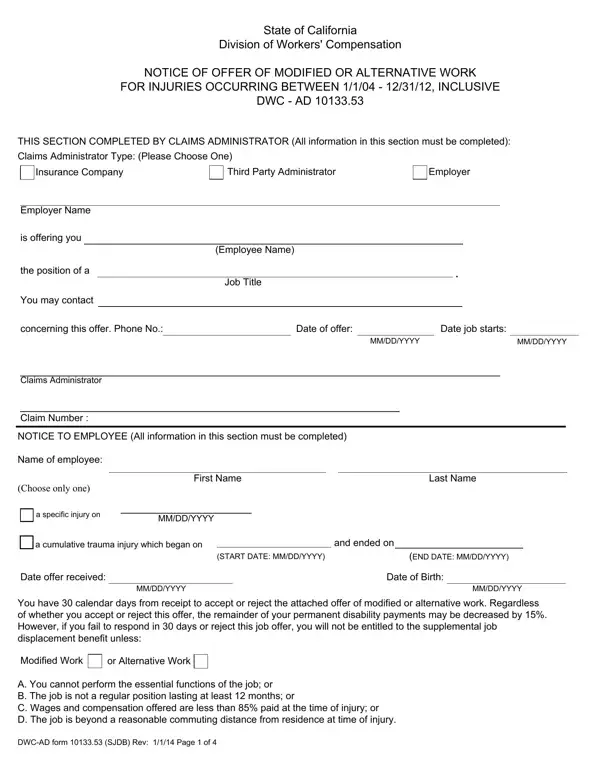
The DWC AD 10133.53 form plays a crucial role in the processes that govern workers' compensation claims in California, particularly for injuries occurring between January 1, 2004, and December 31, 2012. This document is essentially a notification of an offer of modified or alternative work from an employer to an employee who has sustained an injury during their tenure. The form meticulously outlines the responsibilities of both the claims administrator and the employee, with specific sections dedicated to the details of the offered position, including job title, salary, and essential duties, along with its physical requirements. Furthermore, it directs employees on how to respond to the offer, emphasizing the 30-day window they have to accept or reject it. Notably, the document does not shy away from discussing potential implications on the employee's permanent disability payments, highlighting a possible 15% decrease should they decide to refuse the offer without valid reasons listed within the form such as the job not meeting certain criteria related to salary, duration, and location relative to the employee's residence at the time of injury. This complex document underscores the intersection of employment law and workers' compensation regulations, requiring careful consideration from all parties involved to ensure a fair and legal handling of work-related injuries.

QuestionAnswer
Form NameDwc Ad Form 10133 53
Form Length4 pages
Fillable?No
Fillable fields0
Avg. time to fill out1 min
Other namesDWCADform10133_ 53 dwc ad form 1013353sjdb

How to Edit Dwc Ad Form 10133 53 Online for Free

With the online PDF editor by FormsPal, you can fill out or change Dwc Ad Form 10133 53 here. To retain our tool on the forefront of practicality, we aim to put into action user-driven features and improvements regularly. We're at all times looking for feedback - play a vital part in reshaping PDF editing. With some easy steps, you can start your PDF editing:

Step 1: Simply click the "Get Form Button" above on this site to launch our pdf file editing tool. There you'll find all that is needed to work with your document.

Step 2: When you open the PDF editor, there'll be the document ready to be filled in. Apart from filling out various blank fields, you might also perform some other things with the PDF, that is putting on your own textual content, modifying the initial text, inserting images, affixing your signature to the form, and much more.

Be mindful when filling in this pdf. Make sure all necessary fields are filled out accurately.

1. The Dwc Ad Form 10133 53 needs certain information to be inserted. Make sure the following fields are complete:

Dwc Ad Form 10133 53 writing process outlined (step 1)

2. Once the first part is filled out, go on to enter the relevant details in these - NOTICE TO EMPLOYEE All information, Name of employee, Choose only one, First Name, Last Name, a specific injury on, MMDDYYYY, a cumulative trauma injury which, and ended on, START DATE MMDDYYYY, END DATE MMDDYYYY, Date offer received, MMDDYYYY, Date of Birth, and MMDDYYYY.

Tips to fill out Dwc Ad Form 10133 53 portion 2

3. Completing POSITION REQUIREMENTS All, Actual job title, Wages, Per hour, Week, Month, Year, Is salary of modifiedalternative, Is salary of modifiedalternative, Will job last at least months, Is the job a regular position, Yes, Yes, Yes, and Yes is essential for the next step, make sure to fill them out in their entirety. Don't miss any details!

Completing segment 3 in Dwc Ad Form 10133 53

4. Filling in Description of activities to be is key in this form section - be certain to take your time and take a close look at each and every blank!

The best ways to complete Dwc Ad Form 10133 53 step 4

Always be really attentive when filling in Description of activities to be and Description of activities to be, as this is where many people make a few mistakes.

5. This final notch to conclude this form is essential. Make certain you fill in the mandatory blank fields, for instance Physical requirements for, Name of doctor who approved job, Date of report, MMDDYYYY, Date of last payment of Temporary, and MMDDYYYY, prior to submitting. Failing to do it might end up in an unfinished and potentially incorrect document!

A way to fill out Dwc Ad Form 10133 53 step 5

Step 3: Right after rereading your fields, press "Done" and you are all set! Join us right now and immediately get access to Dwc Ad Form 10133 53, prepared for downloading. All changes you make are kept , enabling you to edit the pdf later if required. Here at FormsPal, we aim to guarantee that all your information is kept private.