
Ea Form 741 E PDF Details

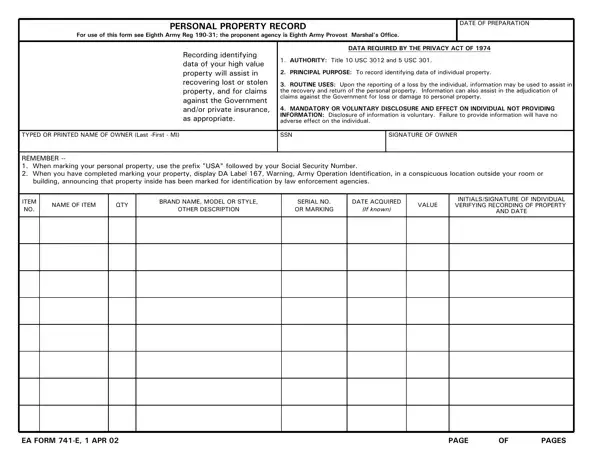
The EA 741 E form, an integral component regulated by the Eighth Army Provost Marshal's Office, serves a crucial role in the management and accountability of personal property within specific regulatory frameworks. Designed in accordance with Eighth Army Reg 190-31, this form is underpinned by authority from Title 10 USC 3012 and 5 USC 301, highlighting its legal foundation and the significance of adherence to both military and civilian statutes. Its primary purpose is to meticulously document identifying information of high-value personal property which not only facilitates the recovery and return of lost or stolen items but also aids in the smooth adjudication of claims against the government or private insurance policies. The privacy considerations are meticulously outlined, reflecting compliance with the Privacy Act of 1974, ensuring that individuals are informed about the voluntary nature of disclosure and its implications. By requiring details such as the owner's name, social security number, and the specifics of each item (including brand, model, and value), the EA 741 E form epitomizes a systematic approach to property management. Moreover, its provisions for marking personal property and displaying DA Label 167 serve as deterrents against theft, portraying an integrated strategy for property identification and theft prevention. Collectively, the EA 741 E form is emblematic of the broader efforts to safeguard personal property through structured documentation, privacy adherence, and proactive loss prevention measures.

QuestionAnswer
Form NameEa Form 741 E
Form Length2 pages
Fillable?No
Fillable fields0
Avg. time to fill out30 sec
Other namesea form 741 pdf, 741e, e 741 form, da form 741

How to Edit Ea Form 741 E Online for Free

da form 741 e can be filled out online in no time. Simply open FormsPal PDF editor to complete the job without delay. We at FormsPal are dedicated to giving you the absolute best experience with our editor by constantly presenting new functions and upgrades. Our tool is now much more helpful as the result of the newest updates! At this point, editing PDF forms is simpler and faster than before. Here is what you'll want to do to start:

Step 1: Open the PDF doc in our tool by clicking the "Get Form Button" in the top section of this page.

Step 2: When you access the file editor, you will see the document ready to be filled out. Apart from filling in different blank fields, you may as well perform some other things with the file, particularly adding custom text, modifying the initial textual content, inserting illustrations or photos, affixing your signature to the document, and much more.

It will be an easy task to fill out the document with our helpful tutorial! Here is what you must do:

1. Begin filling out your da form 741 e with a selection of necessary fields. Gather all the necessary information and make sure there is nothing missed!

Writing section 1 in ea form 741 e

2. Given that the last part is completed, it's time to add the necessary specifics in EA FORM E APR, PAGE, and PAGES so that you can proceed to the third stage.

EA FORM E  APR, PAGES, and PAGE inside ea form 741 e

3. This part is normally easy - fill out all of the blanks in ITEM NO, NAME OF ITEM, QTY, OTHER DESCRIPTION, SERIAL NO OR MARKING, If known, VALUE, INITIALSSIGNATURE OF INDIVIDUAL, and AND DATE in order to complete the current step.

The best ways to fill out ea form 741 e step 3

4. Completing REVERSE OF EA FORM E APR, PAGE, and PAGES is vital in the next step - be sure to be patient and fill in each and every blank area!

Best ways to fill in ea form 741 e part 4

It's easy to get it wrong when filling out the REVERSE OF EA FORM E APR, therefore be sure you take a second look before you'll finalize the form.

Step 3: Soon after proofreading your fields, click "Done" and you're good to go! Create a free trial option with us and gain instant access to da form 741 e - download or modify from your personal account page. We do not sell or share any information you type in whenever working with documents at FormsPal.