
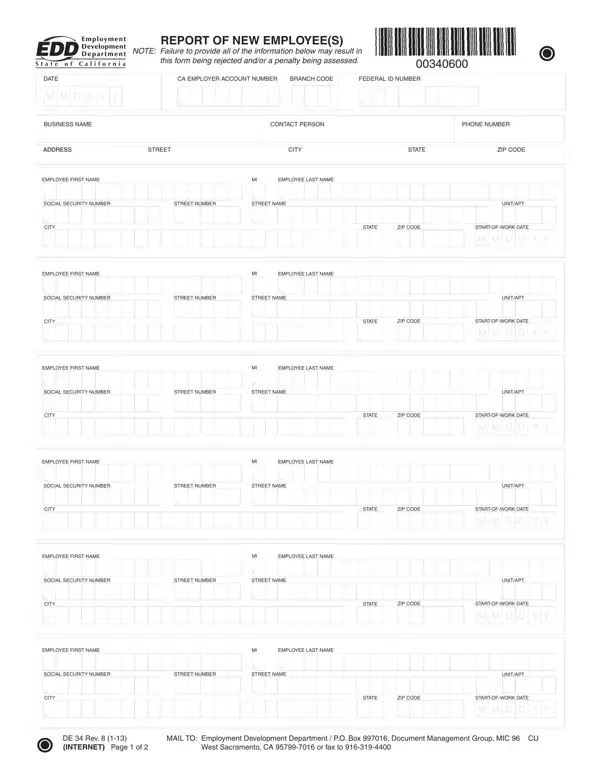
EDD Form DE 34 PDF Details

In the landscape of employment and tax reporting within the United States, especially in California, the EDD DE 34 form occupies a crucial niche. This document is a mandatory report that employers must submit to the Employment Development Department (EDD) to report new or rehired employees within a specified timeline of 20 days following their first day of work. This obligation not only facilitates the smooth functioning of legal and financial frameworks but also aids in the enforcement of child support obligations. By requiring details such as the employee's name, social security number, address, and employment start date, alongside the employer’s identification information, the form acts as a cornerstone for record-keeping and compliance. Moreover, the stipulation of penalties for non-compliance or deliberate misinformation underscores the seriousness with which this reporting is regarded. Ranging from a $24 penalty for each reporting failure to a $490 fine for intentional nondisclosure, these penalties highlight the importance of accurate and timely reporting. Additionally, the guidelines provided for filling out the form aim to streamline the process, offering both digital and paper-based submission options to accommodate different preferences. Thus, the EDD DE 34 form serves as a vital instrument within California’s employment reporting regime, ensuring that employers contribute responsibly to the state’s administrative and social welfare objectives.

QuestionAnswer
Form Name Edd Form De 34
Form Length 2 pages
Fillable? No
Fillable fields 0
Avg. time to fill out 30 sec
Other names California, eddservices, IMOGENE, handwrite

How to Edit EDD Form DE 34 Online for Free

Whenever you need to fill out slashes, there's no need to install any sort of applications - just make use of our online tool. To make our editor better and more convenient to use, we continuously design new features, with our users' suggestions in mind. Getting underway is simple! All you need to do is follow these simple steps down below:

Step 1: Click the orange "Get Form" button above. It is going to open our editor so you can begin filling in your form.

Step 2: With our state-of-the-art PDF tool, it's possible to accomplish more than just fill in blank fields. Express yourself and make your docs look professional with customized textual content added, or modify the file's original content to perfection - all comes with the capability to incorporate almost any graphics and sign the document off.

Filling out this document calls for care for details. Make certain each and every blank field is filled out correctly.

1. The slashes usually requires certain information to be entered. Be sure that the next blanks are finalized:

Filling out section 1 of htm

2. Given that the last part is complete, you're ready to insert the necessary particulars in CITY, STATE, ZIP CODE, STARTOFWORK DATE, M M D D Y Y, EMPLOYEE FIRST NAME, EMPLOYEE LAST NAME, SOCIAL SECURITY NUMBER, STREET NUMBER, STREET NAME, UNITAPT, CITY, STATE, ZIP CODE, and STARTOFWORK DATE in order to progress further.

Step no. 2 for filling in htm

3. Throughout this stage, take a look at If you have any questions, To obtain additional DE forms, HOW TO REPORT, For a faster easier and more, To fi le a paper DE form complete, DE Rev INTERNET, EMPLOYMENT DEVELOPMENT DEPARTMENT, and Page of. Each of these must be completed with highest precision.

Tips to complete htm portion 3

Those who use this form frequently make errors when completing If you have any questions in this section. Ensure you revise everything you type in here.

Step 3: Immediately after taking another look at the form fields you have filled in, click "Done" and you are done and dusted! Get hold of your slashes after you subscribe to a free trial. Readily view the pdf in your FormsPal cabinet, along with any edits and changes being conveniently preserved! FormsPal guarantees your information confidentiality by having a protected method that in no way saves or distributes any personal data involved in the process. You can relax knowing your files are kept protected each time you work with our tools!