
Eta Form 9061 PDF Details

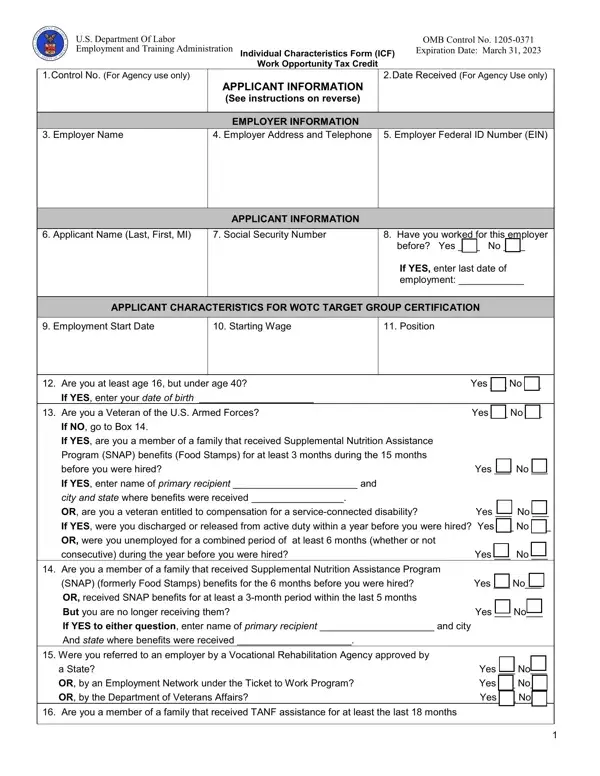
The ETA 9061 form, officially recognized as the Individual Characteristics Form (ICF) by the U.S. Department of Labor and governed under the Employment and Training Administration, plays a critical role in the operation of the Work Opportunity Tax Credit (WOTC) Program. This form, bearing the OMB Control Number 1205-0371 and with an expiration date set for March 31, 2023, serves as a detailed questionnaire designed to gather personal and employment-related information from job applicants. It meticulously collects data ranging from an applicant's name and social security number to their employment history, demographic characteristics, and eligibility for certain target groups that qualify employers for tax incentives under the WOTC. Employers or their representatives, state workforce agencies (SWAs), participating agencies, or in some cases, the applicants themselves (for minors, the responsibility falls on the parent or guardian) can complete the form. It contains precise questions relating to the applicant's potential eligibility under various criteria such as veteran status, familial income, receipt of government benefits (SNAP/TANF), conviction history, and residence within empowerment zones among others. Additionally, it mandates the provision of documentary evidence or forthcoming documents to substantiate the claims made in the application process, thereby facilitating the verification and determination process for eligibility in the targeted groups. This form, which must be used as provided without modifications, underscores the intersecting objectives of employment facilitation and tax credit administration, thereby embodying a multifaceted tool for both workforce development and economic policy execution.

QuestionAnswer
Form NameEta Form 9061
Form Length5 pages
Fillable?No
Fillable fields0
Avg. time to fill out1 min 15 sec
Other nameslabor individual, form irs 8850 form, eta form 9061 fillable form, form characteristics

How to Edit Eta Form 9061 Online for Free

When working in the online PDF editor by FormsPal, it is easy to fill in or modify form characteristics here. In order to make our tool better and simpler to use, we constantly design new features, taking into consideration suggestions from our users. It just takes a couple of simple steps:

Step 1: Just click on the "Get Form Button" at the top of this webpage to see our pdf form editing tool. There you will find everything that is needed to fill out your file.

Step 2: With the help of our handy PDF editing tool, you'll be able to do more than merely complete blank form fields. Express yourself and make your forms look sublime with custom text added, or optimize the file's original content to perfection - all comes along with an ability to incorporate your own photos and sign it off.

This document will need some specific information; to ensure accuracy and reliability, please bear in mind the next suggestions:

1. When completing the form characteristics, make sure to incorporate all of the essential fields within its associated form section. This will help to expedite the work, enabling your details to be handled efficiently and properly.

Stage no. 1 in submitting form irs 8850 form

2. Just after filling out the last step, head on to the next part and fill out the essential details in these blanks - If YES enter your date of birth, Are you a Veteran of the US Armed, Yes No, If NO go to Box, If YES are you a member of a, Program SNAP benefits Food Stamps, before you were hired, Yes No, If YES enter name of primary, city and state where benefits were, OR are you a veteran entitled to, Yes No, If YES were you discharged or, OR were you unemployed for a, and consecutive during the year before.

Part # 2 for filling out form irs 8850 form

Always be very attentive while filling in If YES were you discharged or and Yes No, as this is the part in which many people make errors.

3. Your next stage is usually simple - fill out all the empty fields in before you were hired, Yes No, OR are you a member of a family, after August and the earliest, within years before you were hired, OR did your family stop being, because a Federal or state law, Yes No, YesNo, If NO are you a member of a family, the month period before you were, YesNo, If YES to any question enter name, the city and state where benefits, and Were you convicted of a felony or to finish the current step.

form irs 8850 form conclusion process clarified (step 3)

4. The following paragraph comes with the following fields to complete: Did you receive Supplemental, days before you were hired, Yes No, Are you a veteran unemployed for, consecutive during the year before, Yes No, Are you a veteran unemployed for, consecutive during the year before, Yes No, Are you an individual who is or, If YES what state did you receive, Enter state where UI compensation, Sources used to document, and I certify that this information is.

Filling out segment 4 of form irs 8850 form

5. Finally, this last section is precisely what you will need to wrap up prior to using the PDF. The fields under consideration are the following: a Signature See instructions in, Date, b Indicate with a mark who signed, and ETA Form Rev November.

form irs 8850 form conclusion process described (portion 5)

Step 3: Spell-check all the details you've typed into the blank fields and then click the "Done" button. Join FormsPal now and easily obtain form characteristics, prepared for downloading. Every single modification made is handily preserved , which means you can edit the document further when required. At FormsPal.com, we do everything we can to guarantee that all your information is kept protected.