
Fastmed Patient Registration Form PDF Details

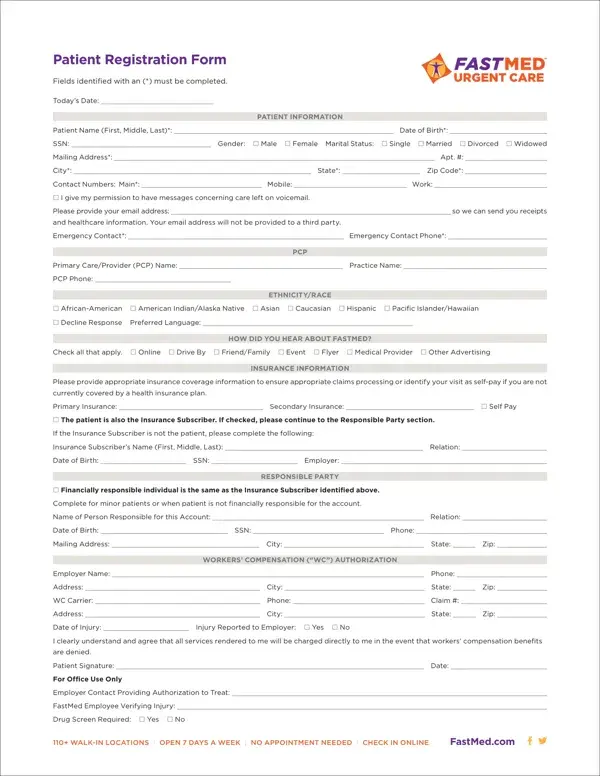
When visiting a FastMed Urgent Care center, the first step for new patients is filling out the FastMed Patient Registration Form. This crucial document, updated as of April 2016, collects essential details like the patient's name, date of birth, Social Security Number, gender, marital status, and contact information, ensuring the clinic can provide the most personalized and efficient care possible. It also requires information on the patient's primary care provider, insurance details, and, if applicable, the person responsible for the account in the case of minor patients or when the patient is not the primary financier. For workers' compensation cases, the form includes a section for authorization, making clear the financial responsibilities should benefits be denied. Beyond logistical and financial aspects, the form inquiries about ethnicity, race, preferred language, and how the patient learned about FastMed, which helps in improving services and outreach. It concludes with acknowledgments and consents crucial for treatment, privacy practices, patient choice policy, and financial policies which include arrangements for payment and late fees, thereby ensuring a comprehensive understanding between the patient and the care provider. This serves not just as a bureaucratic necessity but as a foundation for trust and clarity throughout the patient's care journey.

QuestionAnswer
Form NameFastmed Patient Registration Form
Form Length2 pages
Fillable?No
Fillable fields0
Avg. time to fill out30 sec
Other namesSSN, FastMed, fastmed urgent care doctors note, Alaska

How to Edit Fastmed Patient Registration Form Online for Free

PCP can be completed online with ease. Simply open FormsPal PDF editor to get the job done without delay. To make our editor better and less complicated to use, we consistently design new features, with our users' feedback in mind. If you are looking to get going, here is what it's going to take:

Step 1: Firstly, access the pdf editor by clicking the "Get Form Button" above on this site.

Step 2: With our advanced PDF file editor, you'll be able to do more than merely fill out forms. Express yourself and make your documents seem high-quality with custom text added, or tweak the file's original content to excellence - all that backed up by the capability to insert any graphics and sign the document off.

This form will require particular details to be filled out, thus be sure to take some time to provide what's requested:

1. Begin filling out the PCP with a number of essential blank fields. Consider all of the required information and ensure nothing is missed!

The best way to complete thereunder stage 1

2. Once your current task is complete, take the next step – fill out all of these fields - currently covered by a health, Primary Insurance Secondary, The patient is also the Insurance, If the Insurance Subscriber is not, Insurance Subscribers Name First, Date of Birth SSN Employer, Financially responsible, Complete for minor patients or, RESPONSIBLE PARTY, Name of Person Responsible for, Date of Birth SSN Phone, Mailing Address City State Zip, WORKERS COMPENSATION WC, Employer Name Phone, and Address City State Zip with their corresponding information. Make sure to double check that everything has been entered correctly before continuing!

The best way to fill in thereunder stage 2

3. In this step, have a look at For Office Use Only, Employer Contact Providing, FastMed Employee Verifying Injury, Drug Screen Required Yes No, WALKIN LOCATIONS OPEN DAYS A, and FastMedcom. Each of these should be completed with highest accuracy.

thereunder writing process detailed (step 3)

4. Your next part needs your information in the following parts: At the time of service FastMed, PatientRepresentative Printed Name, PAYMENT AUTHORIZATION, As a courtesy to our patients, I authorize FastMed to charge my, CardholderRepresentative, CardholderRepresentative Printed, I have read and had questions, ACKNOWLEDGMENT OF NOTICE OF, PatientPatient Representative, For Office Use Only, A good faith effort was made in, Patientrepresentative refused to, Communication barriers prohibited, and An emergency situation prevented. Make sure that you provide all of the requested information to move onward.

At the time of service FastMed, ACKNOWLEDGMENT OF NOTICE OF, and CardholderRepresentative inside thereunder

5. Now, this last segment is precisely what you should wrap up prior to closing the PDF. The blanks you're looking at are the next: I have been provided FastMeds, PatientPatient Representative, I the patient or authorized, PatientPatient Representative, CONSENT FOR MEDICAL TREATMENT, FOR MINOR PATIENTS, I the undersigned attest that I am, Name of CustodialLegal Guardian, Other Individual Authorized to, CustodialLegal Guardian Signature, Consent to allow named individual, WALKIN LOCATIONS OPEN DAYS A, and FastMedcom.

Ways to complete thereunder part 5

You can potentially get it wrong while completing your I have been provided FastMeds, hence make sure you take a second look before you submit it.

Step 3: Soon after double-checking your fields you've filled out, click "Done" and you're done and dusted! Try a 7-day free trial option at FormsPal and gain instant access to PCP - downloadable, emailable, and editable from your personal cabinet. Here at FormsPal.com, we do our utmost to make sure that all your information is kept private.