
Fl 170 Form PDF Details

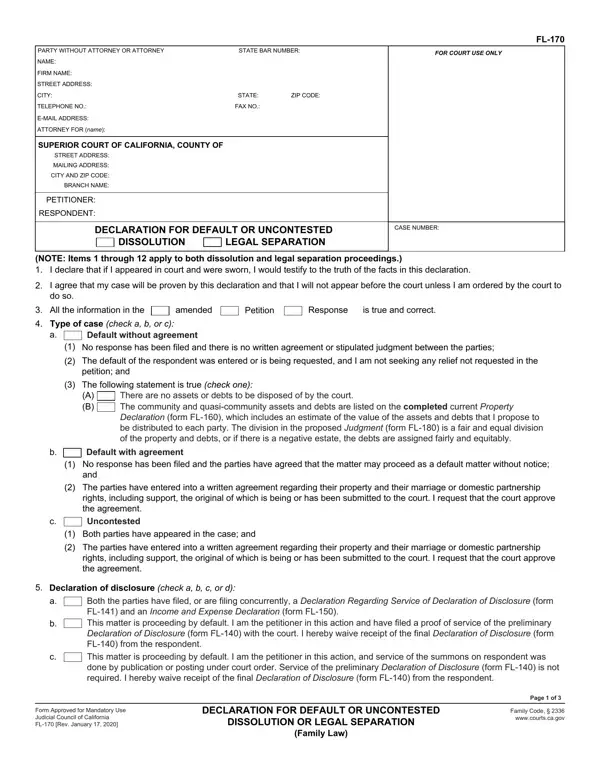
Navigating the landscape of family law, especially when it comes to the dissolution of a marriage or a legal separation, requires an understanding of various legal forms and procedures. Among these, the FL-170 form, or the Declaration for Default or Uncontested Dissolution or Legal Separation, plays a crucial role. This form is used in the state of California and serves as a declaration by one party in cases where a response has not been filed by the other party, or in situations where both parties have reached an agreement on all terms of the dissolution or separation. It covers a comprehensive range of topics, from the division of property and debts to child custody, support, and spousal or partner support issues. Additionally, it touches on the necessity for parties to provide financial disclosures and allows for a waiver of these disclosures under certain conditions. The form includes various sections requiring detailed information about both parties, the nature of the case, and the specific requests being made to the court, including but not limited to, custody arrangements and declarations about child and spousal support. By filling out the FL-170 form, a petitioner or respondent declares their agreement to the terms of the separation or dissolution, essentially streamlining the process in uncontested cases or when proceeding by default. Thus, this form is instrumental in helping parties navigate the legal proceedings with or without the direct intervention of the court, helping to lay out a clear path toward the resolution of the case.

QuestionAnswer
Form NameFl 170 Form
Form Length3 pages
Fillable?No
Fillable fields0
Avg. time to fill out45 sec
Other names FL-170 DECLARATION FOR DEFAULT OR UNCONTESTED DISSOLUTION OR LEGAL SEPARATION(Family Law). Judicial Council forms

How to Edit Fl 170 Form Online for Free

Whenever you intend to fill out Fl 170 Form, you don't have to download and install any kind of programs - just use our PDF editor. FormsPal team is focused on making sure you have the absolute best experience with our editor by constantly adding new features and enhancements. Our editor is now a lot more user-friendly as the result of the newest updates! Now, working with PDF files is easier and faster than before. With a few easy steps, you are able to begin your PDF journey:

Step 1: Hit the "Get Form" button at the top of this page to get into our PDF editor.

Step 2: As you launch the online editor, you will see the document made ready to be filled out. In addition to filling in various blanks, you could also perform other actions with the PDF, that is adding your own words, modifying the initial textual content, adding graphics, putting your signature on the document, and more.

This form will need particular information to be entered, hence make sure you take some time to provide what's requested:

1. To get started, once completing the Fl 170 Form, start in the form section that contains the subsequent fields:

Part number 1 for filling out Fl 170 Form

2. Just after finishing the previous step, go on to the next part and fill out the necessary particulars in these blanks - Type of case check a b or c a, Default without agreement, No response has been filed and, The default of the respondent was, The following statement is true, There are no assets or debts to be, Default with agreement No response, The parties have entered into a, Uncontested, Both parties have appeared in the, The parties have entered into a, Declaration of disclosure check a, and Both the parties have filed or are.

The parties have entered into a, Type of case check a b or c a, and Both parties have appeared in the in Fl 170 Form

3. The next part is straightforward - fill out every one of the form fields in Both the parties have filed or are, This matter is proceeding by, Form Approved for Mandatory Use, DECLARATION FOR DEFAULT OR, DISSOLUTION OR LEGAL SEPARATION, Family Law, Page of, and Family Code wwwcourtscagov to finish the current step.

The way to fill in Fl 170 Form stage 3

4. The subsequent part needs your information in the subsequent areas: PETITIONER, RESPONDENT, CASE NUMBER, This matter is proceeding as an, Child custody and visitation, The information in Declaration, has, has not, changed since it was last filed, There is an existing court order, county, The current custody and visitation, Contained on Attachment c, The facts that support the, and Contained on Attachment d. Always give all needed details to go onward.

Filling out segment 4 in Fl 170 Form

5. This last stage to finish this document is integral. Make sure that you fill out the mandatory blank fields, and this includes Contained on Attachment d, Child support should be ordered as, If there are minor children check, county, Child support is being enforced in, The information in the child, I request that this order be based, Petitioners, Respondents, earning ability The facts in, Complete items and regarding, Contained on Attachment a, am receiving, I listed in the proposed order To, and am not receiving, before submitting. Neglecting to do this may produce an incomplete and probably incorrect form!

Filling in part 5 in Fl 170 Form

It is possible to make a mistake when filling out the If there are minor children check, thus be sure to take another look before you'll finalize the form.

Step 3: Once you have reread the details you filled in, just click "Done" to finalize your form. After registering afree trial account with us, it will be possible to download Fl 170 Form or send it through email directly. The PDF will also be readily available in your personal account menu with your every modification. FormsPal guarantees your data privacy with a protected system that never records or shares any type of private information used. Feel safe knowing your files are kept confidential any time you work with our tools!