
Form 103 Long PDF Details

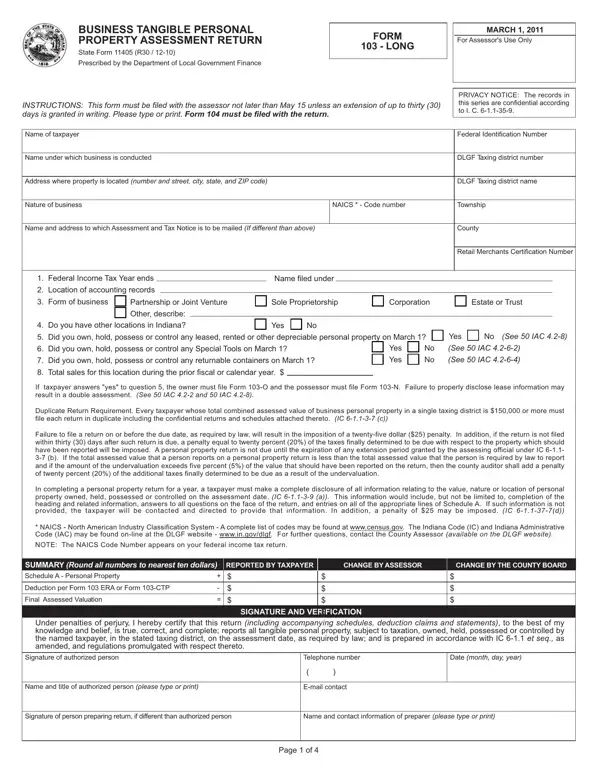
Filing the Business Tangible Personal Property Assessment Return, known as Form 103 Long, is a critical process for businesses operating within Indiana. Due March 1st annually, this form plays a pivotal role in the taxation process for tangible personal property owned, held, possessed, or controlled by businesses. It demands precise and comprehensive disclosure of such properties to ensure accurate tax assessment. The form, which intricacies are governed by the Department of Local Government Finance, mandates completion in conjunction with Form 104 for a seamless tax reporting process. Attention to deadlines is paramount, with submissions due by May 15th, although a thirty-day extension can be requested under specific conditions. Form 103 Long encompasses various segments including taxpayer information, the nature of the business through NAICS codes, detailed inventories of depreciable personal property, and special considerations for leased or rented items to avoid double assessment pitfalls. This form also integrates confidentiality protocols, underscored by the confidentiality notice, to protect sensitive business information. Moreover, stringent penalties await those who navigate this process carelessly, underscoring the necessity for accuracy and timeliness. The penalties include basic late submission fees and escalate to more severe fines for underreporting the value of assessable property. By guiding taxpayers through detailed instructions, the form ensures that businesses can accurately report their taxable property, thus contributing to the equitable distribution of tax responsibilities among Indiana’s business entities.

QuestionAnswer
Form NameForm 103 Long
Form Length4 pages
Fillable?No
Fillable fields0
Avg. time to fill out1 min
Other names103-O, NAICS, Indianas, DLGF

How to Edit Form 103 Long Online for Free

By using the online PDF editor by FormsPal, you can easily fill out or alter depreciable here. Our professional team is ceaselessly endeavoring to develop the editor and ensure it is even faster for people with its multiple features. Take your experience one step further with constantly developing and fantastic options we offer! To start your journey, go through these simple steps:

Step 1: Press the "Get Form" button at the top of this page to access our PDF tool.

Step 2: The tool will allow you to work with your PDF in many different ways. Transform it by including personalized text, adjust what's originally in the document, and add a signature - all possible within a few minutes!

In an effort to complete this PDF form, ensure that you type in the right details in each and every area:

1. When filling out the depreciable, make sure to include all of the important blank fields within the corresponding section. This will help facilitate the work, allowing your details to be handled swiftly and correctly.

Stage number 1 for filling out 103-I

2. After completing the last step, go to the next stage and enter all required details in these blanks - SUMMARY Round all numbers to, CHANGE BY ASSESSOR, CHANGE BY THE COUNTY BOARD, Deduction per Form ERA or Form CTP, Final Assessed Valuation, SIGNATURE AND VERIFICATION, Under penalties of perjury I, Signature of authorized person, Telephone number, Date month day year, Name and title of authorized, Email contact, Signature of person preparing, Name and contact information of, and Page of.

Writing part 2 of 103-I

People generally get some things wrong when filling out Email contact in this part. Don't forget to revise whatever you enter right here.

3. Completing FORM LONG See IAC, CONFIDENTIAL, Line, Report all personal property, SCHEDULE A MARCH, Federal Identification number, Total cost of tangible depreciable, Adjustment to federal tax basis, Total cost and base year value of, Deduct Exempt Property See IAC, COST, Stationary industrial air, Industrial waste control, Enterprise information technology, and Vehicles airplanes subject to is essential for the next step, make sure to fill them out in their entirety. Don't miss any details!

Filling out section 3 of 103-I

4. Filling in Cost of all depreciable personal, Cost of installation and, Cost of interest incurred during, Total cost and base year value of, POOLING SUMMARY, From Schedule A or Form P, TOTAL COST COLUMN A, ADJUSTMENTS, COLUMN B, ADJUSTED COST, COLUMN C, Total All Pools, of Adjusted Cost Line Column C, Greater of Lines D or, and Adjustments to True Tax Value is paramount in the fourth form section - be certain to spend some time and fill out every empty field!

Writing part 4 in 103-I

5. This very last notch to submit this form is essential. Make sure you fill in the displayed blanks, for instance Permanently retired equipment per, Commercial aircraft and commercial, Total additions to True Tax Value, Cost, Cost, Total True Tax Value before, Abnormal Obsolescence Adjustment, Total True Tax Value of personal, and Page of, prior to using the form. If not, it might end up in a flawed and possibly invalid paper!

How one can fill in 103-I step 5

Step 3: Proofread all the details you have entered into the blank fields and click the "Done" button. Sign up with us right now and immediately use depreciable, set for downloading. All alterations you make are kept , allowing you to customize the file at a later stage if necessary. FormsPal is invested in the privacy of all our users; we always make sure that all personal data put into our tool is protected.