
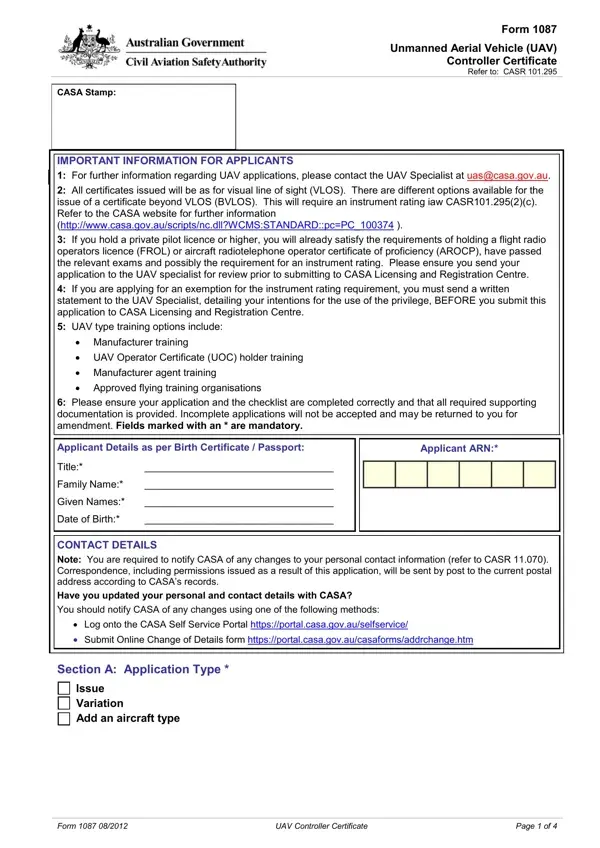
Form 1087 PDF Details

Exploring the world of unmanned aerial vehicles (UAVs), especially in terms of regulation and certification, unveils the critical role of Form 1087 in maintaining sky safety and compliance with the Civil Aviation Safety Regulations (CASR). Designed for UAV controller certification, this form encapsulates vital steps for applicants aiming to secure permissions to operate UAVs, highlighting the intricate requirements set forth by the Civil Aviation Safety Authority (CASA). Key sections cover applicant details, qualifications, training, and aeronautical experience, emphasizing the mandatory nature of certain credentials, such as a private pilot license or higher for specific clearances. The form serves as a gateway for UAV operators, from hobbyists seeking to fly within visual line of sight (VLOS) to professionals aspiring for beyond visual line of sight (BVLOS) operations, demanding an instrument rating as per CASR 101.295(2)(c). Moreover, it lays down provisions for exemptions and variations, accompanied by a detailed checklist to ensure the comprehensive submission of necessary documents and evidence of qualifications. Wrapped up with a payment section, Form 1087 stands as a testament to the structured approach towards UAV operation, underscoring the importance of safety, accountability, and preparedness in the ever-evolving airspace realm.

QuestionAnswer
Form Name Form 1087
Form Length 4 pages
Fillable? No
Fillable fields 0
Avg. time to fill out 1 min
Other names UAV, 1087 tax form, IREX, h1087 form, uav controller certificate

How to Edit Form 1087 Online for Free

When using the online PDF editor by FormsPal, you are able to fill out or modify au here and now. To make our editor better and easier to use, we constantly develop new features, taking into account feedback from our users. Starting is simple! What you need to do is take the next simple steps down below:

Step 1: Access the form inside our editor by clicking the "Get Form Button" at the top of this page.

Step 2: With the help of our online PDF editor, you'll be able to do more than merely fill out blank form fields. Edit away and make your docs appear faultless with customized text put in, or tweak the original content to perfection - all that supported by the capability to insert almost any graphics and sign the PDF off.

Be mindful when filling out this form. Make sure each blank field is filled in correctly.

1. It's essential to complete the au correctly, so take care when filling in the segments containing these specific blank fields:

Stage number 1 of submitting CASR

2. When the previous array of fields is done, you'll want to put in the necessary specifics in Applicant Details as per Birth, Applicant ARN, Title, Family Name, Given Names, Date of Birth, CONTACT DETAILS Note You are, Have you updated your personal and, Log onto the CASA Self Service, Section A Application Type, and Issue Variation Add an aircraft so you can move on further.

Stage number 2 of submitting CASR

3. This next segment is rather simple, UAV Controller Certificate, Section B Qualification Details, Qualifications Held Please attach, Do you hold an UAV Controller, ARN, Yes UAV Controller Certificate, Do you have an existing pilot, Yes No, PPAL, PPHL, CPAL, CPHL, ATPAL, ATPHL, and Do you have a command instrument - these blanks is required to be filled in here.

Tips on how to fill out CASR step 3

4. The subsequent paragraph requires your information in the subsequent parts: Licence or Certificate, Number, Ratings or Endorsement, Air Traffic Control Licence, Flight Service Officer Licence, Flight Radio Operator Licence, Aircraft Radio Operator, Military Flight Crew Qualification, One or other is a mandatory, Aeronautical Knowledge Other than, To be eligible for a UAV, Exam Code, PPAL or PPHL Single Exam, PPLA or PPLH, and Other. Be sure to give all needed info to move forward.

Stage # 4 in filling in CASR

5. Finally, the following final segment is precisely what you will need to wrap up prior to submitting the form. The blanks at issue are the following: Name of course, UAV type, Organisation, Date of completion, Form, UAV Controller Certificate, and Page of.

Learn how to fill in CASR part 5

As for Page of and Form, make sure that you review things in this section. The two of these are definitely the key ones in this document.

Step 3: Glance through the details you've entered into the blanks and click the "Done" button. Get hold of the au the instant you register here for a 7-day free trial. Conveniently gain access to the form from your personal account, along with any edits and adjustments being conveniently preserved! FormsPal offers protected document completion with no data recording or distributing. Be assured that your data is secure with us!