
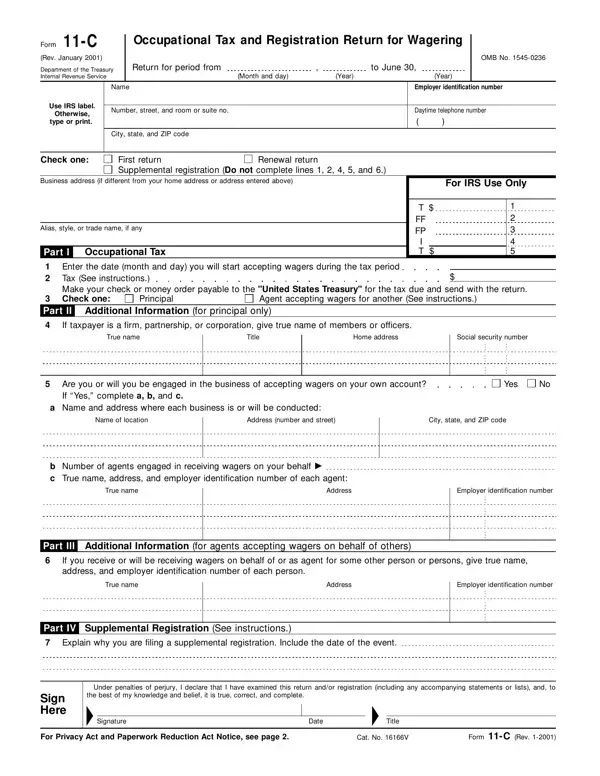
File Form 11-C if you're a principal or an agent.
Tax: you must pay the occupational tax if you accept taxable wagers for yourself or another person.
Occupational tax amounts: one or the other applies depending on whether the wagers you accept are authorized by the laws of the state in which you accept the wager.
When to file: file the first return before wagers are accepted. After that, file a renewal return by July 1 for each year wagers are accepted.
Supplemental registration: don't complete lines 1, 2, 4, 5, or 6.
Principals and agents: lines 4 and 5 are to be completed by principals only. Line 6 is to be completed by agents accepting wagers on behalf of another.
| Question | Answer |
|---|---|
| Form Name | Form 11-C |
| Form Length | 6 pages |
| Fillable? | Yes |
| Fillable fields | 129 |
| Avg. time to fill out | 22 min |
| Edition | 12-2017 |
| Issuing agency | Department of the Treasury, Internal Revenue Service |
| Where to send | Department of the Treasury, Internal Revenue Service, Ogden, UT 84201-0101 |
| Matches the agency's file | Yes, checked October 9, 2026 |
| Other names | Form 11-C, 11-C, 11C, Form 11C, 11-C form, Occupational Tax and Registration Return for Wagering |
| Official source | Form 11-C (Rev 12-2017), Department of the Treasury, Internal Revenue Service |
Form 11 C isn’t the one you’re looking for?