
Form 119 PDF Details

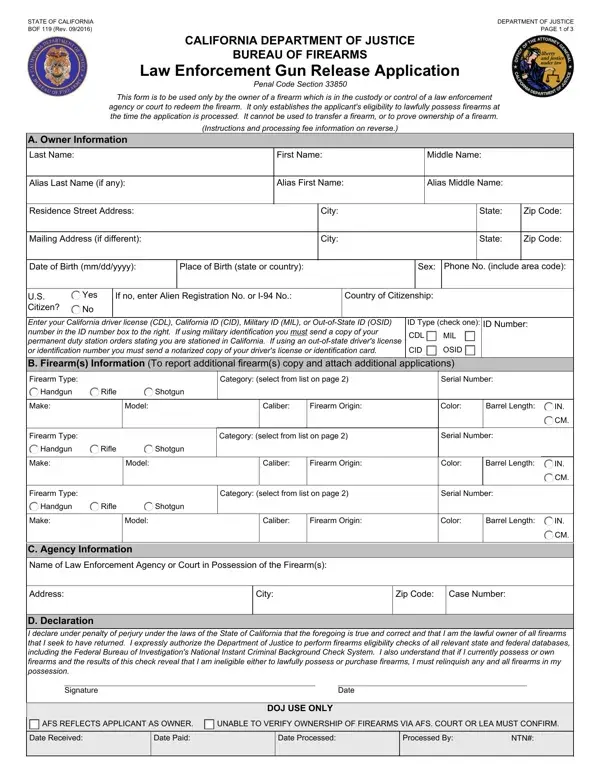
For individuals in California seeking the return of firearms currently under the custody or control of law enforcement agencies or courts, the BOF 119 (Rev. 09/2016) form plays a crucial role. Issued by the State of California Department of Justice Bureau of Firearms, this document is designed exclusively for firearm owners aiming to reclaim firearms lawfully. However, it’s not just a formality. Filling out the BOF 119 form initiates a meticulous process, including a firearms eligibility check to ensure the applicant can legally possess firearms. This check taps into state and federal databases, underscoring the rigorous scrutiny involved. Besides personal and firearm details, applicants must acknowledge their understanding of the consequences if found ineligible to possess firearms. The form also outlines essential instructions, fee information, and legally binds the applicant to truthfulness under penalty of perjury. Further details pertained include proper use and submission requirements, emphasizing the form’s role not only in verifying ownership but also in maintaining legal compliance and public safety. This introduction into the form’s intricacies highlights its position within the framework of firearm regulation and the steps responsible owners must take to navigate the legal landscape surrounding firearm possession and retrieval.

QuestionAnswer
Form NameForm 119
Form Length3 pages
Fillable?No
Fillable fields0
Avg. time to fill out45 sec
Other nameshow to complete form 1199a, doj bof 119, bof california department of justice, form law enforcement

How to Edit Form 119 Online for Free

By using the online PDF editor by FormsPal, you may fill in or edit form enforcement release right here and now. The editor is constantly maintained by us, receiving new awesome functions and turning out to be greater. Getting underway is simple! All you have to do is follow the next easy steps below:

Step 1: Access the form in our editor by hitting the "Get Form Button" above on this page.

Step 2: With this handy PDF tool, you can actually accomplish more than merely fill out blank form fields. Edit away and make your documents seem perfect with custom text put in, or modify the file's original input to excellence - all comes along with the capability to insert your own images and sign the document off.

It is actually simple to fill out the form adhering to our helpful guide! Here is what you have to do:

1. Whenever filling out the form enforcement release, ensure to complete all necessary blank fields in the corresponding section. It will help to expedite the work, which allows your information to be processed without delay and correctly.

The right way to fill out how to fill form 119 step 1

2. After finishing the last step, go to the subsequent stage and complete the essential details in all these fields - Firearm Type, Category select from list on page, Serial Number, Handgun, Rifle, Shotgun, Make, Model, Caliber, Firearm Origin, Color, Barrel Length, Firearm Type, Category select from list on page, and Serial Number.

The best way to fill in how to fill form 119 stage 2

3. Through this part, review DOJ USE ONLY, AFS REFLECTS APPLICANT AS OWNER, UNABLE TO VERIFY OWNERSHIP OF, Date Received, Date Paid, Date Processed, Processed By, and NTN. Each one of these have to be filled in with utmost accuracy.

Date Received, AFS REFLECTS APPLICANT AS OWNER, and UNABLE TO VERIFY OWNERSHIP OF of how to fill form 119

4. The following part comes next with the following form blanks to focus on: Part A Owner Information Enter the.

How you can fill in how to fill form 119 stage 4

It's very easy to make errors when completing the Part A Owner Information Enter the, for that reason you'll want to look again prior to when you finalize the form.

Step 3: Look through the information you've typed into the blank fields and hit the "Done" button. Create a free trial option at FormsPal and obtain instant access to form enforcement release - download, email, or edit inside your FormsPal account page. At FormsPal.com, we strive to be sure that all of your information is kept private.