
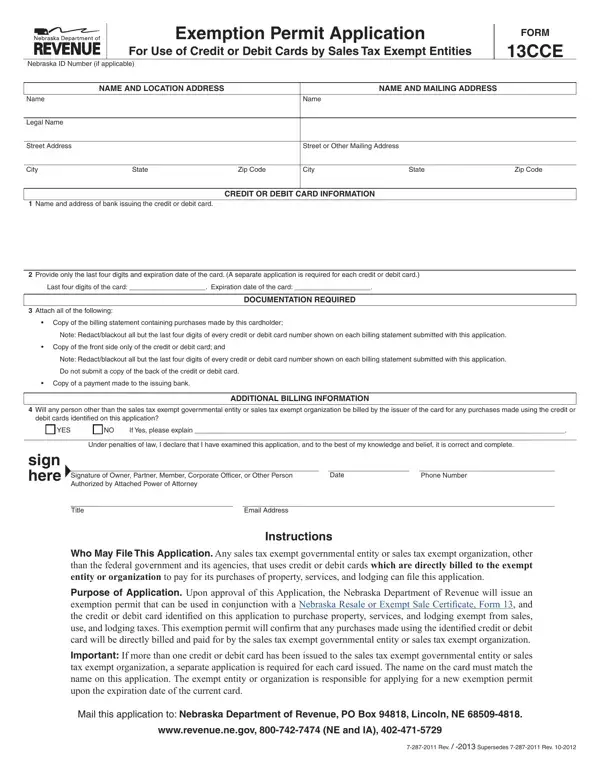
Navigating the complexities of sales tax exemption for credit or debit card purchases can be challenging for exempt entities and organizations. The Form 13CCE, titled "Exemption Permit Application For Use of Credit or Debit Cards by Sales Tax Exempt Entities," serves as a critical tool in this process for those based in Nebraska. This form allows sales tax exempt governmental bodies and nonprofit organizations, excluding federal entities, to apply for an exemption permit. Such a permit enables them to make tax-free purchases of goods, services, and lodging. Applicants are required to furnish detailed information, including the Nebraska ID number (if available), the legal names and addresses of the entity, and the last four digits along with the expiration date of the credit or debit card. Essential documentation must accompany the application, including a copy of the billing statement with purchases, a copy of the front side of the credit or debit card, and proof of payment to the issuing bank, ensuring that sensitive information is appropriately redacted. Moreover, the form inquires if individuals other than the exempt entity will be billed for purchases, emphasizing accountability and proper use of the exemption. Upon approval, the Nebraska Department of Revenue issues an exemption permit for use with Nebraska's Resale or Exempt Sale Certificate (Form 13), officially recognizing the card for tax-exempt purchases. It's important for applicants to note that separate applications are needed for each credit or debit card issued to the entity or organization, ensuring the name on the card matches the name on the application. This comprehensive application process underscores the importance of accuracy and completeness, ensuring that sales tax exemptions are granted to eligible entities responsibly.
| Question | Answer |
|---|---|
| Form Name | Form 13Cce |
| Form Length | 1 pages |
| Fillable? | No |
| Fillable fields | 0 |
| Avg. time to fill out | 15 sec |
| Other names | IA, governmental, issuer, applicable |