Please rate Form 2031

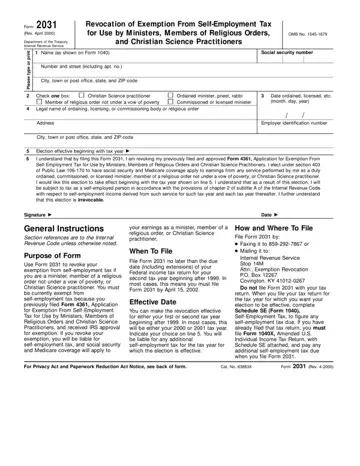
Form 2031, revised in April 2000 by the Department of the Treasury Internal Revenue Service, serves as a crucial document for ministers, members of religious orders not under a vow of poverty, and Christian Science practitioners who seek to revoke their exemption from self-employment tax. Initially, individuals in these positions could file Form 4361 to exempt themselves from self-employment tax. Form 2031 allows these individuals to reverse this decision, making their earnings subject to social security and Medicare coverage under the provisions of chapter 2 of subtitle A of the Internal Revenue Code. This form requires detailed information, including the filer's name, social security number, and the effective date of this revocation, which signals a significant financial and legal shift for the filer. It's essential for those filing to do so by the specified deadline, which is no later than the due date of their federal income tax return for their second tax year beginning after 1999. Instructions also detail the submission process, which involves either faxing or mailing the form to a designated Internal Revenue Service office, but not filing it with their tax return. This procedure signifies a critical decision point for religious professionals and practitioners who previously opted out of social security and Medicare coverage, making the election to revoke an irrevocable step towards re-entering the tax system's self-employment provisions.
| Question | Answer |
|---|---|
| Form Name | Form 2031 |
| Form Length | 2 pages |
| Fillable? | No |
| Fillable fields | 0 |
| Avg. time to fill out | 30 sec |
| Other names | irs form 2031, form 2031 hhsc, EIN, nal |
Form 2031 isn’t the one you’re looking for?
Please rate Form 2031
