
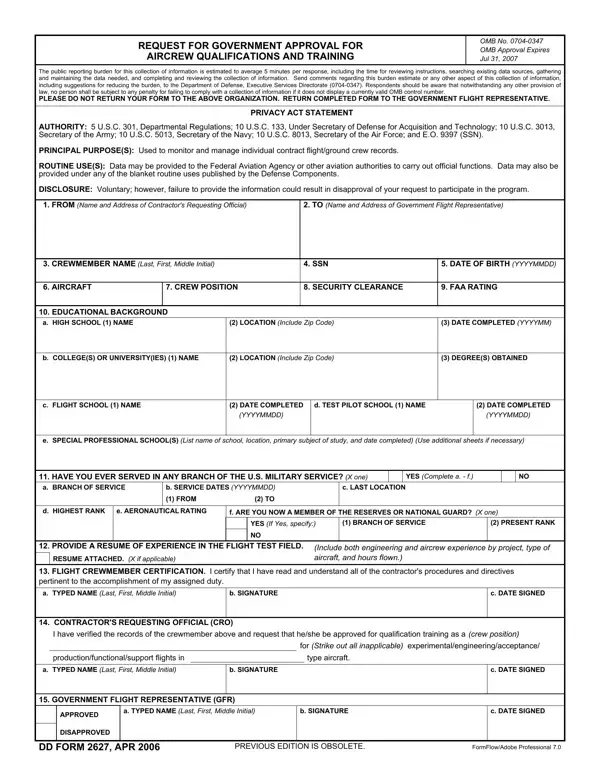

DD Form 2627 at a glance
What it is: DD Form 2627 is the Request for Government Approval for Aircrew Qualifications and Training.
Who signs: Boxes 13, 14 and 15 are signed by the Flight Crew Member, the Contractor's Requesting Official (CRO) and the Government Flight Representative (GFR).
Box 1, FROM, is the Contractor's Requesting Official (CRO) and box 2, TO, is the Government Flight Representative. In box 14, the CRO: "I have verified the records of the crewmember above and request that he/she be approved for qualification training."
A filled-in DD Form 2627 example: a contractor requests approval for a civilian pilot
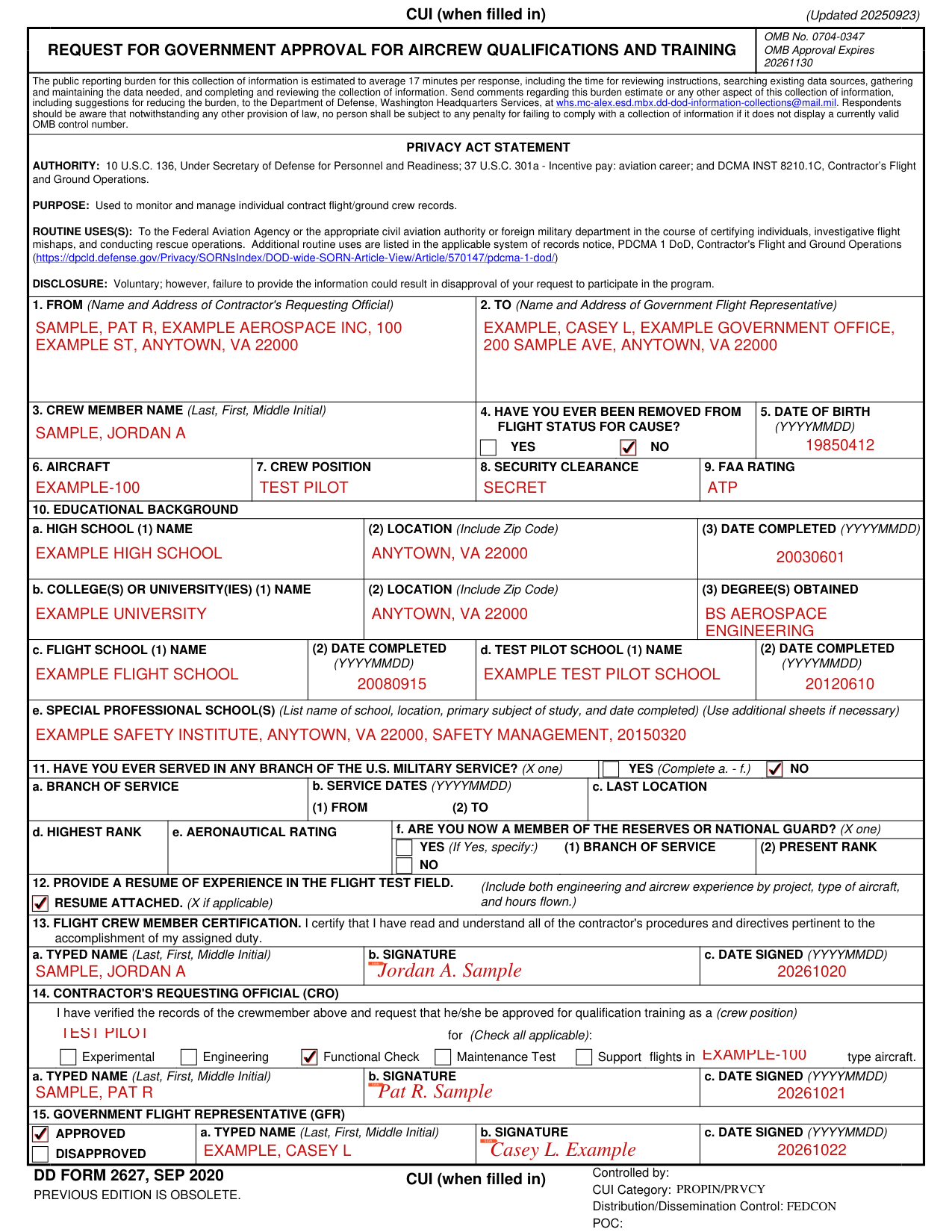
How to fill out DD Form 2627, box by box
From and to

Enter the Name and Address of Contractor's Requesting Official in box 1, FROM, and the Name and Address of Government Flight Representative in box 2, TO.
Crew member name and date of birth

Enter the Crew Member Name (Last, First, Middle Initial) in box 3 and the Date of Birth (YYYYMMDD) in box 5.
Removed from flight status for cause

Mark YES or NO in box 4, Have you ever been removed from flight status for cause?
Aircraft, crew position, security clearance and FAA rating

Enter the Aircraft in box 6, the Crew Position in box 7, the Security Clearance in box 8 and the FAA Rating in box 9.
Educational background
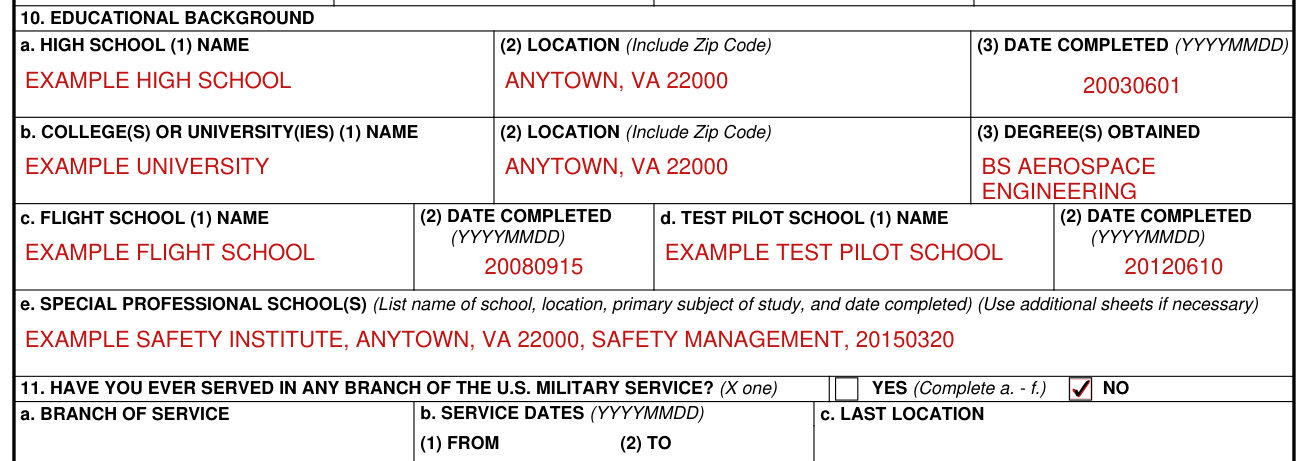
In box 10, Educational Background, a. High School, enter the Name, the Location (Include Zip Code) and the Date Completed (YYYYMMDD).
In b. College(s) or University(ies), enter the Name, the Location (Include Zip Code) and the Degree(s) Obtained.
In c. Flight School, enter the Name and the Date Completed (YYYYMMDD).
In d. Test Pilot School, enter the Name and the Date Completed (YYYYMMDD).
In e. Special Professional School(s), list name of school, location, primary subject of study, and date completed (Use additional sheets if necessary).
Military service

In box 11, Have you ever served in any branch of the U.S. military service? (X one), mark YES (Complete a. - f.) or NO, and enter a. Branch of Service and b. Service Dates (YYYYMMDD) (1) FROM and (2) TO.
Enter c. Last Location, d. Highest Rank and e. Aeronautical Rating.
In f. Are you now a member of the Reserves or National Guard?, mark one (X one): YES (If Yes, specify:) (1) Branch of Service and (2) Present Rank, or NO.
Resume of experience in the flight test field

Provide a resume of experience in the flight test field. (Include both engineering and aircrew experience by project, type of aircraft, and hours flown.)
Mark RESUME ATTACHED. (X if applicable)
Flight crew member certification

Box 13, Flight Crew Member Certification, reads: I certify that I have read and understand all of the contractor's procedures and directives pertinent to the accomplishment of my assigned duty.
In box 13, enter a. Typed Name (Last, First, Middle Initial), b. Signature and c. Date Signed (YYYYMMDD).
Contractor's requesting official

In box 14, Contractor's Requesting Official (CRO), enter the (crew position) the crewmember is requested to be approved for qualification training as.
If applicable, check Experimental, Engineering, Functional Check, Maintenance Test or Support flights in type aircraft (Check all applicable).
In box 14, enter a. Typed Name (Last, First, Middle Initial), b. Signature and c. Date Signed (YYYYMMDD).
Government flight representative

In box 15, Government Flight Representative (GFR), mark APPROVED or DISAPPROVED.
In box 15, enter a. Typed Name (Last, First, Middle Initial), b. Signature and c. Date Signed (YYYYMMDD).
More rules for DD Form 2627
The public reporting burden for this collection of information is estimated to average 17 minutes per response, including the time for reviewing instructions, searching existing data sources, gathering and maintaining the data needed, and completing and reviewing the collection of information. Respondents should be aware that notwithstanding any other provision of law, no person shall be subject to any penalty for failing to comply with a collection of information if it does not display a currently valid OMB control number.
Authority: 10 U.S.C. 136; 37 U.S.C. 301a; and DCMA INST 8210.1C. Purpose: used to monitor and manage individual contract flight/ground crew records. Routine uses are listed in the applicable system of records notice, PDCMA 1 DOD, Contractor's Flight and Ground Operations (Article 570147). Disclosure: voluntary; however, failure to provide the information could result in disapproval of your request to participate in the program.
Sources
[1] DD Form 2627 (SEP 2020), Request for Government Approval for Aircrew Qualifications and Training, Washington Headquarters Services (the Official source link on this page).