
Form 4197 Pec 55555 E 02 10 PDF Details

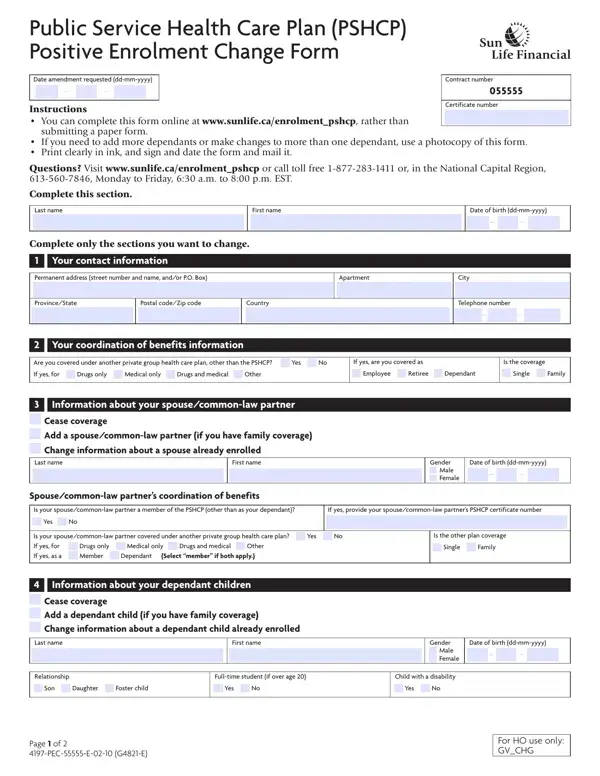
Managing health care plans within the public service sector can often seem complex, but the 4197 PEC 55555 E 02 10 form aims to streamline the process of making essential amendments. This document facilitates significant changes for members of the Public Service Health Care Plan (PSHCP), particularly focusing on positive enrolment changes. Whether members need to add dependents, update contact information, or adjust their coordination of benefits, this form serves as a comprehensive tool to ensure their health care coverage accurately reflects their current needs. Available for completion online or via a paper submission, it provides a versatile option for members to manage their enrollment. The form includes sections for personal identification, information about dependents, spouse or common-law partner details, and a consent to release personal information. With instructions clearly outlined and support provided through Sun Life Assurance Company of Canada, users are guided through the process of submitting their changes efficiently. Additionally, the form reinforces the importance of confidentiality in handling personal information, aligning with the Personal Information Protection and Electronic Documents Act (PIPEDA). By offering a structured way to report changes, the form plays a crucial role in the administration of the PSHCP, ensuring members and their families receive the appropriate health care benefits.

QuestionAnswer
Form NameForm 4197 Pec 55555 E 02 10
Form Length2 pages
Fillable?No
Fillable fields0
Avg. time to fill out30 sec
Other namesPSHCP PE Change Form 4197 pe 55555 e 02 10 form

How to Edit Form 4197 Pec 55555 E 02 10 Online for Free

Dealing with PDF documents online is always simple with our PDF editor. Anyone can fill out Form 4197 Pec 55555 E 02 10 here without trouble. Our team is relentlessly working to enhance the tool and make it much better for people with its cutting-edge functions. Enjoy an ever-evolving experience today! To get the process started, go through these simple steps:

Step 1: Press the "Get Form" button above. It'll open up our pdf tool so that you could start completing your form.

Step 2: As you launch the tool, you will get the form ready to be filled in. Besides filling out various blanks, you can also perform various other actions with the file, namely putting on custom words, editing the initial text, inserting graphics, placing your signature to the form, and a lot more.

This PDF doc will require specific information; in order to ensure accuracy, you need to heed the guidelines just below:

1. Complete the Form 4197 Pec 55555 E 02 10 with a number of essential blanks. Note all of the required information and be sure there's nothing omitted!

Form 4197 Pec 55555 E 02 10 completion process clarified (stage 1)

2. When the first part is filled out, go on to type in the relevant details in these: I Your coordination of benefits, Are you covered under another, If yes are you covered as, Is the coverage, If yes for Drugs only Medical, Employee Retiree Dependant, Single Family, I Information about your, Gender Male Female, Date of birth ddmmyyyy, Spousecommonlaw partners, Is your spousecommonlaw partner a, If yes provide your, Yes No, and Is your spousecommonlaw partner.

Guidelines on how to fill in Form 4197 Pec 55555 E 02 10 part 2

3. Within this stage, check out I Information about your, First name, Relationship, Fulltime student if over age, Son Daughter Foster child, Yes No, Gender Male Female, Child with a disability, Yes No, Date of birth ddmmyyyy, Page of PECE GE, and For HO use only GVCHG. Every one of these are required to be taken care of with highest accuracy.

Stage # 3 in submitting Form 4197 Pec 55555 E 02 10

4. This next section requires some additional information. Ensure you complete all the necessary fields - I Information about your, Dependants coordination of benefits, Is your dependant child covered, If yes for Drugs only Medical, If yes as Member Dependant, If dependant under another private, Certificate number, Date of birth of parent covered, First name of parent with other, I Consent to release of personal, Definitions The Plan Sponsor is, I have read and I understand the, and providers to use and disclose - to proceed further in your process!

Form 4197 Pec 55555 E 02 10 conclusion process detailed (part 4)

It's easy to make a mistake when filling out the I Consent to release of personal, for that reason be sure you take another look before you decide to send it in.

5. The pdf must be finalized by dealing with this part. Further you'll see a full set of form fields that need appropriate information for your document usage to be complete: Member signature X, Date ddmmyyyy, Keeping your information, Mailing instructions keep a copy, Mail your completed and signed, Sun Life Financial PSHCP Positive, Page of PECE GE, and For HO use only GVCHG.

Find out how to prepare Form 4197 Pec 55555 E 02 10 part 5

Step 3: Just after rereading your fields and details, press "Done" and you are done and dusted! Grab your Form 4197 Pec 55555 E 02 10 once you register at FormsPal for a free trial. Quickly gain access to the pdf file from your FormsPal account page, with any edits and adjustments automatically synced! FormsPal provides protected form editing without personal data recording or sharing. Rest assured that your details are in good hands here!