
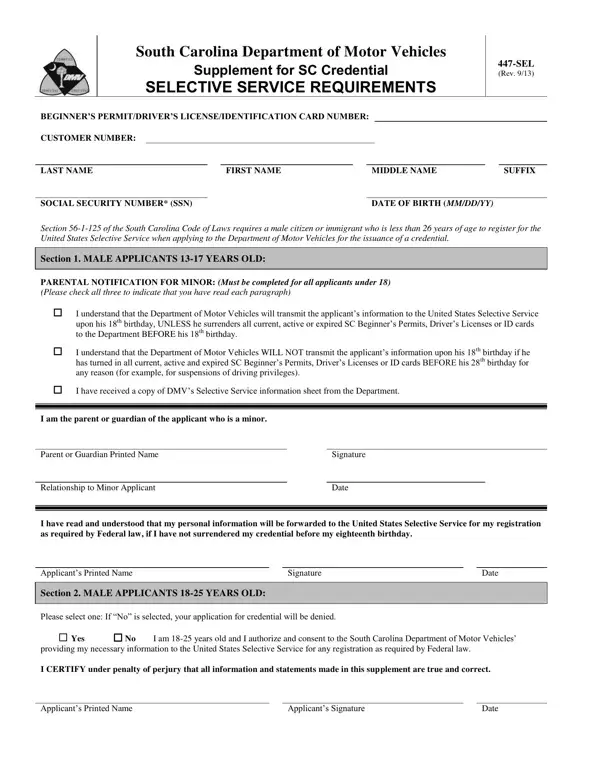
Form 447 PDF Details

In the landscape of legal obligations that intertwine with everyday activities, the South Carolina Department of Motor Vehicles’ Form 447-SEL stands out for its unique blend of state requirements and federal mandates concerning the Selective Service System. This form, which acts as a crucial document for young male citizens and immigrants seeking to obtain a beginner’s permit, driver’s license, or identification card in South Carolina, encapsulates the complexity of adhering to laws that bridge local and national interests. It specifically targets male applicants who are less than 26 years old, making the act of applying for a driving credential in South Carolina a simultaneous step toward complying with federal Selective Service registration requirements. For those between the ages of 13 to 17, the form necessitates parental acknowledgment and consent, highlighting the legal guardians' roles in the minors' responsibilities toward federal obligations. Meanwhile, applicants aged 18 to 25 face a direct mandate: consent to have their details forwarded to the Selective Service as a condition for receiving their desired credential, illustrating a clear intersection between civic duties and personal milestones. Moreover, the form offers insights into various scenarios, including the potential for renewal or duplication of credentials and the implications of withholding consent, thus navigating through the complexities of legal compliance while pursuing individual entitlements such as the privilege to drive.

QuestionAnswer
Form NameForm 447
Form Length2 pages
Fillable?No
Fillable fields0
Avg. time to fill out30 sec
Other names447 sel form 447

How to Edit Form 447 Online for Free

Form 447 can be filled out without any problem. Simply try FormsPal PDF editing tool to get the job done quickly. To make our tool better and less complicated to utilize, we constantly implement new features, taking into account feedback from our users. To get started on your journey, go through these easy steps:

Step 1: Access the PDF inside our tool by clicking on the "Get Form Button" in the top part of this page.

Step 2: As soon as you start the PDF editor, you will see the form all set to be filled out. Aside from filling out various fields, you may also do many other things with the Document, such as writing any text, changing the initial text, inserting images, putting your signature on the PDF, and more.

It is actually easy to complete the document using this practical guide! This is what you want to do:

1. Whenever completing the Form 447, ensure to incorporate all important fields in its relevant area. This will help to hasten the process, enabling your details to be handled efficiently and correctly.

Form 447 conclusion process detailed (step 1)

Step 3: Go through the details you've inserted in the blanks and then press the "Done" button. Grab the Form 447 after you join for a 7-day free trial. Easily gain access to the form within your FormsPal cabinet, along with any edits and adjustments automatically preserved! FormsPal is devoted to the personal privacy of our users; we make sure that all information used in our editor is kept confidential.