
Form 50 135 PDF Details

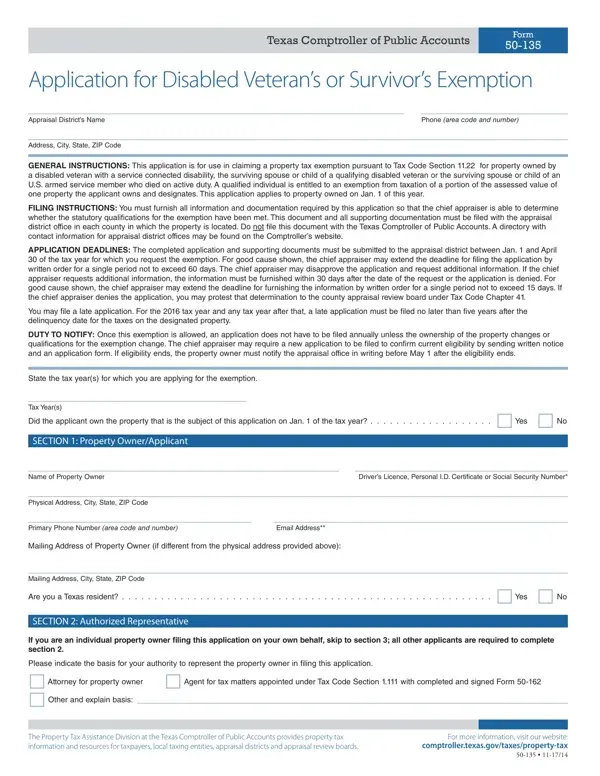
Every year, numerous Texas residents find themselves navigating the complexities of property tax exemptions, a task that often brings them face to face with the Texas Comptroller of Public Accounts Form 50-135. This form, officially titled "Application for Disabled Veteran’s or Survivor’s Exemption," stands as a crucial document for disabled veterans, as well as surviving spouses or children of disabled veterans or service members who have died in active duty, aiming to claim a property tax exemption under Tax Code Section 11.22. Eligibility for this exemption provides a significant financial relief, allowing for a portion of the property’s assessed value to be exempted from taxation. The form requires detailed personal information, property descriptions, and specific data about the applicant's military and disability status to guide the appraisal district in assessing exemption qualifications. Moreover, with an annual filing deadline from January 1 to April 30, along with provisions for late filings and the possibility of extension by the chief appraiser for good cause, thorough attention to deadlines and requirements is vital. This exemption is not merely about financial savings; it represents a tangible acknowledgment of the sacrifices made by veterans and their families. Hence, understanding the nuances of Form 50-135 is essential for those seeking to navigate the process effectively and secure the benefits due to them.

QuestionAnswer
Form NameForm 50 135
Form Length3 pages
Fillable?No
Fillable fields0
Avg. time to fill out45 sec
Other namestx form disabled, application you exemption form, texas form application disabled veteran, how to texas veteran exemption

How to Edit Form 50 135 Online for Free

tx form disabled can be completed effortlessly. Just use FormsPal PDF editor to do the job fast. FormsPal expert team is constantly endeavoring to develop the editor and help it become even faster for people with its multiple functions. Take your experience one stage further with continuously improving and fantastic possibilities we provide! With some basic steps, it is possible to begin your PDF editing:

Step 1: First, open the pdf editor by pressing the "Get Form Button" at the top of this webpage.

Step 2: After you access the editor, you'll see the form prepared to be filled out. In addition to filling out different blanks, you can also perform other sorts of actions with the PDF, that is writing custom text, editing the initial textual content, inserting graphics, putting your signature on the PDF, and a lot more.

It's simple to complete the form using this practical guide! This is what you want to do:

1. The tx form disabled will require certain details to be entered. Make sure the next blanks are complete:

application you exemption get writing process outlined (step 1)

2. Right after this part is filled out, go to type in the relevant information in all these - Tax Years, Did the applicant own the property, SECTION Property OwnerApplicant, Name of Property Owner, Drivers Licence Personal ID, Physical Address City State ZIP, Primary Phone Number area code, Email Address, Mailing Address of Property Owner, Mailing Address City State ZIP, Are you a Texas resident, SECTION Authorized Representative, If you are an individual property, Please indicate the basis for your, and Attorney for property owner.

Filling in part 2 in application you exemption get

3. This next step is normally easy - fill in all the blanks in The Property Tax Assistance, and For more information visit our in order to finish the current step.

Step # 3 for filling in application you exemption get

4. This next section requires some additional information. Ensure you complete all the necessary fields - Provide the following information, Name of Authorized Representative, Title of Authorized Representative, Primary Phone Number, area code and number, Email Address, Mailing Address City State ZIP, SECTION Property Descriptions, Provide the descriptive, Physical Address ie street, Appraisal District Account Number, Manufactured Home make model and, Legal Description, and SECTION Type of Exemption and - to proceed further in your process!

Filling in segment 4 of application you exemption get

When it comes to Physical Address ie street and Provide the following information, ensure you take another look here. Both these are certainly the key fields in this form.

5. To finish your form, this final part includes a couple of extra fields. Filling out Check the exemption for which you, Veteran classiied as disabled by, Surviving spouse or child of a, Surviving spouse or child of US, Veterans Name, Branch of Service, Disability Rating, Age, Serial Number, Does the serviceconnected, Are you the surviving spouse of a, If yes have you remarried, If yes did, Are you the surviving spouse of a, and Are you a surviving child of a will conclude the process and you're going to be done in a snap!

Step number 5 of completing application you exemption get

Step 3: Prior to submitting the document, ensure that form fields were filled in as intended. The moment you establish that it's correct, click “Done." Right after setting up a7-day free trial account at FormsPal, you will be able to download tx form disabled or send it through email without delay. The document will also be readily available from your personal cabinet with all of your modifications. Here at FormsPal.com, we strive to make sure your information is stored protected.