

Form 5005 at a glance
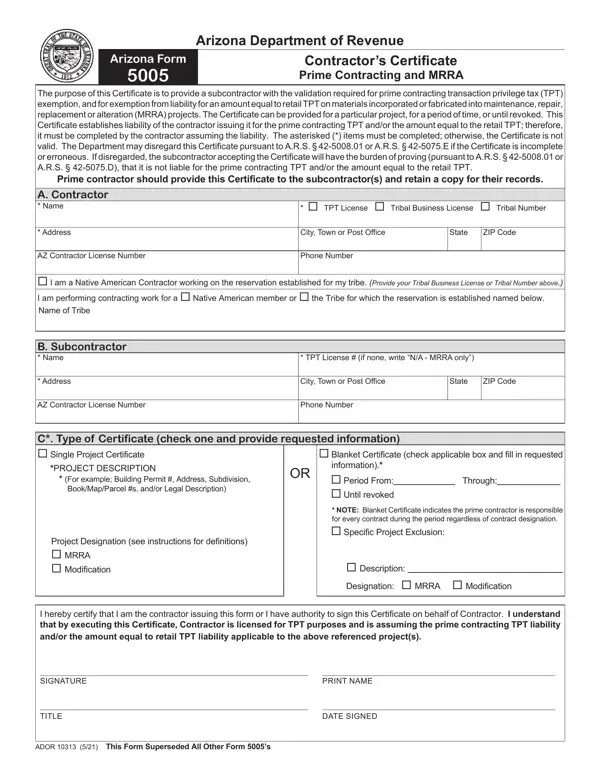
What it is: Arizona Form 5005 is the Contractor's Certificate Prime Contracting and MRRA of the Arizona Department of Revenue.
Who signs: By signing you certify that you are the contractor issuing this form or you have authority to sign this Certificate on behalf of Contractor. You understand that by executing this Certificate, Contractor is licensed for TPT purposes and is assuming the prime contracting TPT liability and/or the amount equal to retail TPT liability applicable to the referenced project(s).
A filled-in Form 5005 example: a blanket certificate for a subcontractor
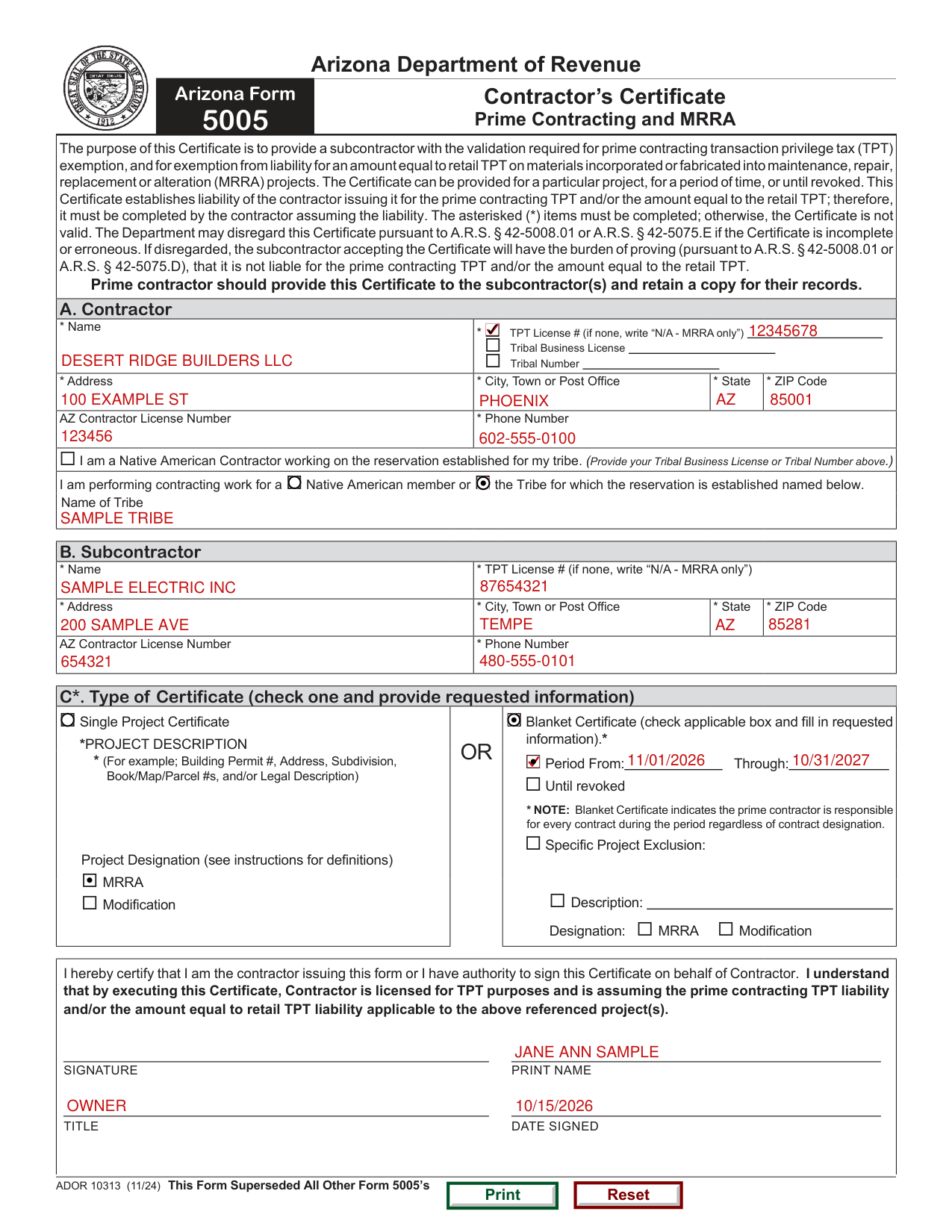
How to fill out Form 5005, box by box
A. Contractor
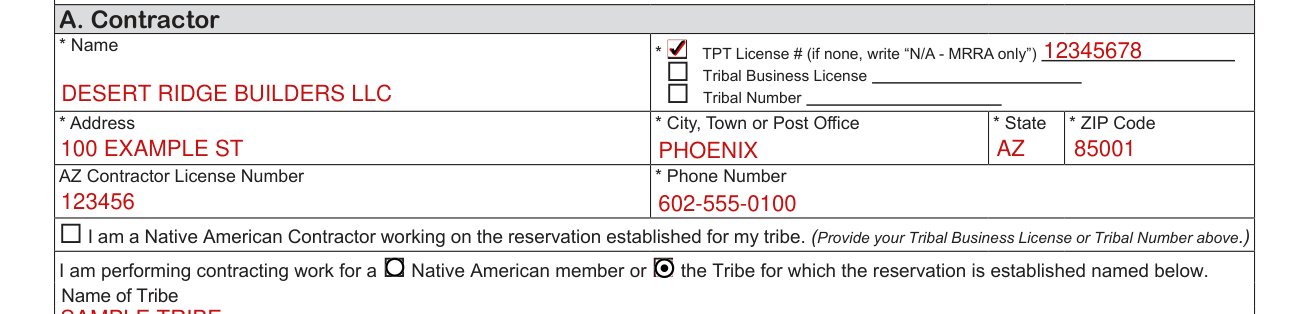
Under A. Contractor, enter the Name, the TPT License # (if none, write “N/A - MRRA only”) or the Tribal Business License or Tribal Number, the Address, City, Town or Post Office, State and ZIP Code.
The “NAME”, “ADDRESS”, and “TPT LICENSE NUMBER” fields of the Contractor section must be completed.
The contractor is the entity responsible for the tax.
Enter the AZ Contractor License Number and the Phone Number.
Native American Contractor

I am a Native American Contractor working on the reservation established for my tribe. (Provide your Tribal Business License or Tribal Number in section A, Contractor.)
A contractor who is Native American, working on the reservation established for their tribe will mark the box indicating this.
Mark Native American member or the Tribe for which the reservation is established when you are performing contracting work for one of them, and write the Name of Tribe.
A contractor working for the Native American or the Tribe on the reservation established for the Tribe will mark the box indicating this. The name of the Tribe must also be included.
B. Subcontractor

Under B. Subcontractor, enter the Name, the TPT License # (if none, write “N/A - MRRA only”), the Address, City, Town or Post Office, State and ZIP Code.
The “NAME”, “ADDRESS”, and “TPT LICENSE” fields of the Subcontractor section must be complete.
C. Type of Certificate
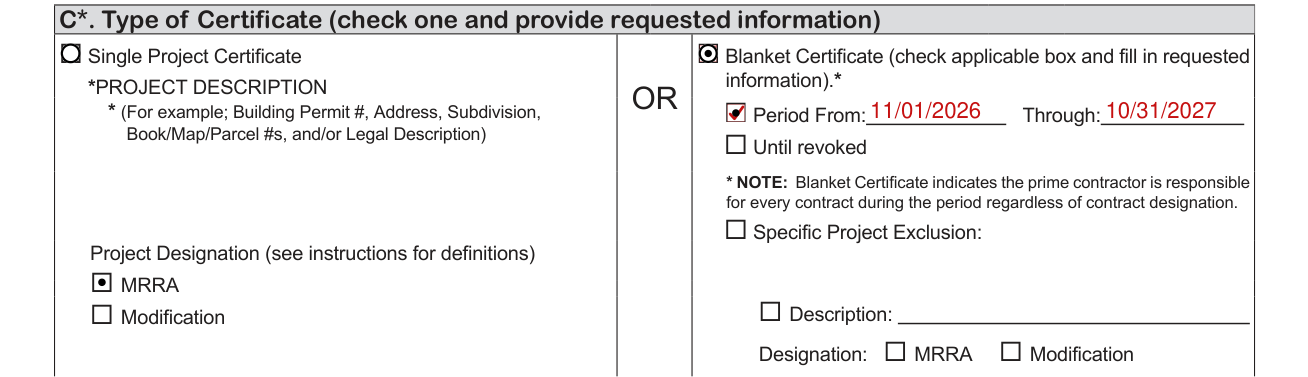
C*. Type of Certificate (check one and provide requested information) Single Project Certificate
Either the “Single Project Certificate” box or the “Blanket Certificate” box of the Type of Certificate section must be checked.
If the “Single Project Certificate” box is checked, the “PROJECT DESCRIPTION” must be supplied. The project description must be sufficient to identify the location of the single project or the Certificate will be deemed incomplete by the Department. For example; Building Permit #, Address, Subdivision, Book/Map/Parcel #s, and/or Legal Description.
Additionally, if the “Single Project Certificate” box is checked, a project designation description must be provided.
Under Project Designation, mark MRRA or Modification.
Blanket Certificate (check applicable box and fill in requested information).* OR Period From: Through: Until revoked
If the “Blanket Certificate” box is checked, either the “From: Through:” box or the “Until revoked” box must be checked. If the “From: Through:” box is checked, the “From: Through:” dates must be provided.
A Blanket Certificate indicates the prime contractor is responsible for every contract during the period regardless of contract designation.
The “Specific Project Exclusion” box is optional and allows the “Prime Contractor” to exclude specific projects or time periods from the Blanket Certificate.
If the “Specific Project Exclusion” box is checked, details including the project's description and designation or the excluded time periods must be provided.
Signature

The “SIGNATURE”, “TITLE”, “PRINT NAME” and “DATE SIGNED” FIELDS of the Signature section must be completed.
Failure to complete these fields as specified may result in the Department disregarding the incomplete Certificate.
More rules for Form 5005
Prime contractor should provide this Certificate to the subcontractor(s) and retain a copy for their records.
If your situation is different
The alteration thresholds are exceeded
Alteration: An activity or action that causes a direct physical change (e.g., adding or expanding square footage) to existing property that cannot be classified as maintenance, repair or replacement and that is under the following thresholds. For residential property the alteration amount is less than 25% of the property's value as determined by the county assessor.
For commercial property, the alteration amount is for less than $750,000 (checked October 19, 2026).
If the thresholds are exceeded, then the project is a modification project.
Modification: Activities encompassing “ground up” construction, grading and leveling ground, and wreckage or demolition, or other new contracting activity where none previously existed to the extent such activity cannot otherwise be characterized as maintenance, repair, replacement or alteration (“MRRA”).
The Certificate is not signed contemporaneously
RETROACTIVE EFFECT If a Certificate is not signed contemporaneously with the commencement of a contracting project intended to be within the scope of the Certificate, the Department will accept the Certificate as evidence of the alleged facts. However, the person receiving the Certificate may not receive the benefit of the Certificate if the Department determines that any of the facts set forth in the Certificate are inaccurate.
The contractor is not the prime contractor
In most instances, the entity assuming the transaction privilege tax liability for the contracting project(s) referenced in the Certificate will legally be the prime contractor for such project(s).
However, in some instances such entity may not legally be the prime contractor for such project(s). If an entity is not the prime contractor for such project(s), the Certificate will nevertheless be effective and will subject such entity to the transaction privilege tax liability of the entity receiving the Certificate.
Common questions about Form 5005
What is Arizona form 5005?
Arizona Form 5005 is the Contractor's Certificate Prime Contracting and MRRA of the Arizona Department of Revenue. The purpose of this Certificate is to provide a subcontractor with the validation required for prime contracting transaction privilege tax (TPT) exemption, and for exemption from liability for an amount equal to retail TPT on materials incorporated or fabricated into maintenance, repair, replacement or alteration (MRRA) projects. The Certificate can be provided for a particular project, for a period of time, or until revoked. This Certificate establishes liability of the contractor issuing it for the prime contracting TPT and/or the amount equal to the retail TPT; therefore, it must be completed by the contractor assuming the liability. The asterisked (*) items must be completed; otherwise, the Certificate is not valid. The Department may disregard this Certificate pursuant to A.R.S. § 42-5008.01 or A.R.S. § 42-5075.E if the Certificate is incomplete or erroneous. If disregarded, the subcontractor accepting the Certificate will have the burden of proving (pursuant to A.R.S. § 42-5008.01 or A.R.S. § 42-5075.D), that it is not liable for the prime contracting TPT and/or the amount equal to the retail TPT.
Sources
[1] Arizona Form 5005 (ADOR 10313 (11/24)), Contractor's Certificate Prime Contracting and MRRA, Arizona Department of Revenue (the Official source link on this page).