
Form 541 K 1 PDF Details

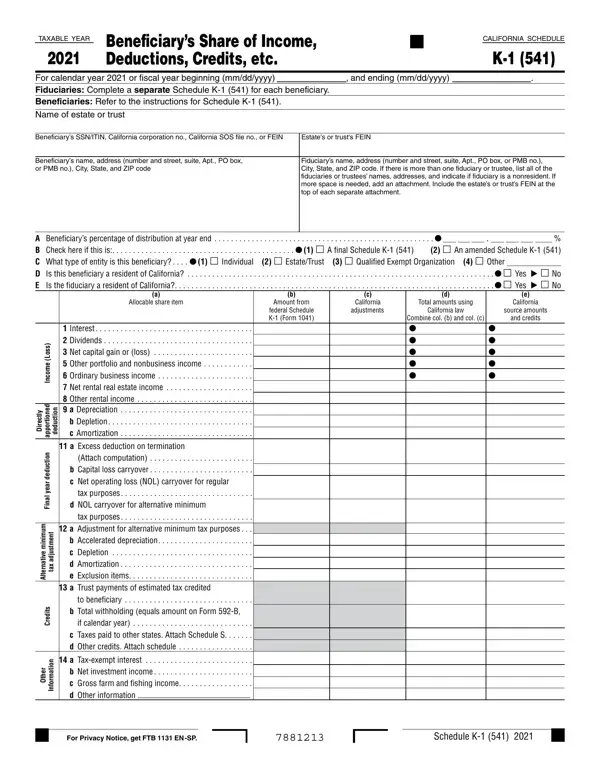
Navigating the complexities of tax documentation and compliance, beneficiaries of estates and trusts face a specific set of reporting requirements, with the Schedule K-1 (541) being a pivotal component for those in California. This form delineates the beneficiary's share of income, deductions, credits, etc., for a tax year, whether it's the calendar year 2020 or a fiscal year that begins and ends on specified dates. Unique to California, the Schedule K-1 (541) ensures that both fiduciaries and beneficiaries understand their tax obligations and entitlements, with fiduciaries required to file a separate form for each beneficiary. This involves a meticulous breakdown of allocable share items, including but not limited to interest, dividends, net capital gains or losses, along with deductions such as depreciation, amortization, and depletion. The form also addresses various categories under other income, credits, and additional tax-related information, requiring detailed capture of data such as estate or trust FEIN, beneficiary personal information, and specifics on residency status for tax purposes. Beneficiaries are guided to refer to the instructions for Schedule K-1 (541) to accurately report and comprehend how estate or trust distributions affect their personal income tax situation in California, ensuring compliance while optimally managing their tax liabilities.

QuestionAnswer
Form NameForm 541 K 1
Form Length1 pages
Fillable?No
Fillable fields0
Avg. time to fill out15 sec
Other names2020 form k 1, k 1 541 instructions, california schedule k 1 541, ca form 541 k 1

How to Edit Form 541 K 1 Online for Free

Handling PDF files online is quite easy with this PDF editor. You can fill in 2020 form k 1 here in a matter of minutes. FormsPal expert team is continuously endeavoring to develop the tool and insure that it is even easier for users with its multiple functions. Unlock an constantly innovative experience now - take a look at and uncover new opportunities as you go! In case you are seeking to begin, this is what it requires:

Step 1: Just press the "Get Form Button" above on this site to see our pdf editing tool. This way, you'll find everything that is required to fill out your file.

Step 2: This editor gives you the ability to modify your PDF document in various ways. Enhance it by writing personalized text, correct what's originally in the document, and add a signature - all at your convenience!

When it comes to blank fields of this particular form, here is what you should do:

1. While submitting the 2020 form k 1, be certain to include all of the necessary blank fields within the relevant section. This will help facilitate the process, which allows your information to be handled promptly and properly.

Part number 1 in filling out california form 541 k 1 instructions

2. The subsequent stage is usually to fill out all of the following blanks: Interest, n o i t c u d e d, y l t c e r i D, d e n o i t r o p p a, n o i t c u d e d, r a e y l a n i F, m u m i n i m e v i t a n r e t l, t n e m t s u j d a, x a t, s t i d e r C, a Excess deduction on termination, Attach computation, tax purposes, to beneficiary, and r e h t O.

california form 541 k 1 instructions conclusion process clarified (stage 2)

Always be really attentive when filling in Attach computation and m u m i n i m e v i t a n r e t l, as this is the section in which most users make mistakes.

3. The next section should also be quite simple, r e h t O, n o i t a m r o f n I, a Taxexempt interest, For Privacy Notice get FTB EN SP, and Schedule K - all these form fields must be completed here.

Step # 3 of filling in california form 541 k 1 instructions

Step 3: Reread the details you have inserted in the blank fields and then hit the "Done" button. Download the 2020 form k 1 the instant you register online for a 7-day free trial. Immediately access the pdf file inside your personal account page, together with any modifications and adjustments all saved! At FormsPal, we do everything we can to guarantee that all your details are maintained secure.