
Form 5495 PDF Details

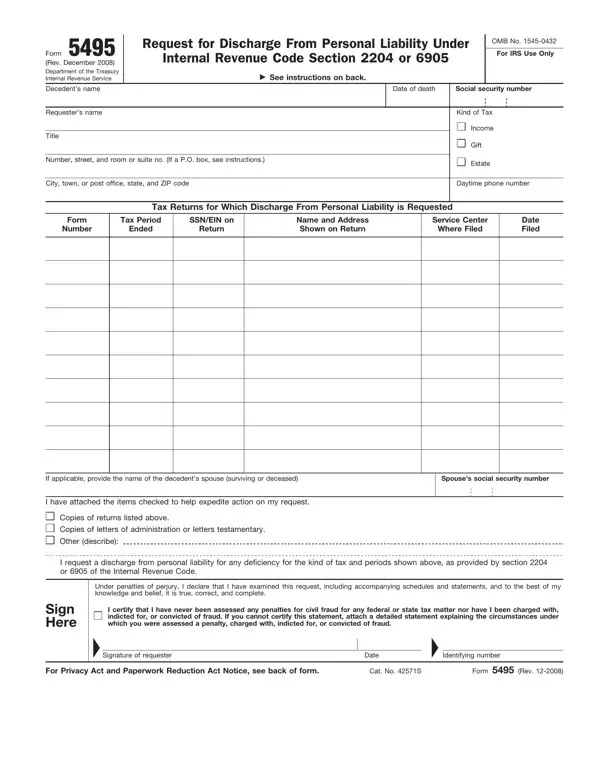
Navigating the aftermath of a loved one's death can be an arduous journey, particularly when it involves fulfilling tax obligations. The IRS Form 5495, titled "Request for Discharge From Personal Liability," offers a pathway for executors and fiduciaries to absolve themselves of personal responsibility for any potential undetected tax deficiencies related to the deceased's income, gift, or estate taxes. Essential to the administration of an estate, this form applies under specific sections of the Internal Revenue Code—2204 for executors and 6905 for fiduciaries. Its use involves providing detailed information about the decedent, the types of taxes in question, and the tax periods for which discharge is sought, along with any supporting documentation that might expedite the process. Filing this form at the correct time and place, as stipulated in its instructions, is crucial. The stipulation that the request can be attached to Form 706 (United States Estate (and Generation-Skipping Transfer) Tax Return) or filed within a three-year window thereafter signals flexibility matched by the requirement for precision in compliance. Further, the form's sections encourage transparency and thoroughness, with provisions for attaching additional documents, such as copies of tax returns, letters of administration, testamentary letters, or other relevant materials. By engaging with Form 5495, individuals acting on behalf of the decedent can navigate the legal complexities of tax liabilities with the aim of securing a discharge from personal liability, highlighting the form's significant role in estate administration.

QuestionAnswer
Form NameForm 5495
Form Length2 pages
Fillable?No
Fillable fields0
Avg. time to fill out30 sec
Other names5495, form 5495 online, 5495 personal fill, irs form 5495

How to Edit Form 5495 Online for Free

Using PDF forms online is certainly a breeze with this PDF tool. You can fill out irs form 5495 here effortlessly. Our team is committed to providing you the absolute best experience with our tool by consistently presenting new capabilities and improvements. Our editor is now much more helpful with the newest updates! Currently, filling out documents is a lot easier and faster than ever before. By taking a couple of easy steps, it is possible to begin your PDF journey:

Step 1: Open the PDF inside our editor by clicking the "Get Form Button" above on this webpage.

Step 2: This tool helps you work with PDF documents in a range of ways. Change it by adding your own text, adjust what's originally in the file, and place in a signature - all within several clicks!

This PDF form will need particular details to be filled in, so you must take the time to enter precisely what is asked:

1. It is advisable to complete the irs form 5495 properly, so take care while working with the areas that contain all these blank fields:

5495 personal fill writing process clarified (stage 1)

2. Soon after this section is done, go to enter the suitable details in all these: If applicable provide the name of, Spouses social security number, I have attached the items checked, Copies of returns listed above, I request a discharge from, Under penalties of perjury I, Sign Here, and I certify that I have never been.

Writing segment 2 in 5495 personal fill

It's very easy to make errors while completing the If applicable provide the name of, hence make sure to go through it again before you'll submit it.

Step 3: Glance through everything you have typed into the blank fields and click on the "Done" button. Right after setting up a7-day free trial account with us, it will be possible to download irs form 5495 or email it directly. The PDF document will also be readily accessible from your personal account page with all of your edits. At FormsPal, we aim to make sure that all of your information is kept secure.