
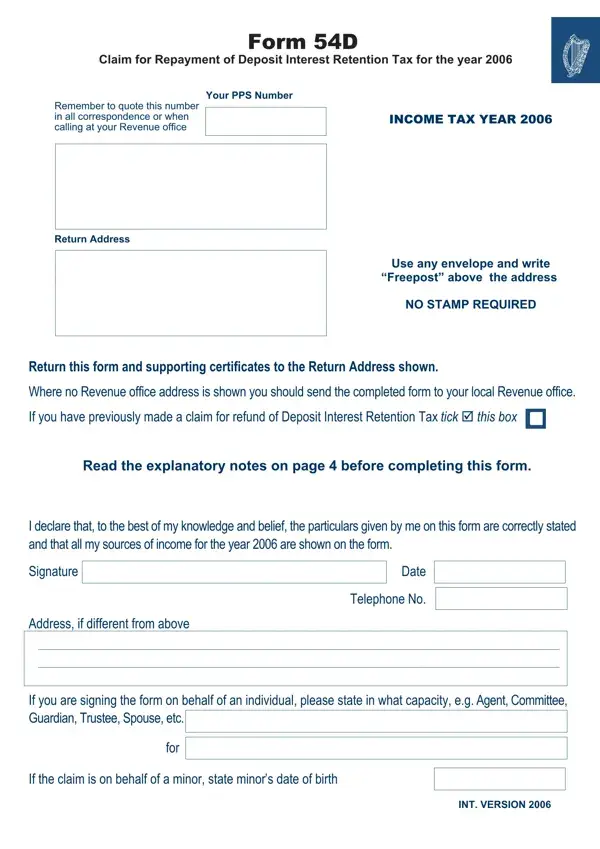
Form 54D PDF Details

The process of managing taxes and seeking possible refunds can be nuanced and complex, vividly illustrated by the requirement for specific forms such as the Form 54D. This particular document is a critical tool for individuals looking to claim a refund of their Deposit Interest Retention Tax (DIRT) for the year 2006. It is designed for those whose age or health condition exempts them from certain tax obligations or whose tax credits and reliefs exceed their total income for the specified year. What sets this form apart is its comprehensive approach to capturing personal details, income specifics, and potential relief or exemptions such as the Rent-a-Room scheme or income from Childcare Services. Furthermore, it emphasizes the need for accuracy and honesty in reporting, guiding claimants through the process with detailed instructions, including reminders to attach necessary certificates from financial institutions and warnings about the penalties for false statements. Its design caters to individuals across various life stages and situations—from the single to the widowed, from the employed to the self-employed—ensuring that a wide range of citizens can understand and potentially benefit from the exemptions and reliefs it addresses.

QuestionAnswer
Form NameForm 54D
Form Length4 pages
Fillable?No
Fillable fields0
Avg. time to fill out1 min
Other namesreliefs, 216C, TCA, act 54d sample answers

How to Edit Form 54D Online for Free

Working with PDF files online is definitely very easy using our PDF tool. Anyone can fill in overleaf here and use a number of other options we provide. We at FormsPal are dedicated to making sure you have the absolute best experience with our editor by regularly introducing new functions and enhancements. Our editor is now much more useful as the result of the latest updates! At this point, filling out PDF forms is a lot easier and faster than ever before. Should you be looking to get going, here's what it takes:

Step 1: Click on the "Get Form" button above. It'll open up our pdf tool so that you can start filling out your form.

Step 2: With the help of this state-of-the-art PDF tool, you are able to do more than simply fill out blank fields. Edit away and make your docs seem faultless with customized text put in, or modify the original input to excellence - all comes with an ability to add any photos and sign it off.

For you to finalize this PDF document, be sure to provide the required details in each area:

1. To get started, while filling in the overleaf, start in the area containing subsequent blanks:

Stage number 1 in completing 54D

2. Now that the last array of fields is done, you'll want to include the essential particulars in If you have previously made a, Read the explanatory notes on page, DECLARATION, I declare that to the best of my, Signature, Address if different from above, Date, Telephone No, and If you are signing the form on so you can progress to the next stage.

Part number 2 in filling out 54D

3. Completing If you are signing the form on, for, If the claim is on behalf of a, and INT VERSION is essential for the next step, make sure to fill them out in their entirety. Don't miss any details!

If the claim is on behalf of a, for, and If you are signing the form on in 54D

Be really mindful while completing If the claim is on behalf of a and for, because this is where a lot of people make errors.

4. Now proceed to this fourth segment! In this case you'll have these Indicate for if you were, Tick þ appropriate box, Single, Married, Widowed, Married but living apart, Divorced, If married state your spouses name, Date of marriage if after, If widowed state date of spouses, If separateddivorced state date of, AGE, If either you or your spouse were, Self, and Spouse empty form fields to fill out.

Single, Tick þ appropriate box, and If widowed state date of spouses in 54D

5. The very last step to submit this form is crucial. Make sure that you fill in the appropriate blanks, consisting of c The date the infirmity began, Attach a medical certificate if, FIRST CLAIM, If this is your first claim for a, a Were you or your spouse, Tick þ appropriate box, Employed, SelfEmployed, b The date of retirement if, c Your PPS NoPersonal Public, and d The name of your last employer, before using the form. Failing to do so might contribute to a flawed and possibly unacceptable paper!

The right way to prepare 54D part 5

Step 3: After proofreading your fields and details, click "Done" and you are good to go! After creating a7-day free trial account here, you'll be able to download overleaf or send it through email promptly. The PDF will also be readily available in your personal account page with your every modification. FormsPal is invested in the confidentiality of all our users; we make sure all personal data going through our system is kept secure.