
Form 593 E PDF Details

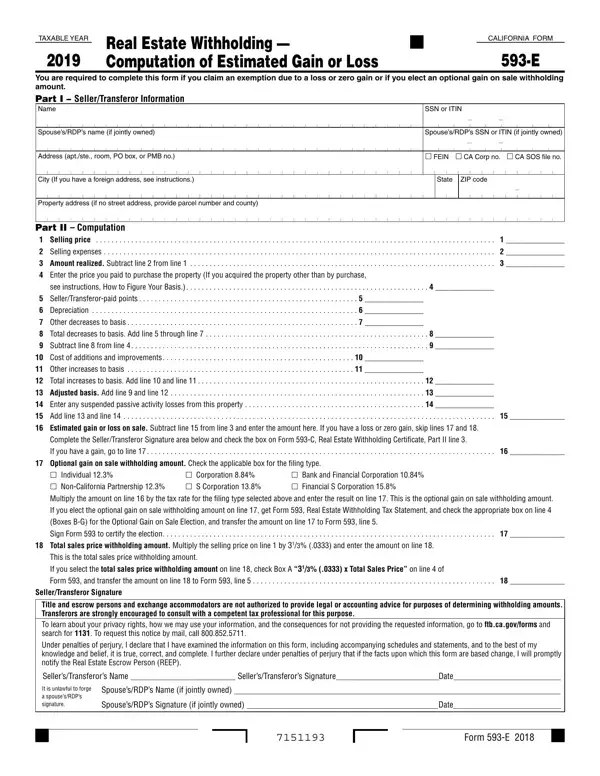
In the realm of real estate transactions in California, the Form 593-E stands out as a crucial document for sellers. This form, officially titled "Computation of Estimated Gain or Loss," is integral to the process of withholding taxes on real estate sales. Its primary purpose is to determine whether the seller is exempt from withholding due to reporting a loss or zero gain on the sale, or if they choose to elect an optional gain on sale withholding amount. The form necessitates detailed information from the seller, including personal identifiers and specifics regarding the property sold. It meticulously guides through the computation of the selling price, selling expenses, adjustments to basis, and ultimately, the estimated gain or loss on the sale. Notably, Form 593-E plays a significant role in determining the appropriate withholding rate, which varies based on the entity type of the seller and the financial gain realized from the sale. Additionally, this form sets the stage for compliance with California's tax requirements, insisting on accuracy under the penalties of perjury, and emphasizing the importance of consulting with tax professionals for accurate completion. As such, it serves not just as a formality but as a critical financial document ensuring both legal compliance and financial clarity in real estate transactions within the state.

QuestionAnswer
Form NameForm 593 E
Form Length1 pages
Fillable?No
Fillable fields0
Avg. time to fill out15 sec
Other namesform 593, 593 ca form, 593 form 2021, california form 593

How to Edit Form 593 E Online for Free

You may fill in form 593 c instantly using our online tool for PDF editing. The editor is continually updated by our staff, getting handy features and turning out to be more convenient. Getting underway is easy! Everything you need to do is take the next basic steps below:

Step 1: Simply click on the "Get Form Button" in the top section of this site to see our pdf file editing tool. This way, you'll find all that is necessary to fill out your document.

Step 2: As you open the PDF editor, you'll see the form ready to be filled in. Aside from filling in various blank fields, it's also possible to do various other actions with the Document, namely adding any textual content, modifying the original text, inserting graphics, putting your signature on the form, and much more.

It really is simple to finish the pdf with this practical guide! Here is what you should do:

1. Fill out your form 593 c with a selection of necessary blanks. Get all the required information and be sure not a single thing overlooked!

Step number 1 in filling out form 593 california

2. Once your current task is complete, take the next step – fill out all of these fields - Total increases to basis Add line, Adjusted basis Add line and line, Enter any suspended passive, Add line and line, Estimated gain or loss on sale, Complete the SellerTransferor, If you have a gain go to line, Optional gain on sale withholding, Individual NonCalifornia, Bank and Financial Corporation, Corporation S Corporation, If you elect the optional gain on, Boxes BG for the Optional Gain on, Sign Form to certify the election, and Total sales price withholding with their corresponding information. Make sure to double check that everything has been entered correctly before continuing!

Filling in section 2 in form 593 california

As to Individual NonCalifornia and Total increases to basis Add line, be certain that you review things in this current part. Both of these are the key fields in the file.

Step 3: Prior to finalizing this document, check that form fields are filled out as intended. As soon as you determine that it is fine, click on “Done." Make a free trial subscription with us and obtain immediate access to form 593 c - download, email, or edit from your personal account page. FormsPal is invested in the privacy of our users; we make certain that all information coming through our tool is kept secure.