
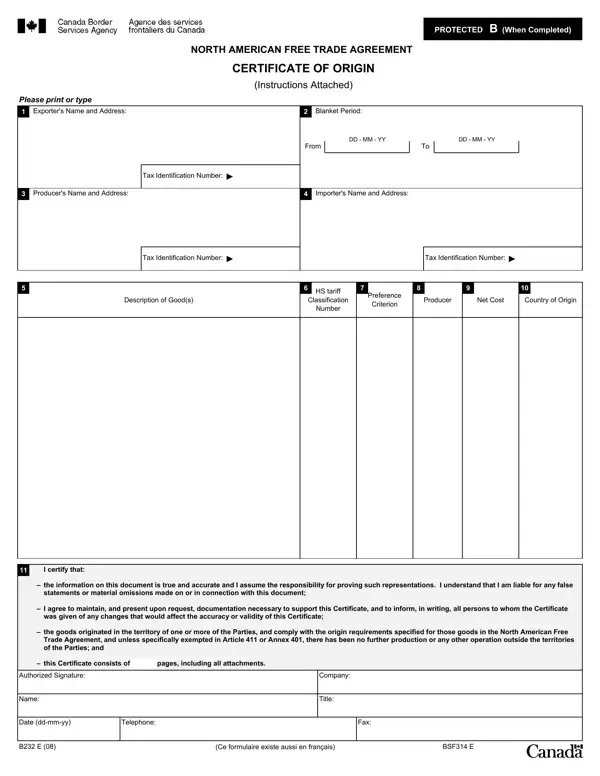
The B232 E form plays a pivotal role in facilitating trade under the North American Free Trade Agreement (NAFTA), acting as a Certificate of Origin to qualify goods for preferential tariff treatment among Canada, Mexico, and the United States. By certifying that goods meet the applicable NAFTA criteria, this form helps ensure that exporters can take full advantage of reduced tariffs and expedite the movement of goods across borders. It covers a range of crucial details, including the exporter's and producer's names and addresses, the importer's information, and a thorough description of the goods including their tariff classifications and criteria under which they qualify for preferential treatment. Moreover, it addresses the period for which the certificate covers, preference criteria that justify the claim, and the producer’s details, suggesting a comprehensive approach to authenticating the origin of goods. The form further mandates the exporter’s or producer’s certification that the information provided is accurate and assumes responsibility for such claims, underscoring the legal implications and importance of truthfulness in international trade documentation. This form not only facilitates trade but also enforces transparency and accountability, requiring detailed documentation and knowledge of the goods being exported.
| Question | Answer |
|---|---|
| Form Name | Form B232 E |
| Form Length | 2 pages |
| Fillable? | No |
| Fillable fields | 0 |
| Avg. time to fill out | 30 sec |
| Other names | 300-B, E, b232 e fillable, RVC |