

Shipper's Export Declaration at a glance
What it is: The Shipper's Export Declaration is a U.S. Department of Commerce, U.S. Census Bureau form (7-18-2003).
Who signs: In Box 29, enter the duly authorized officer or employee: the USPPI authorizes the forwarder named above to act as forwarding agent for export control and customs purposes. Sign in Box 30.
A filled-in Shipper's Export Declaration example: a shipment of brake pads by truck
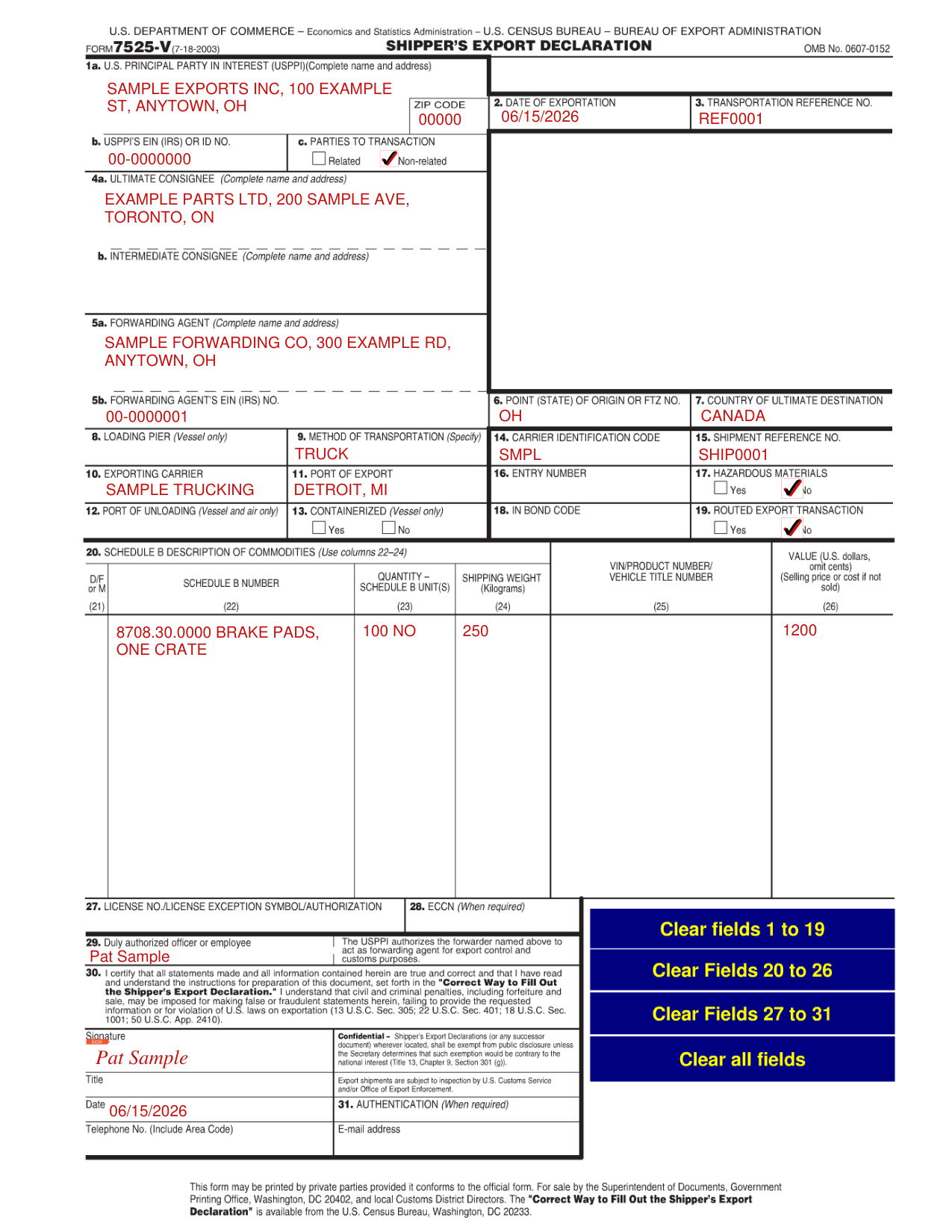
How to fill out Shipper's Export Declaration, box by box
Boxes 1 to 3, the USPPI and the date
In Box 1a, enter the U.S. Principal Party in Interest (USPPI), complete name and address, and the ZIP code. In Box 1b, enter the EIN (IRS) or ID No. In Box 1c, mark Related or Non-related for the parties to transaction. In Box 2, enter the date of exportation. In Box 3, enter the transportation reference no.
Boxes 4 and 5, the consignees and the forwarding agent
In Box 4a, enter the ultimate consignee, complete name and address. In Box 4b, enter the intermediate consignee, complete name and address. In Box 5a, enter the forwarding agent, complete name and address. In Box 5b, enter the forwarding agent's EIN (IRS) no.
Boxes 6 to 11, origin, destination and transportation
In Box 6, enter the point (state) of origin or FTZ no. In Box 7, enter the country of ultimate destination. In Box 8, enter the loading pier, for a vessel only. In Box 9, specify the method of transportation. In Box 10, enter the exporting carrier. In Box 11, enter the port of export.
Boxes 12 to 19, the port, the container and the routing
In Box 12, enter the port of unloading, for a vessel and air only. In Box 13, mark Yes or No for containerized, for a vessel only. Enter the carrier identification code. In Box 15, enter the shipment reference no. In Box 16, enter the entry number. In Box 17, mark Yes or No for hazardous materials. In Box 18, enter the in bond code. In Box 19, mark Yes or No for routed export transaction.
Boxes 20 to 26, the commodities
In Box 20, use columns 22 to 24 for the Schedule B description of commodities. In column 22, enter the Schedule B number. In column 23, enter the quantity and the Schedule B unit(s). In column 24, enter the shipping weight in kilograms. If the commodity is a vehicle, enter the vehicle title number in column 25. In column 26, enter the value in dollars and omit cents.
Boxes 27 and 28, the license and the ECCN
In Box 27, enter the license no., license exception symbol or authorization. In Box 28, enter the ECCN, when required.
Boxes 29 to 31, signing
By signing in Box 30 you certify that all statements made and all information contained herein are true and correct and that you have read and understand the instructions for preparation of this document, set forth in the "Correct Way to Fill Out the Shipper's Export Declaration."
Enter the date, the telephone no. (include area code) and the e-mail address. In Box 31, enter the authentication, when required.
Common questions about Shipper's Export Declaration
Is there a penalty?
Civil and criminal penalties, including forfeiture and sale, may be imposed for false or fraudulent statements herein, failing to provide the requested information or for violation of U.S. laws on exportation (13 U.S.C. Sec. 305; 22 U.S.C. Sec. 401; 18 U.S.C. Sec. 1001; 50 U.S.C. App. 2410).
Sources
[1] Shipper's Export Declaration (7-18-2003), U.S. Department of Commerce, U.S. Census Bureau, as served on this page (the Official source link on this page).
