
Form 753 PDF Details

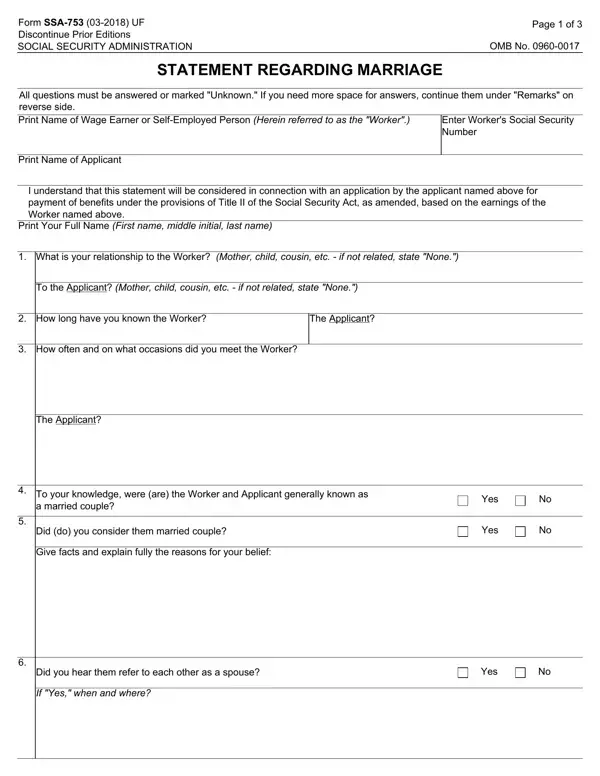
Navigating through the maze of Social Security Administration (SSA) forms can sometimes feel daunting, especially when faced with the Form SSA-753, Statement Regarding Marriage. This particular form is a crucial piece of documentation used to establish the marital relationship between individuals for the purpose of determining eligibility for Social Security benefits. It mandates the input of various pieces of information including the worker's Social Security Number, personal testimony regarding the nature of the relationship between the worker and the applicant, and detailed questions aimed at ascertaining the legitimacy of the marital status claimed. Respondents are required to disclose their relationship to the worker and the applicant, how long and in what context they have known each individual, their opinion on whether the couple lived together and presented themselves publicly as married, among other details. This form also provides space for additional remarks, ensuring that any unique scenarios or explanations can be thoroughly communicated. Completion of Form SSA-753 is declared under penalty of perjury, highlighting the importance and seriousness of the information being provided. Moreover, the form underscores the SSA’s commitment to privacy and data security, with comprehensive measures in place to protect the personal information collected throughout the process. As with many SSA forms, the SSA-753 is pivotal for the accurate and timely processing of benefit claims, making it imperative for applicants and those providing statements to understand its scope and significance fully.

QuestionAnswer
Form NameForm 753
Form Length3 pages
Fillable?No
Fillable fields0
Avg. time to fill out45 sec
Other namesssa 753 forms, ssa 753, social security form 753, social security form statement online

How to Edit Form 753 Online for Free

You could prepare how to social security form marriage instantly by using our online PDF tool. Our editor is consistently evolving to provide the very best user experience achievable, and that's thanks to our dedication to continual enhancement and listening closely to user comments. For anyone who is looking to get started, here's what it will require:

Step 1: Simply click the "Get Form Button" in the top section of this page to open our pdf form editor. Here you will find everything that is needed to fill out your document.

Step 2: The editor helps you customize your PDF in a variety of ways. Modify it with your own text, correct what is already in the PDF, and include a signature - all within the reach of several mouse clicks!

This form will require specific information to be filled in, thus make sure you take whatever time to type in exactly what is required:

1. Fill out the how to social security form marriage with a number of necessary blank fields. Collect all the necessary information and make sure nothing is missed!

Step no. 1 in filling out marriage form ssa

2. Just after filling in this step, head on to the next step and fill in the necessary particulars in all these blank fields - The Applicant, To your knowledge were are the, a married couple, Did do you consider them married, Give facts and explain fully the, Yes, Yes, Did you hear them refer to each, Yes, and If Yes when and where.

marriage form ssa conclusion process clarified (part 2)

3. Completing Form SSA UF, In your opinion did do they, Page of, Yes, CITY OR TOWN, STATE, DATES, FROM, To your knowledge did they live, If No explain, Yes, To your knowledge has either the, If Yes give the following, STATE WHETHER, and WORKER OR APPLICANT is essential for the next step, make sure to fill them out in their entirety. Don't miss any details!

marriage form ssa completion process clarified (step 3)

Always be extremely careful while completing Page of and Form SSA UF, as this is where many people make errors.

4. To go forward, the following form section will require completing a handful of blank fields. Examples of these are Remarks This space may be used for, I declare under penalty of perjury, Signature First name middle, Date Month day year, SIGNATURE OF PERSON MAKING, Telephone Number include Area Code, and Mailing Address Number and Street, which you'll find essential to continuing with this particular document.

Find out how to prepare marriage form ssa stage 4

5. This form must be finished with this particular section. Further there's a full listing of blanks that have to be filled out with specific information to allow your document submission to be accomplished: City and State, ZIP Code, Witnesses are required ONLY if, Signature of Witness, Signature of Witness, Address Number and Street City, and Address Number and Street City.

marriage form ssa conclusion process clarified (portion 5)

Step 3: Once you've looked once more at the information you filled in, click on "Done" to finalize your form at FormsPal. Join FormsPal now and easily obtain how to social security form marriage, prepared for downloading. All changes made by you are preserved , allowing you to customize the form later on as required. FormsPal guarantees your data privacy by having a protected system that in no way records or shares any kind of private data used in the form. Rest assured knowing your paperwork are kept safe whenever you use our services!