
Form A 3730 PDF Details

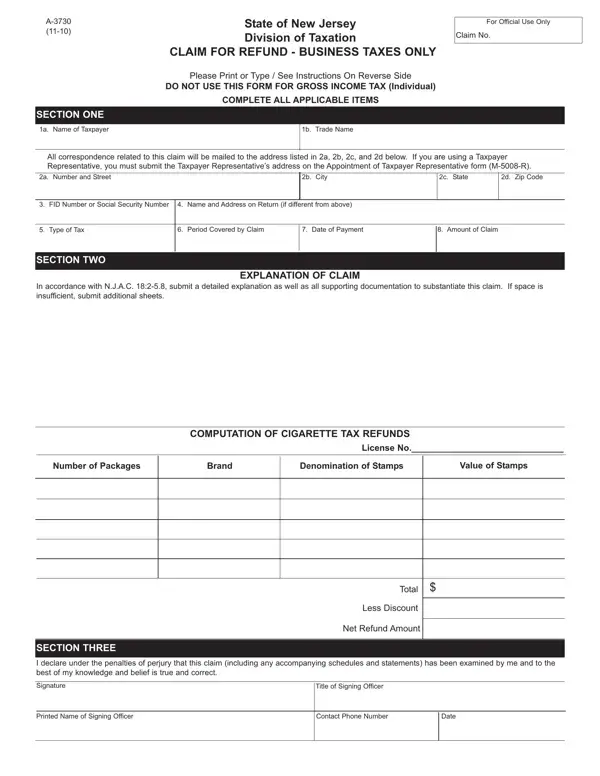
Navigating the complexities of business tax refunds in New Jersey requires familiarizing oneself with the crucial document, the A-3730 form, designed specifically for this purpose by the State of New Jersey Division of Taxation. As a conduit for businesses seeking restitution for overpaid taxes, this form stipulates that it is to be used exclusively for business taxes, excluding gross income tax claims for individuals. Detailed sections guide the taxpayer through providing essential information such as taxpayer identification, the type and period of tax for which a refund is sought, and the total amount claimed. Furthermore, the form mandates a thorough explanation of the claim supported by substantive documentation to establish the validity of the request comprehensively. The structure of the A-3730 form emphasizes the importance of accuracy and completeness, highlighting sections dedicated to taxpayer information, an explanation of the claim including the computation of cigarette tax refunds, if applicable, and requisite signatures validating the claim under the penalties of perjury. With instructions that underscore the necessity of completing all applicable items and submitting additional documents as necessary, the form is designed to streamline the refund process while ensuring adherence to the State's regulatory requirements and statutes of limitations. This process underscores the New Jersey Division of Taxation’s commitment to providing a systematic approach for businesses to rectify overpayments and secure their entitled refunds efficiently.

QuestionAnswer
Form NameForm A 3730
Form Length2 pages
Fillable?No
Fillable fields0
Avg. time to fill out30 sec
Other namesNew_Jersey, fillable a 3730, FID, NJ

How to Edit Form A 3730 Online for Free

M-5008-R can be filled in without difficulty. Just try FormsPal PDF editing tool to get it done right away. The tool is continually improved by us, receiving handy features and turning out to be better. With just several basic steps, you can begin your PDF editing:

Step 1: Hit the "Get Form" button at the top of this webpage to access our editor.

Step 2: The tool provides the opportunity to change your PDF file in a variety of ways. Modify it by adding any text, adjust what is already in the file, and put in a signature - all doable in minutes!

This form will need you to type in some specific details; in order to guarantee accuracy and reliability, you should take note of the suggestions hereunder:

1. When submitting the M-5008-R, be sure to incorporate all important blank fields within its associated area. It will help speed up the work, making it possible for your details to be processed quickly and properly.

Completing section 1 in A-3730

2. Right after filling out the previous step, go to the next stage and fill in all required particulars in these blank fields - COMPUTATION OF CIGARETTE TAX, License No, Number of Packages, Brand, Denomination of Stamps, Value of Stamps, Total, Less Discount, Net Refund Amount, SECTION THREE, I declare under the penalties of, Signature, and Title of Signing Officer.

Filling in part 2 in A-3730

When it comes to Total and I declare under the penalties of, make sure that you take a second look in this section. These two are thought to be the most important fields in this page.

3. Completing Signature, Title of Signing Officer, Printed Name of Signing Officer, Contact Phone Number, and Date is essential for the next step, make sure to fill them out in their entirety. Don't miss any details!

Step # 3 for filling in A-3730

Step 3: Right after you have looked over the information you filled in, just click "Done" to finalize your document generation. After setting up a7-day free trial account here, you will be able to download M-5008-R or send it via email promptly. The form will also be at your disposal via your personal account with your every single modification. FormsPal is committed to the personal privacy of our users; we always make sure that all information put into our editor stays protected.