
Form A48 PDF Details

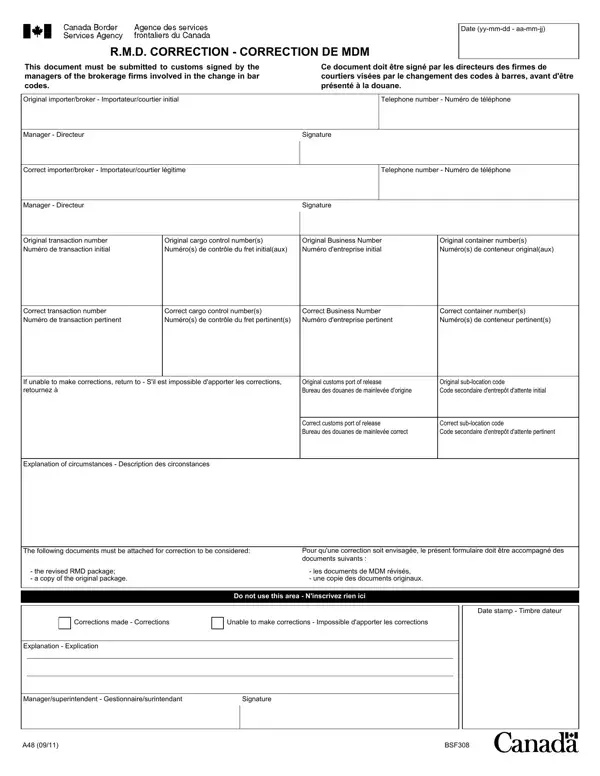
In the intricate ballet of international trade, ensuring that all documentation is correct and up to date is paramount. The A48 form, also known as the R.M.D. (Release on Minimal Documentation) Correction form, plays a vital role in this process. Serving as a crucial tool for brokerage firms, this document is necessary whenever there is a need to correct information related to bar code changes on shipments. It must be meticulously filled out and signed by the managers of the firms involved, underscoring its importance in the smooth operation of international trade logistics. The form captures essential data, including the original and correct importer or broker details, telephone numbers, manager signatures, and specific transaction and cargo control numbers, alongside business and container numbers. Additionally, it outlines the procedure for instances where corrections cannot be made, directing the involved parties to return the document to the original or correct customs port of release, as appropriate. The inclusion of an Explanation of Circumstances section, alongside the requirement to attach both the revised RMD package and a copy of the original documents, ensures a comprehensive approach to corrections. This meticulous documentation process underscores the complexities of international trade, requiring attention to detail to prevent potential disruptions in the supply chain.

QuestionAnswer
Form NameForm A48
Form Length1 pages
Fillable?No
Fillable fields0
Avg. time to fill out15 sec
Other namesrmd correction pdf, rmd correction a48, a48 cbsa, a48 rmd correction form

How to Edit Form A48 Online for Free

It is possible to prepare rmd correction without difficulty with our PDFinity® online PDF tool. FormsPal team is aimed at providing you with the absolute best experience with our editor by regularly presenting new functions and upgrades. With all of these updates, working with our editor becomes easier than ever before! With some basic steps, it is possible to begin your PDF journey:

Step 1: First of all, access the tool by clicking the "Get Form Button" at the top of this page.

Step 2: As soon as you launch the tool, you will notice the document ready to be filled out. Apart from filling in various blanks, you could also do various other things with the PDF, including writing custom textual content, changing the original textual content, adding illustrations or photos, signing the form, and much more.

If you want to fill out this form, be sure you enter the necessary information in each and every area:

1. The rmd correction necessitates certain details to be typed in. Ensure that the subsequent fields are finalized:

rmd correction form conclusion process outlined (step 1)

2. Your next stage is to complete the following blanks: If unable to make corrections, Original customs port of release, Original sublocation code Code, Correct customs port of release, Correct sublocation code Code, Explanation of circumstances, The following documents must be, Pour quune correction soit, the revised RMD package a copy, les documents de MDM révisés une, Corrections made Corrections, Unable to make corrections, Do not use this area Ninscrivez, Date stamp Timbre dateur, and Explanation Explication.

A way to fill in rmd correction form portion 2

Those who work with this document often get some points wrong when filling out Explanation of circumstances in this area. Don't forget to read again everything you enter here.

Step 3: Before submitting this form, make certain that form fields were filled in correctly. Once you’re satisfied with it, press “Done." After starting a7-day free trial account here, you'll be able to download rmd correction or send it through email promptly. The PDF document will also be accessible in your personal account menu with your each modification. At FormsPal, we do everything we can to make certain that your details are maintained private.