
Form C 105 51 PDF Details

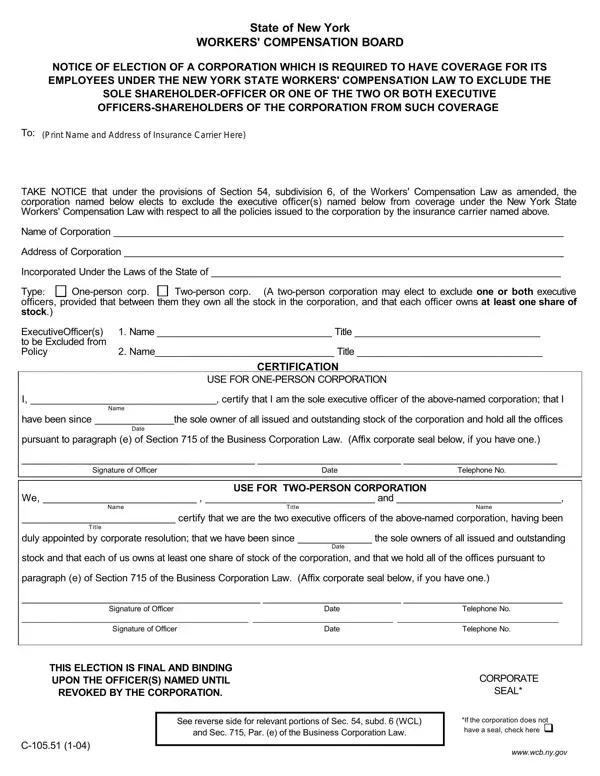
In the bustling world of business operations, navigating the complexities of legal requirements stands as a critical endeavor for corporations, particularly when it pertains to workers' compensation. Among the myriad forms and notifications that businesses must manage, the C-105.51 form holds particular significance for corporations within New York State. This form serves as a Notice of Election, designed for corporations that are mandated by the New York State Workers' Compensation Law to provide coverage for their employees, yet wish to exclude certain individuals from this requirement—specifically, the sole shareholder-officer or two executive officers/shareholders, assuming they own all of the corporation's stock. Detailed within the form are provisions for both one-person and two-person corporations, outlining the process by which these entities can officially make such an election. This declaration entails a certification process, where the concerned officer(s) affirm their stock ownership, their exclusive operation of the corporation, and their decision to waive workers' compensation coverage for themselves, under specified conditions. The form’s stipulations extend to outlining the conditions under which these elections are deemed final and binding, alongside how revocations can be processed. Such details underscore the importance of understanding the legal nuances embedded within the C-105.51 form, ensuring corporations comply with the law while aligning with their operational needs.

QuestionAnswer
Form NameForm C 105 51
Form Length2 pages
Fillable?No
Fillable fields0
Avg. time to fill out30 sec
Other names10551 form, nys exclude workers, c 105 51 form, exclude workers

How to Edit Form C 105 51 Online for Free

Through the online PDF editor by FormsPal, you may fill out or alter officer exclusion form ny right here and now. To keep our tool on the cutting edge of convenience, we aim to integrate user-driven capabilities and enhancements regularly. We are routinely looking for suggestions - join us in revampimg PDF editing. With a few easy steps, you may start your PDF editing:

Step 1: Open the PDF form in our editor by clicking on the "Get Form Button" at the top of this page.

Step 2: This editor provides you with the capability to change PDF documents in a variety of ways. Modify it by including your own text, adjust existing content, and add a signature - all when you need it!

When it comes to blank fields of this particular document, here's what you should consider:

1. While completing the officer exclusion form ny, be sure to complete all of the essential fields within its relevant section. This will help facilitate the process, allowing your information to be processed promptly and correctly.

c 105 51 form writing process detailed (step 1)

2. Once the last part is complete, you need to include the required particulars in pursuant to paragraph e of Section, Signature of Officer Date, USE FOR TWOPERSON CORPORATION We, Name, Title, Name, certify that we are the two, Title, duly appointed by corporate, Date, stock and that each of us owns at, paragraph e of Section of the, Signature of Officer Date, THIS ELECTION IS FINAL AND BINDING, and REVOKED BY THE CORPORATION so you can go to the next stage.

Stage number 2 in submitting c 105 51 form

Many people frequently get some points wrong while filling out stock and that each of us owns at in this area. Don't forget to revise everything you enter here.

3. In this part, look at wwwwcbnygov, See reverse side for relevant, and Sec Par e of the Business, and If the corporation does not have a. Each one of these should be completed with highest precision.

If the corporation does not have a, See reverse side for relevant, and wwwwcbnygov of c 105 51 form

Step 3: Proofread what you have typed into the blank fields and hit the "Done" button. Right after getting a7-day free trial account here, it will be possible to download officer exclusion form ny or email it at once. The PDF document will also be readily accessible in your personal account with all your adjustments. FormsPal is invested in the confidentiality of our users; we make sure that all personal information processed by our tool is kept secure.