
Form Ccc 37 PDF Details

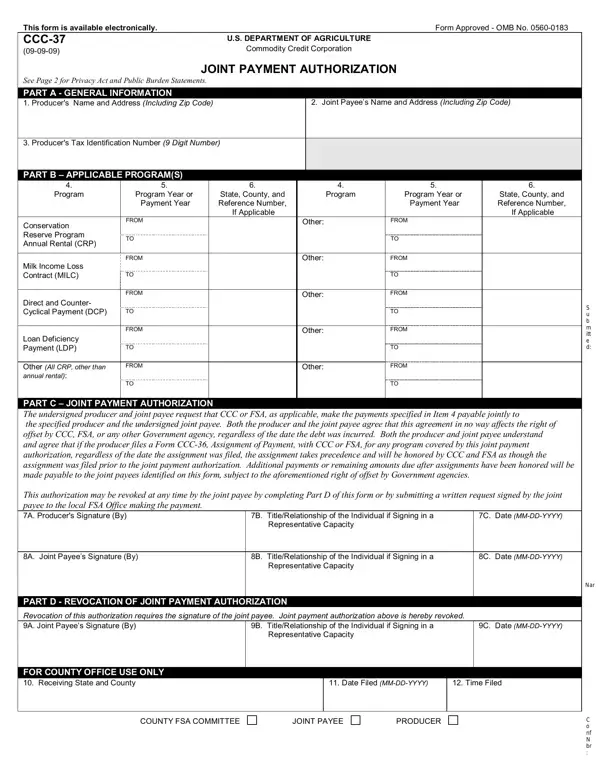
Understanding the intricate workings of the CCC-37 form is vital for anyone involved in the agricultural sector who seeks to benefit from certain U.S. Department of Agriculture (USDA) programs. Essentially, the CCC-37 form serves as a joint payment authorization document, enabling payments to be issued jointly to a producer and a designated joint payee under various USDA programs. It is part of the administrative process managed by the Commodity Credit Corporation and the USDA's Farm Service Agency (FSA), designed to streamline the transaction and distribution of funds. This form encompasses general information including the producer's and joint payee’s names and addresses, as well as their tax identification numbers. Furthermore, it details applicable programs like the Conservation Reserve Program (CRP), Milk Income Loss Contract (MILC), Direct and Counter-Cyclical Payment (DCP), and Loan Deficiency Payment (LDP), among others. The signing of the CCC-37 signifies an agreement between the producer and the joint payee that the specified payments will be made jointly, yet it also notes that this agreement does not affect any rights of offset by the CCC, FSA, or any government agency. The intricacies of filing, revoking, and managing this authorization, as outlined in the form, highlight the procedural requirements and legal considerations integral to the authorization process for joint payments. Additionally, the form touches on privacy act statements, the process for revoking joint payment authorization, and nondiscrimination policies, thereby encapsulating a wide array of protocols necessary for the lawful and ethical administration of agriculture-related payments.

QuestionAnswer
Form NameForm Ccc 37
Form Length2 pages
Fillable?No
Fillable fields0
Avg. time to fill out30 sec
Other namesWashington, USDA, mation, CCC

How to Edit Form Ccc 37 Online for Free

Handling PDF forms online is actually simple with this PDF editor. You can fill out Washington here painlessly. In order to make our editor better and more convenient to use, we continuously design new features, considering feedback from our users. By taking a few simple steps, you can begin your PDF editing:

Step 1: Open the PDF form inside our tool by pressing the "Get Form Button" above on this webpage.

Step 2: This editor gives you the opportunity to modify your PDF form in various ways. Improve it with personalized text, adjust original content, and put in a signature - all when it's needed!

When it comes to fields of this particular form, here is what you should do:

1. Fill out your Washington with a selection of necessary blank fields. Note all of the important information and make certain there's nothing neglected!

Tips on how to prepare CCC-37 part 1

2. Once your current task is complete, take the next step – fill out all of these fields - This authorization may be revoked, C Date MMDDYYYY, B TitleRelationship of the, A Joint Payees Signature By, B TitleRelationship of the, C Date MMDDYYYY, PART D REVOCATION OF JOINT, Revocation of this authorization, B TitleRelationship of the, C Date MMDDYYYY, FOR COUNTY OFFICE USE ONLY, Date Filed MMDDYYYY, Time Filed, COUNTY FSA COMMITTEE, and JOINT PAYEE with their corresponding information. Make sure to double check that everything has been entered correctly before continuing!

Part # 2 of completing CCC-37

3. Within this step, look at C Neither the United States of, officer nor any other Government, D This joint payment authorization, E This joint payment authorization, F This joint payment authorization, A COUNTY FSA OFFICE NAME AND, B TELEPHONE NO Including area code, NOTE, and The follow ing stat ement is made. Every one of these have to be completed with greatest attention to detail.

Filling in part 3 in CCC-37

It's easy to make an error when filling out your B TELEPHONE NO Including area code, so be sure to take a second look prior to when you finalize the form.

4. Completing The US Department of Agriculture is key in this fourth section - make certain that you invest some time and fill out each and every field!

Learn how to fill in CCC-37 stage 4

Step 3: Check the details you have typed into the blank fields and then press the "Done" button. Make a 7-day free trial subscription at FormsPal and gain direct access to Washington - download or modify in your FormsPal account page. FormsPal is devoted to the confidentiality of our users; we always make sure that all personal data coming through our tool is protected.