
Form CG-7042 PDF Details

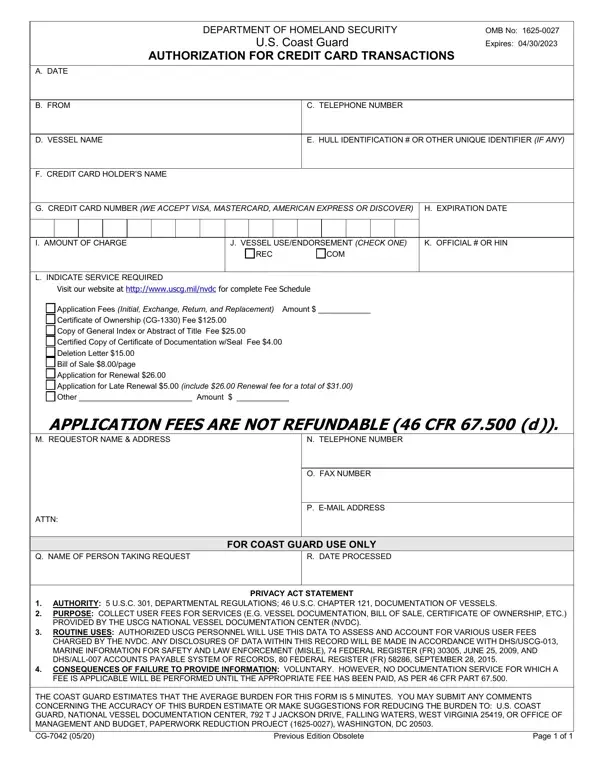
When it comes to maritime operations and vessel management, efficiently handling financial transactions is a key aspect that cannot be overstated. This is where the CG-7042 form, sanctioned by the Department of Homeland Security and specifically by the U.S. Coast Guard, comes into play. With its expiration dated April 30, 2023, and identified under OMB No: 1625-0027, this form serves as an authorization for credit card transactions related to a diverse range of services provided by the U.S. Coast Guard's National Vessel Documentation Center (NVDC). Covering everything from application fees for initial documentation to renewal and late renewal fees, and even charges for certificates of ownership and bills of sale, the CG-7042 form is fundamental for vessel owners and operators looking to simplify their transactions with the NVDC. By accepting major credit cards such as Visa, MasterCard, American Express, and Discover, the form streamlines the process of paying for necessary documentation and services, which are crucial for compliance and operational efficiency in maritime activities. Moreover, the form's consideration of privacy and routine use of collected data ensures that users are informed about the handling of their information, thus, emphasizing transparency and trust in these transactions. Importantly, the CG-7042 form alerts users that application fees are not refundable, underlining the importance of accuracy and attention to detail when completing and submitting this form.

QuestionAnswer
Form Name Form CG-7042
Form Length 1 pages
Fillable? No
Fillable fields 0
Avg. time to fill out 15 sec
Other names cg 7042, us coast guard form 7042, cg 7042 authorization for credit card, form 7042 form, doh authorization for credit card transactions

How to Edit Form CG-7042 Online for Free

Any time you want to fill out uscg Form CG-7042, you don't need to download and install any programs - just use our online tool. FormsPal professional team is constantly working to develop the editor and help it become much easier for people with its handy features. Take your experience one stage further with continually improving and exceptional options we offer! With a few basic steps, it is possible to start your PDF editing:

Step 1: First of all, open the pdf tool by clicking the "Get Form Button" in the top section of this webpage.

Step 2: Once you access the PDF editor, you will notice the form all set to be filled in. Other than filling out different blanks, you can also perform many other actions with the PDF, including writing custom words, changing the initial textual content, inserting illustrations or photos, placing your signature to the form, and much more.

It is actually simple to fill out the document using out detailed guide! Here is what you must do:

1. While filling in the uscg Form CG-7042, make sure to include all of the necessary blanks within the relevant area. This will help to speed up the work, which allows your information to be processed without delay and properly.

Step no. 1 of submitting form 7042 form

2. Given that the previous part is done, it is time to insert the required specifics in Application Fees Initial Exchange, APPLICATION FEES ARE NOT, N TELEPHONE NUMBER, O FAX NUMBER, P EMAIL ADDRESS, FOR COAST GUARD USE ONLY, R DATE PROCESSED, M REQUESTOR NAME ADDRESS ATTN, and Q NAME OF PERSON TAKING REQUEST so you're able to go to the 3rd part.

The way to complete form 7042 form step 2

People often make mistakes when filling in N TELEPHONE NUMBER in this area. Make sure you read twice what you enter right here.

Step 3: Right after you've glanced through the details in the file's blank fields, simply click "Done" to complete your FormsPal process. Right after starting afree trial account with us, you'll be able to download uscg Form CG-7042 or email it right off. The PDF document will also be at your disposal via your personal account with all your changes. We don't sell or share the information you use whenever completing forms at FormsPal.