
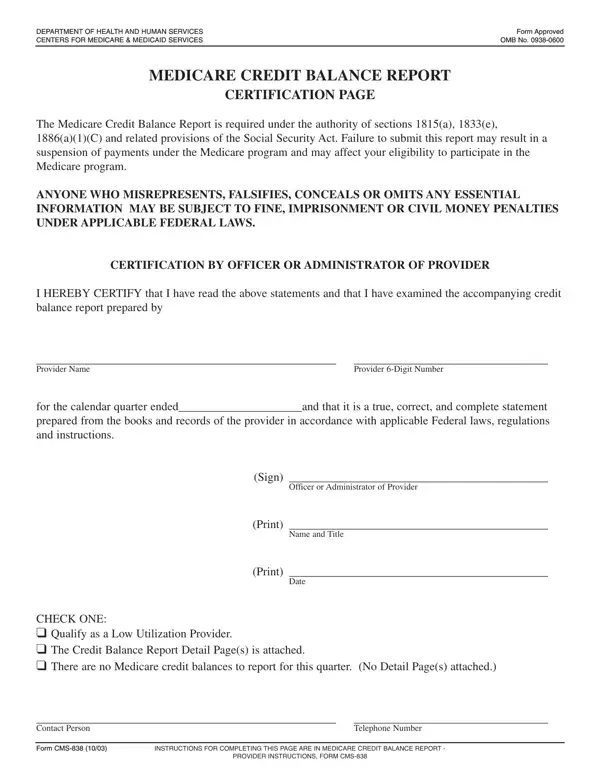

Form CMS-838 at a glance
What it is: The Medicare Credit Balance Report (CMS-838) consists of a certification page and a detail page, and is used to monitor identification and recovery of credit balances owed to Medicare.
Who signs: An officer (the Chief Financial Officer or Chief Executive Officer) or the Administrator of your facility must sign and date the certification page.
Where and when to file: Submit a completed CMS-838 to your fiscal intermediary (FI). Submit it within 30 days after the close of each calendar quarter.
All providers participating in the Medicare program are to complete a Medicare Credit Balance Report (CMS-838) to help ensure that monies owed to Medicare are repaid in a timely manner.
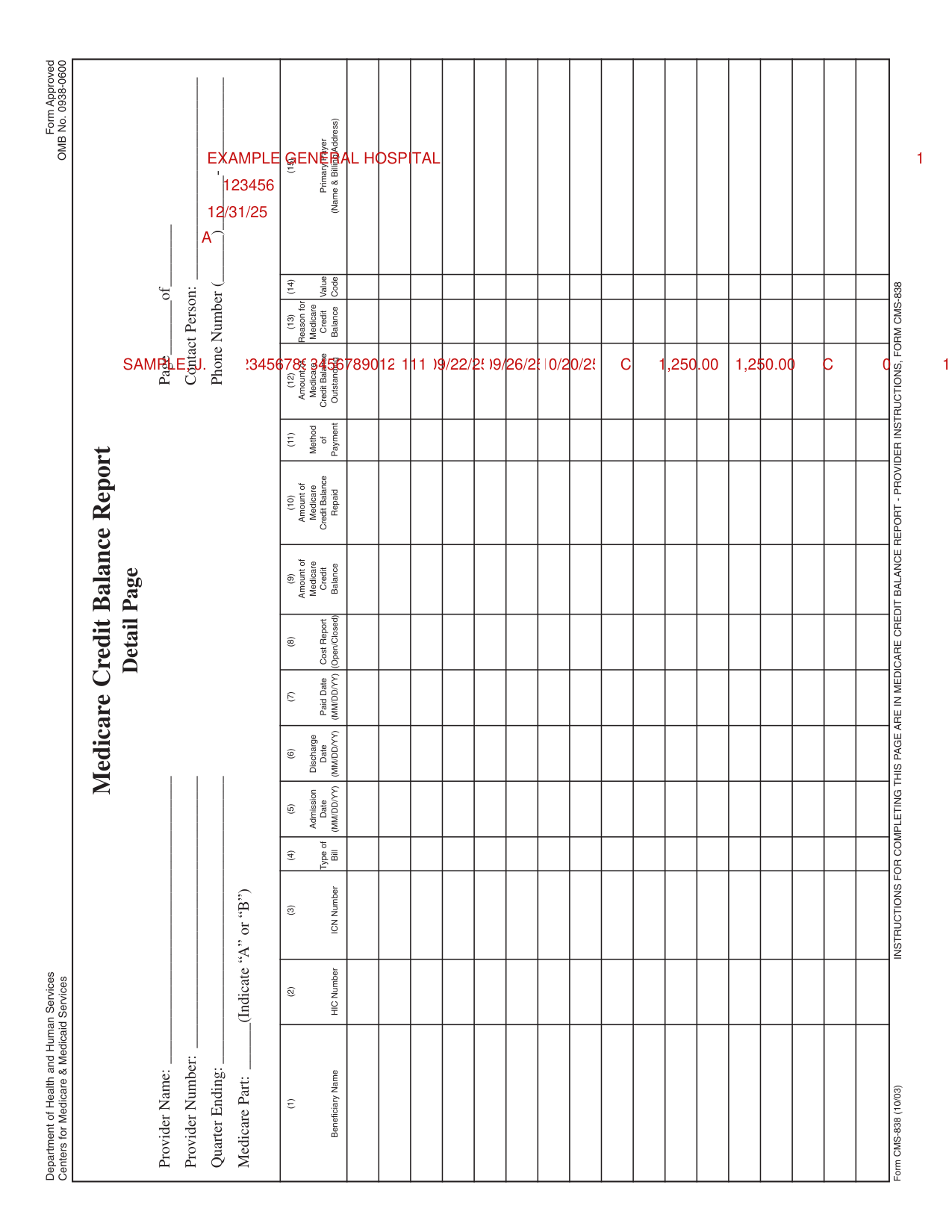
A filled-in Form CMS-838 example: a hospital repays a duplicate payment
How to fill out Form CMS-838, box by box
Provider Name and Provider 6-Digit Number, and the calendar quarter ended

Enter the Provider Name and the Provider 6-Digit Number after "credit balance report prepared by", and the end of the calendar quarter after "for the calendar quarter ended", in the box next to "prepared from the books and records of the provider in accordance with applicable Federal laws, regulations".
Officer or Administrator of Provider, Name and Title, and Date

Sign on the Officer or Administrator of Provider line, then print the Name and Title and the Date.
Check one

Check one box: Qualify as a Low Utilization Provider, the Credit Balance Report Detail Page(s) is attached, or there are no Medicare credit balances to report for this quarter (No Detail Page(s) attached).
Contact Person and Telephone Number

Enter the Contact Person and the Telephone Number.
Heading area of the detail page: facility name, provider number, reporting quarter, Part A or B, page number and contact

Begin completing the CMS-838 by providing the full name of the facility and the facility's provider number in the heading area of the detail page(s).
If there are multiple provider numbers for dedicated units within the facility (e.g., psychiatric, physical medicine and rehabilitation), complete a separate Medicare Credit Balance Report for each provider number.
Enter the month, day and year of the reporting quarter; e.g., 12/31/02. Enter an "A" if the report page(s) reflects Medicare Part A credit balances, or a "B" if it reflects Part B credit balances.
Enter the number of the current detail page and the total number of pages forwarded, excluding the certification page (e.g., Page 1 of 3). Enter the name and telephone number of the individual who may be contacted regarding any questions that may arise with respect to the credit balance data.
Columns 1 to 3: Beneficiary Name, HIC Number and ICN Number

Column 1: The last name and first initial of the Medicare Beneficiary, (e.g., Doe, J.). When a credit balance is the result of a duplicate Medicare primary payment, report the data pertaining to the most recently paid claim.
Column 2: The Medicare Health Insurance Claim Number (HICN) of the Medicare Beneficiary.
Column 3: The multiple-digit Internal Control Number (ICN) assigned by Medicare when the claim is processed.
Columns 4 to 7: Type of Bill, Admission Date, Discharge Date and Paid Date

Column 4: The 3-digit number explaining the type of bill; e.g., 111 - inpatient, 131 - outpatient, 831 - same day surgery.
Columns 5/6: The month, day and year the beneficiary was admitted and discharged, if an inpatient claim; or "From" and "Through" dates (date service(s) were rendered), if an outpatient service. Numerically indicate the admission (From) and discharge (Through) date (e.g., 01/01/02).
Column 7: The month, day and year (e.g., 01/01/02) the claim was paid. If a credit balance is caused by a duplicate Medicare payment, ensure the paid date and ICN number correspond to the most recent payment.
Columns 8 and 9: Cost Report (Open/Closed) and Amount of Medicare Credit Balance

Column 8: An "O" if the claim is for an open Medicare cost reporting period, or a "C" if the claim pertains to a closed cost reporting period. (An open cost report is one where an NPR has not yet been issued. Do not consider a cost report open if it was reopened for a specific issue such as graduate medical education or malpractice insurance.)
Column 9: The amount of the Medicare credit balance that was determined from your patient/ accounting records.
Columns 10 to 12: Amount of Medicare Credit Balance Repaid, payment and Amount of Medicare Credit Balance Outstanding

Column 10: The amount of the Medicare credit balance identified in column 9 being repaid with the submission of the report.
Column 11: A "C" when you submit a check with the CMS-838 to repay the credit balance amount shown in column 9, an "A" if a claim adjustment is being submitted in hard copy (e.g., adjustment bill in UB-92 format) with the CMS-838, and a "Z" if payment is being made by a combination of check and adjustment bill with the CMS-838. Use an "X" if an adjustment bill has already been submitted electronically or by hard copy.
Providers must pay all amounts owed (column 9 of the report) at the time the credit balance report is submitted. Providers must submit payment, by check or adjustment bill.
Payments by check must also be accompanied by a separate adjustment bill, electronic or hard copy, for all individual credit balances that pertain to open cost reporting periods.
Column 12: The amount of the Medicare credit balance that remains outstanding (column 9 minus column 10). Show a zero ("0") if you made full payment with the CMS-838 or a claim adjustment had been submitted previously, including electronically.
Columns 13 and 14: Reason for Medicare Credit Balance and Value Code

Column 13: The reason for the Medicare credit balance by entering a "1" if it is the result of duplicate Medicare payments, a "2" for a primary payment by another insurer, or a "3" for "other reasons." Provide an explanation on the detail page for each credit balance with a "3."
Column 14: The Value Code to which the primary payment relates, using the appropriate two digit code. This column is completed only if the credit balance was caused by a payment when Medicare was not the primary payer. If more than one code applies, enter the code applicable to the payer with the largest liability.
More rules for Form CMS-838
Only Medicare credit balances are reported on the CMS-838. Include in the report all Medicare credit balances shown in your accounting records (including transfer, holding or other general accounts used to accumulate credit balance funds) as of the last day of the reporting quarter. Report all Medicare credit balances shown in your records regardless of when they occurred.
If your situation is different
Your facility has no Medicare credit balances for the reporting quarter
Even if no Medicare credit balances are shown in your records for the reporting quarter, you must still have the form signed and submitted to your FI in attestation of this fact. Only a signed certification page needs to be submitted if your facility has no Medicare credit balances as of the last day of the reporting quarter.
Your facility is a low utilization provider
Providers with extremely low Medicare utilization do not have to submit a CMS-838. A low utilization provider is defined as a facility that files a low utilization Medicare cost report as specified in PRM-I, section 2414.4.B, or files less than 25 Medicare claims per year.
You have both Part A and Part B credit balances
Segregate Part A credit balances from Part B credit balances by reporting them on separate detail pages. Part B pertains only to services you provide which are billed to your FI. It does not pertain to physician and supplier services billed to carriers.
Common questions about Form CMS-838
Is there a deadline?
Submit it within 30 days after the close of each calendar quarter.
Where do I file it?
Submit a completed CMS-838 to your fiscal intermediary (FI).
Is there a penalty?
Anyone who misrepresents, falsifies, conceals or omits any essential information may be subject to fine, imprisonment or civil money penalties under applicable Federal laws.
Sources
[1] Form CMS-838 (10/03), Medicare Credit Balance Report, Centers for Medicare & Medicaid Services (the Official source link on this page).