
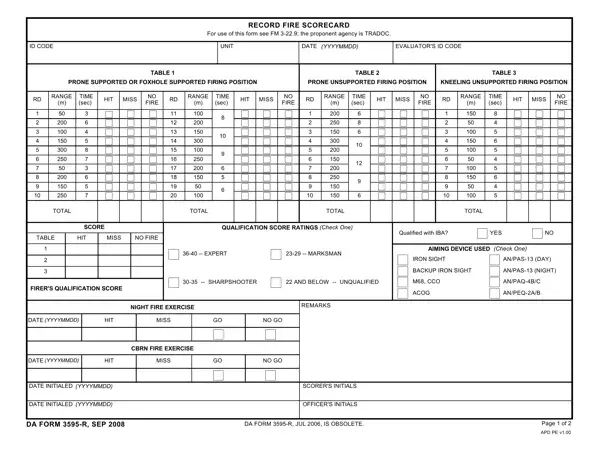
Ensuring military personnel are proficient in marksmanship is a critical component of their training regimen, encapsulated in the rigorous evaluation process of the DA Form 3595-R, or Record Fire Scorecard. This form, governed by the guidelines set forth in FM 3-22.9 and under the stewardship of TRADOC, serves as a standardized tool for recording a soldier's firearm proficiency across varying conditions and positions. It documents the performance of soldiers engaging targets from three distinct firing positions: prone supported or foxhole, prone unsupported, and kneeling unsupported, across different ranges. The form meticulously tracks each round fired, hits and misses, and the time taken for each engagement, catering to the comprehensive evaluation of a soldier's marksmanship skills. It categorizes qualification scores into four ratings—expert, sharpshooter, marksman, and unqualified—providing clear benchmarks for soldier performance. Additionally, the DA Form 3595-R details the conditions under which the fire exercises are conducted, including the use of specific aiming devices and the attire required for qualification. Remedial training and reevaluation procedures for those not meeting the qualifying criteria on their first attempt are also outlined, emphasizing the form's role not just as a record-keeping instrument but as a tool for continuous improvement and skill reinforcement. The form encapsulates the complex interplay of regulations, proficiency standards, and the commitment to maintaining an operationally ready force.
| Question | Answer |
|---|---|
| Form Name | Form Da 3595 R |
| Form Length | 2 pages |
| Fillable? | No |
| Fillable fields | 0 |
| Avg. time to fill out | 30 sec |
| Other names | how to fillable da 3595 r, record fire scorecard, da form 3595 r pdf fillable, fillable da r form 3595 |
Form Da 3595 R isn’t the one you’re looking for?