Form Dab 101 PDF Details

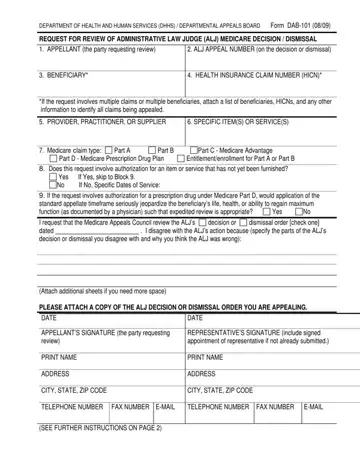
Navigating the intricacies of Medicare appeals is a complex process that necessitates a deep understanding of the procedural steps and documentation required to effectively challenge a decision or dismissal. Among the critical tools in this process is the Department of Health and Human Services (DHHS) / Departmental Appeals Board's Form DAB-101. This form serves as a formal request for a review of an Administrative Law Judge's (ALJ) Medicare decision or dismissal. Its purpose is to facilitate appellants—be they beneficiaries, providers, practitioners, or suppliers—in disputing ALJ decisions that they believe were wrongly adjudicated. The form meticulously requires essential information such as the appellant's details, ALJ appeal number, beneficiary information, health insurance claim number (HICN), and specific details about the items or services under dispute. Moreover, it covers various Medicare claim types, including Parts A, B, C, and D, and addresses cases where expedited review is necessary due to the urgent health needs of a beneficiary. Additionally, the DAB-101 form outlines the procedure for attaching additional evidence, seeking an extension for submitting evidence or legal arguments, and the importance of including the ALJ decision or dismissal order being appealed. It emphasizes that this request must be made within a strict timeline following the receipt of the ALJ’s decision, underlining the procedural rigor that governs the Medicare appeals process. Furthermore, it stresses the importance of privacy and compliance with federal laws concerning the disclosure and exchange of information. Through this document, appellants are guided through a structured process aimed at contesting decisions in a manner that is coherent with regulatory expectations and procedural fairness, marking an important step in the appeals process with the Medicare Appeals Council.

QuestionAnswer
Form NameForm Dab 101
Form Length2 pages
Fillable?No
Fillable fields0
Avg. time to fill out30 sec
Other namesdhhs form request, dhhs departmental form, department departmental appeals, appeals council form

How to Edit Form Dab 101 Online for Free

It is simple to fill out forms using our PDF editor. Editing the human appeals form document is effortless as soon as you keep to these actions:

Step 1: Pick the button "Get Form Here".

Step 2: Once you have accessed the human appeals form edit page, you'll discover all options you may undertake concerning your document at the top menu.

Prepare the human appeals form PDF by providing the details required for every single area.

part 1 to writing department dab get

Inside the field Yes If Yes skip to Block No If No, I request that the Medicare, dismissal order check one, decision or, Attach additional sheets if you, PLEASE ATTACH A COPY OF THE ALJ, DATE, DATE, APPELLANTS SIGNATURE the party, and REPRESENTATIVES SIGNATURE include enter the information that the system requires you to do.

department dab get Yes If Yes skip to Block  No If No, I request that the Medicare, dismissal order check one, decision or, Attach additional sheets if you, PLEASE ATTACH A COPY OF THE ALJ, DATE, DATE, APPELLANTS SIGNATURE the party, and REPRESENTATIVES SIGNATURE include blanks to insert

The application will require for further details with a purpose to easily fill in the box PRINT NAME, ADDRESS, PRINT NAME, ADDRESS, CITY STATE ZIP CODE, CITY STATE ZIP CODE, TELEPHONE NUMBER, FAX NUMBER EMAIL, TELEPHONE NUMBER FAX NUMBER, EMAIL, and SEE FURTHER INSTRUCTIONS ON PAGE.

Completing department dab get stage 3

The space If you are a provider supplier or, IMPORTANT Include the HICN and ALJ, This request must be received, You must file your request for, Department of Health and Human, and You may send the request for is going to be where you can insert both sides' rights and responsibilities.

Finishing department dab get step 4

End by reviewing these areas and filling them in accordingly: If you have any questions about, PRIVACY ACT STATEMENT, and The collection of information on.

stage 5 to entering details in department dab get

Step 3: Press "Done". Now you may export your PDF document.

Step 4: Get duplicates of the file. This is going to save you from upcoming difficulties. We cannot look at or reveal your data, thus be assured it is protected.

Please rate Form Dab 101

1 Votes
If you believe this page is infringing on your copyright, please familiarize yourself with and follow our DMCA notice and takedown process - click here to proceed .