
Form Dh3039 PDF Details

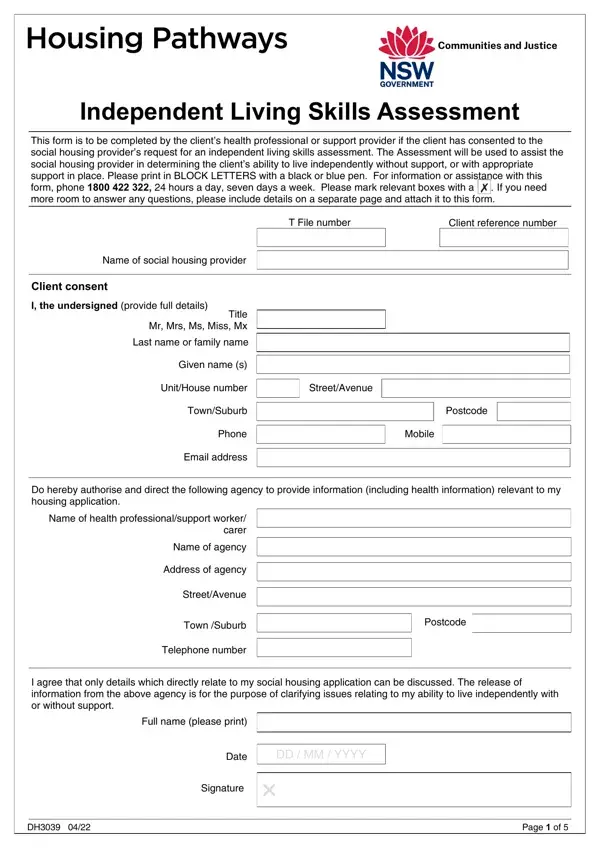
Navigating the complex terrain of social housing can be daunting, especially when it involves assessing an individual's ability to live independently. The DH3039 form serves as a crucial tool in this process, meticulously designed for health professionals or support providers to evaluate and communicate a client’s capabilities in managing life's daily tasks without, or with, external support. This detailed Independent Living Skills Assessment requires careful completion in BLOCK LETTERS using a black or blue pen, ensuring clarity and precision in every section. It marks a pivotal step for clients consenting to undergo this evaluation, a gesture of their trust and a significant move toward securing appropriate social housing. With sections ranging from financial management to personal care, and even social interaction, the form guides the assessor through a comprehensive review of the client's abilities. Additionally, it facilitates a nuanced understanding, allowing space for detailed explanations beyond the constraints of tick boxes and yes/no queries. The DH3039 form is not just a document; it's a bridge between a client's current situation and their potential new home, ensuring that those who are most in need are supported in a manner that respects their independence and dignity. The form must be submitted with accurate and consented information, as it directly informs the social housing provider's decision-making process, making it a critical piece of the puzzle in the journey towards secure and suitable housing.

QuestionAnswer
Form NameForm Dh3039
Form Length5 pages
Fillable?No
Fillable fields0
Avg. time to fill out1 min 15 sec
Other nameshousing pathways independent living skills assessment, Postcode, independent living skills assessment form, NSW

How to Edit Form Dh3039 Online for Free

Handling PDF forms online is certainly a breeze with our PDF tool. Anyone can fill out carer here and try out various other functions we offer. To have our tool on the forefront of practicality, we work to put into action user-oriented features and enhancements on a regular basis. We're routinely glad to receive suggestions - join us in revolutionizing PDF editing. This is what you would want to do to get started:

Step 1: First of all, open the pdf tool by clicking the "Get Form Button" in the top section of this page.

Step 2: The tool will let you change nearly all PDF forms in various ways. Enhance it by writing any text, correct existing content, and place in a signature - all when you need it!

In order to complete this PDF form, make certain you provide the necessary information in every single blank field:

1. You will need to fill out the carer properly, therefore pay close attention while filling in the segments containing these blank fields:

Find out how to fill in supported living risk assessment template step 1

2. Once this array of fields is done, proceed to type in the suitable details in all these - Address of agency, StreetAvenue, Town Suburb, Telephone number, Postcode, I agree that only details which, Full name please print, Date, DD MM YYYY, Signature, and Page of.

supported living risk assessment template writing process outlined (stage 2)

3. In this particular step, look at If applicable, Guardians full name please print, Date, DD MM YYYY, Guardians signature, Independent living skills, To be eligible for social housing, Section A To be completed by, How long have you known or worked, the client, Have you seen or worked with the, and Yes. These will have to be completed with greatest awareness of detail.

Stage number 3 of submitting supported living risk assessment template

4. This paragraph comes next with these particular form blanks to consider: In your professional opinion is, Yes, Provide details below and go to, Section B Financial Management, Based on your professional, Is the NSW Trustee and Guardian or, Yes, Go to Section C, Go to question, Yes, Go to Section C, Go to question, Is a third party such as a family, Yes, and Go to Section C.

Is the NSW Trustee and Guardian or, Section B Financial Management, and Go to Section C in supported living risk assessment template

5. As a final point, the following last portion is what you should complete before submitting the PDF. The blank fields in this instance are the next: Section C Property Care, Based on your professional, Does the client have the ability, maintain their home in a, Yes, Go to Section D, Go to question, Yes, and Page of.

maintain their home in a, Yes, and Go to question in supported living risk assessment template

Be extremely careful while filling in maintain their home in a and Yes, since this is where many people make some mistakes.

Step 3: Soon after proofreading the fields you have filled in, hit "Done" and you're good to go! Try a free trial subscription at FormsPal and obtain immediate access to carer - which you can then work with as you would like from your FormsPal account page. If you use FormsPal, you can certainly complete forms without being concerned about data breaches or records being shared. Our protected platform makes sure that your personal information is maintained safely.