
You'll be able to prepare pennsylvania identification dot instantly with the help of our PDFinity® online tool. Our tool is continually evolving to present the very best user experience achievable, and that's because of our resolve for constant improvement and listening closely to feedback from users. Here's what you'll need to do to begin:
Step 1: Hit the "Get Form" button in the top section of this page to access our tool.
Step 2: As you open the file editor, you will get the document made ready to be filled in. Aside from filling out various blank fields, you may as well do many other things with the file, including adding any textual content, changing the initial textual content, inserting graphics, signing the form, and a lot more.
If you want to fill out this PDF document, make certain you provide the required details in every area:
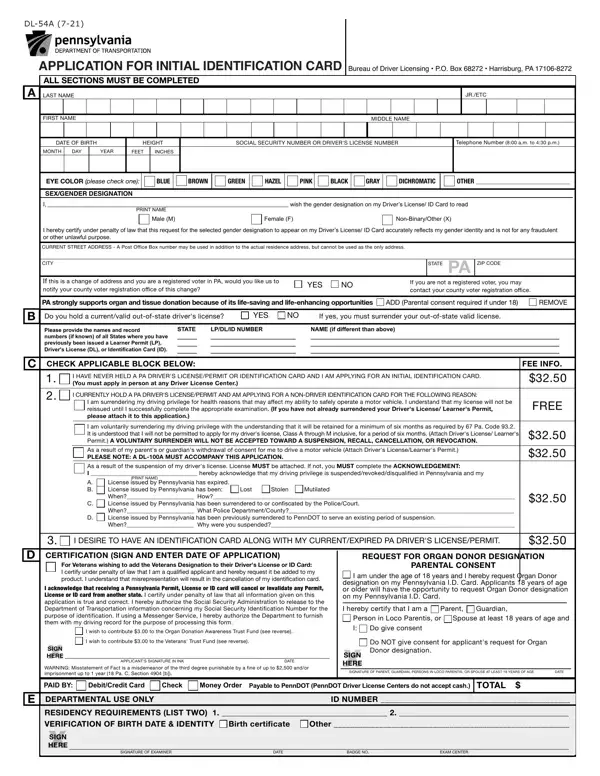
1. While filling out the pennsylvania identification dot, ensure to include all needed fields in their associated form section. It will help facilitate the process, which allows your information to be processed quickly and correctly.
2. Once your current task is complete, take the next step – fill out all of these fields - I am surrendering my driving, License issued by Pennsylvania has, PRINT NAME, I DESIRE TO HAVE AN IDENTIFICATION, FREE, CERTIFICATION SIGN AND ENTER DATE, For Veterans wishing to add the, I wish to contribute to the Organ, HERE, XSIGN WARNING Misstatement of Fact, APPLICANTS SIGNATURE IN INK, DATE, REQUEST FOR ORGAN DONOR DESIGNATION, PARENTAL CONSENT, and I am under the age of years and I with their corresponding information. Make sure to double check that everything has been entered correctly before continuing!
3. This next step is going to be easy - fill out all the fields in XSIGN WARNING Misstatement of Fact, Do NOT give consent for applicants, HERE, SIGNATURE OF PARENT GUARDIAN, DATE, PAID BY DebitCredit Card Check, Payable to PennDOT PennDOT Driver, TOTAL, DEPARTMENTAL USE ONLY, ID NUMBER, RESIDENCY REQUIREMENTS LIST TWO, XSIGN, HERE, SIGNATURE OF EXAMINER, and DATE to conclude this segment.
4. Filling in If you are under years of age, SECTION D Veterans Designation You, TO MEET IDENTIFICATION, Birth Certificate with raised, and US CITIZENS You must bring the is paramount in the next step - always take your time and fill in every field!
It is possible to get it wrong while completing the Birth Certificate with raised, and so ensure that you reread it before you finalize the form.
Step 3: Right after proofreading your entries, press "Done" and you are all set! Obtain the pennsylvania identification dot the instant you sign up at FormsPal for a 7-day free trial. Instantly gain access to the pdf form inside your FormsPal cabinet, along with any edits and changes automatically saved! FormsPal is invested in the personal privacy of all our users; we ensure that all personal data coming through our system is secure.
