
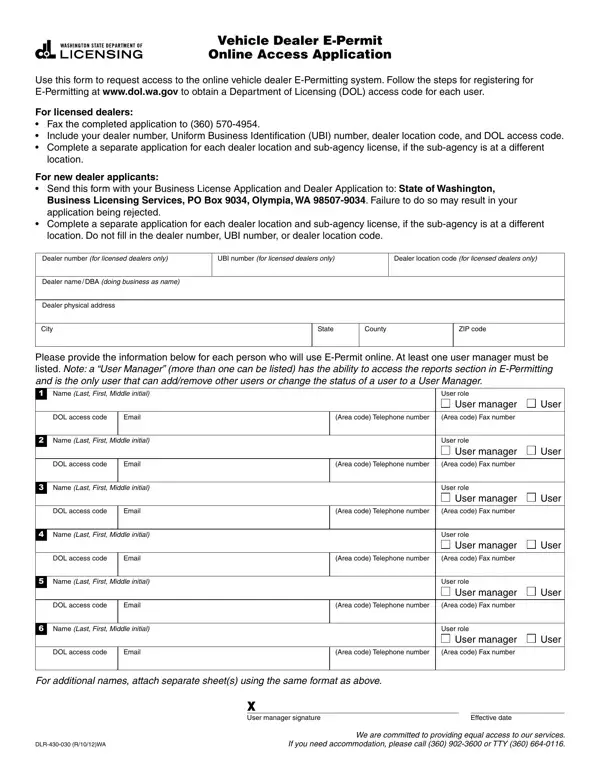
In today's digitally-driven marketplace, having online access to essential services has become a cornerstone for efficiency and effectiveness, especially in the vehicle dealership sector. At the heart of this transformation is the DLR 430 030 form, a critical document for vehicle dealers who wish to tap into the convenience of the E-Permitting system provided by the Department of Licensing (DOL) in Washington State. This application process is designed to streamline the entryway into this digital service, offering dealers a simplified pathway to manage their permits online. By focusing on the mandatory steps outlined at www.dol.wa.gov, dealers are guided on how to secure a unique DOL access code for each user, a prerequisite for exploiting the system's full capabilities. Licensed dealers are required to fax their completed applications, ensuring their dealer number, Uniform Business Identification (UBI) number, dealer location code, and DOL access code are clearly stated. Importantly, separate applications are necessary for each dealer location and for sub-agency licenses at different locations, underlining the need for comprehensive compliance. For newcomers to the dealership landscape, the integration of this form with the Business License Application and Dealer Application is a crucial step to ensure legitimacy and access. The form also meticulously collects essential information for each individual requiring online access, including their names, roles, DOL access codes, and contact details, ensuring a seamless transition to digital permit management. Furthermore, the inclusion of at least one user manager in the applications emphasizes the system's approach towards security and controlled access, empowering dealers to manage their teams effectively. Given its pivotal role in modernizing interactions with the DOL's E-Permitting system, the DLR 430 030 form stands as a beacon for dealers aiming to navigate the digital age with confidence and competence.
| Question | Answer |
|---|---|
| Form Name | Form Dlr 430 030 |
| Form Length | 1 pages |
| Fillable? | No |
| Fillable fields | 0 |
| Avg. time to fill out | 15 sec |
| Other names | 430030 access washington epermit login form |