Please rate Form Ds 5026

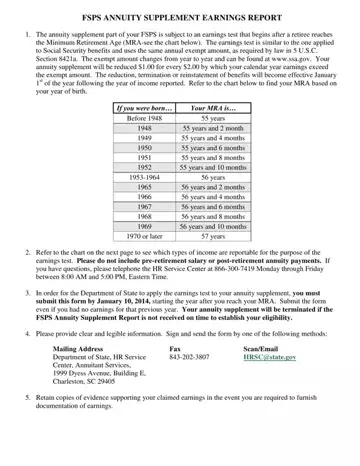
Navigating the complexities of retirement benefits and earnings reporting can be a challenging task for retirees under the Federal Employees Retirement System (FERS). The DS 5026 form plays a crucial role in this scenario. This form, known as the FSPS Annuity Supplement Earnings Report, is designed to ensure that the annuity supplements of retirees are adjusted according to their post-retirement earnings. The FSPS annuity supplement is subject to an earnings test comparable to that used for Social Security benefits, initiating once a retiree reaches their Minimum Retirement Age (MRA). The earnings test adheres to the guidelines detailed in 5 U.S.C. Section 8421a, with the annual exempt amount and reduction rate of the supplement based on earnings exceeding this amount clearly outlined. Notably, the adjustment of benefits – whether a reduction, termination, or reinstatement – takes effect from the first day of the year following the reported income year. The form also specifies which types of income should be reported and provides a contact avenue for retirees who may have questions regarding their eligibility or the reporting process. Submission requirements emphasize the importance of timely and accurate completion to avoid potential termination of the annuity supplement. Through clear instructions and structured guidance, the DS 5026 form serves as an essential tool for managing the intricate balance between retirement benefits and post-retirement earnings.
| Question | Answer |
|---|---|
| Form Name | Form Ds 5026 |
| Form Length | 3 pages |
| Fillable? | No |
| Fillable fields | 0 |
| Avg. time to fill out | 45 sec |
| Other names | fsps report online, 2002 787 medical capability edit, ds 5026, fsps annuitant wage report form |
Form Ds 5026 isn’t the one you’re looking for?
Please rate Form Ds 5026
