
Form Dss 5102 PDF Details

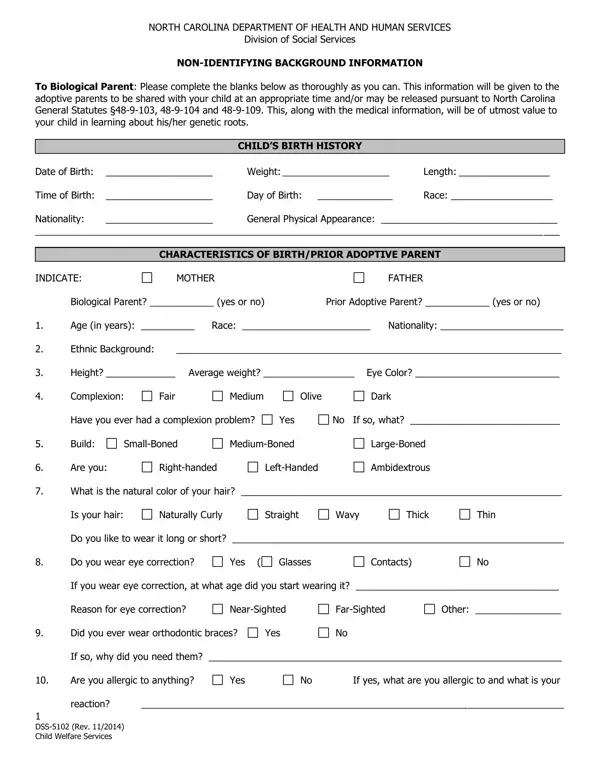
The DSS-5102 form, developed by the North Carolina Department of Health and Human Services Division of Social Services, serves a crucial role in the adoption process by ensuring that adoptive parents receive comprehensive non-identifying background information about the child they plan to adopt. This document, meticulously filled out by biological parents, contains essential details concerning the child’s birth history, including date of birth, physical characteristics at birth, and racial and national backgrounds. Moreover, it extends to provide an in-depth account of the biological parents' characteristics, such as their physical attributes, health history, allergies, hobbies, educational background, occupation, and family medical history, among others. The information shared aims to preserve the child's connection to their genetic roots, offering a deeper understanding of inherited traits and potential health issues. The form also touches upon the desires of biological parents regarding future contact, and encapsulates data on the extended family's characteristics, which may include grandparents, aunts, and uncles, thus providing a fuller picture of the biological family's background. With stipulations on how the form should be disseminated among the involved parties and instructions for certification, the DSS-5102 underscores a vital part of the adoption process, balancing the privacy concerns of biological parents with the adoptive family's right to access pertinent heritage and health-related information about the child.

QuestionAnswer
Form NameForm Dss 5102
Form Length4 pages
Fillable?No
Fillable fields0
Avg. time to fill out1 min
Other namesdss5102 form, dss form 8191, dds 5102, dss 8551 form

How to Edit Form Dss 5102 Online for Free

dss 8551 form can be filled out online without any problem. Simply use FormsPal PDF editor to perform the job fast. Our expert team is ceaselessly endeavoring to expand the tool and enable it to be much easier for users with its multiple features. Benefit from the current modern opportunities, and discover a heap of emerging experiences! Starting is simple! Everything you need to do is take these easy steps below:

Step 1: Access the PDF doc in our tool by pressing the "Get Form Button" above on this page.

Step 2: This editor grants the opportunity to work with PDF documents in a range of ways. Transform it by writing personalized text, correct what's originally in the document, and add a signature - all when it's needed!

Filling out this document demands attentiveness. Make sure all required blanks are filled in properly.

1. Fill out the dss 8551 form with a selection of major blank fields. Note all the required information and make sure not a single thing left out!

Tips on how to fill in form dss 5102 portion 1

2. After the last part is completed, you're ready to include the necessary details in What is the natural color of your, Is your hair, Naturally Curly, Straight, Wavy, Thick, Thin, Do you like to wear it long or, Do you wear eye correction, Yes, Glasses, Contacts, If you wear eye correction at what, Reason for eye correction, and NearSighted so that you can move forward further.

Stage number 2 in submitting form dss 5102

3. This stage is going to be easy - complete all of the form fields in What are your hobbies and, What are your favorite foods and, What is your favorite color, Your favorite season, Your favorite holiday, Education highest grade completed, Favorite subjects in school, Any extracurricular activities, Special Talents, Religious Preference, Usual Occupation, Military Service, Yes, If yes what branch, and Marital Status to conclude this part.

Filling out part 3 in form dss 5102

4. Filling out Marital Status, Age and sex of other children, Were you or anyone in your family, Yes, No If yes who, Why are you placing child for, Are you interested in future, Yes, If you are deceased when the child, family, Yes, If so what are your concerns, What was your relationship with, Friends, and Dating Steadily is vital in the fourth part - you'll want to don't hurry and fill out each and every field!

Filling out section 4 in form dss 5102

You can certainly get it wrong when completing the Are you interested in future, and so make sure that you look again before you submit it.

5. This document must be finalized with this particular segment. Below you can find a detailed list of form fields that need accurate information in order for your form usage to be complete: PERSONALITY DESCRIPTION, Please check all that apply, Aggressive Calm Emotional Easygoing, Friendly Happy Irresponsible, Nervous Outgoing Rebellious, SelfConfident Serious Shy, Stubborn Temperamental Unhappy, Other, and DSS Rev Child Welfare Services.

Filling in segment 5 in form dss 5102

Step 3: Prior to finishing your file, you should make sure that form fields were filled in correctly. As soon as you are satisfied with it, click “Done." Right after getting afree trial account with us, you will be able to download dss 8551 form or email it immediately. The PDF file will also be easily accessible through your personal account page with all your adjustments. FormsPal is dedicated to the personal privacy of our users; we always make sure that all personal information coming through our tool is confidential.