
Form Dss 8551 PDF Details

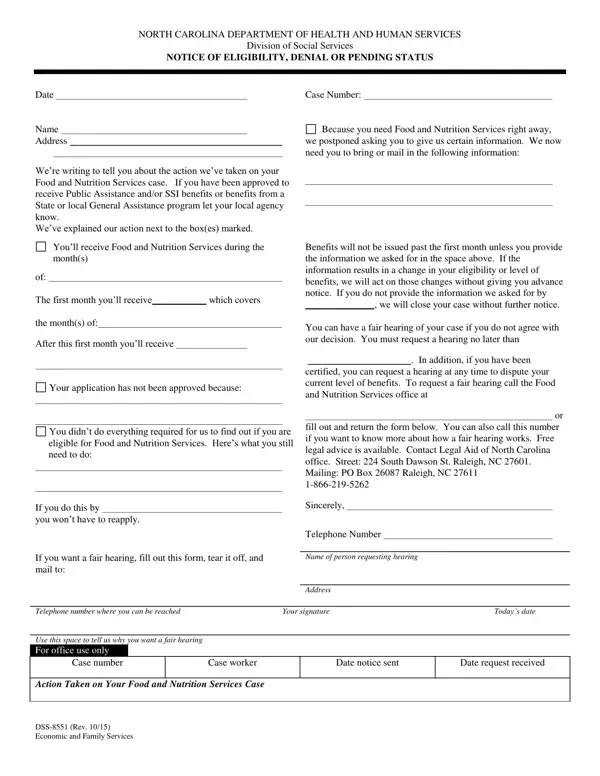
Understanding the DSS-8551 form is crucial for individuals engaged with the North Carolina Department of Health and Human Services, especially regarding Food and Nutrition Services. This form serves as a communication tool between the department and recipients, detailing decisions on eligibility, denials, or pending status of their applications. It signifies an essential step in the application process for Food and Nutrition Services, indicating whether immediate needs have led to a deferral in the collection of certain information, the specifics of benefit allocations for approved months, or the reasons behind the denial of services. Furthermore, the form provides guidance on next steps for applicants, including how to supply additional required information, the process for disputing decisions through fair hearings, and where to seek free legal advice, specifically pointing to resources like Legal Aid of North Carolina. By mapping out these procedures, the DSS-8551 form not only informs recipients about the status of their application but also outlines critical actions necessary to maintain or appeal for benefits, making it a pivotal document in the public assistance landscape.

QuestionAnswer
Form NameForm Dss 8551
Form Length1 pages
Fillable?No
Fillable fields0
Avg. time to fill out15 sec
Other namesNorth_Carolina, weve, dss8551, Dawson

How to Edit Form Dss 8551 Online for Free

Raleigh can be completed online easily. Just use FormsPal PDF editor to finish the job quickly. We at FormsPal are devoted to providing you with the perfect experience with our editor by regularly releasing new features and improvements. Our editor has become even more useful with the newest updates! So now, editing PDF documents is easier and faster than ever. All it takes is just a few simple steps:

Step 1: Hit the orange "Get Form" button above. It is going to open up our tool so that you could start completing your form.

Step 2: Once you access the editor, you'll notice the form all set to be completed. Apart from filling in various fields, it's also possible to do several other actions with the Document, such as putting on any words, changing the original textual content, inserting illustrations or photos, signing the document, and a lot more.

This PDF will require specific info to be filled in, thus you must take whatever time to fill in what is expected:

1. Start filling out your Raleigh with a number of major fields. Consider all of the required information and make sure absolutely nothing is left out!

Writing section 1 in SSI

2. The subsequent stage is usually to submit these fields: of The first month youll receive, Your application has not been, You didnt do everything required, If you do this by you wont have to, If you want a fair hearing fill, In addition if you have been, Benefits will not be issued past, Telephone number where you can be, Your signature, and Todays date.

Your signature, Todays date, and of The first month youll receive in SSI

3. This third section should be pretty easy, Telephone number where you can be, Case number, Case worker, Date notice sent, Date request received, Action Taken on Your Food and, and DSS Rev Economic and Family - all of these fields must be filled out here.

SSI writing process shown (portion 3)

You can certainly make errors when filling out the Telephone number where you can be, hence ensure that you take a second look before you decide to send it in.

Step 3: Once you've glanced through the details in the file's blanks, just click "Done" to complete your document generation. Acquire the Raleigh the instant you register here for a 7-day free trial. Immediately gain access to the pdf document within your personal cabinet, with any modifications and adjustments being automatically synced! We do not share or sell the information you enter while completing documents at our website.